METER / GAUGE / DISPLAY METER / GAUGE SYSTEM DTC CHECK / CLEAR
CHECK DTC (Using the GTS or Techstream)
Connect the GTS or Techstream to the DLC3.
Turn the ignition switch to ON.
Turn the GTS or Techstream on.
Enter the following menus: Body Electrical / Meter / Trouble Codes.
Check for DTCs.
CLEAR DTC (Using the GTS or Techstream )
Connect the GTS or Techstream to the DLC3.
Turn the ignition switch to ON.
Turn the GTS or Techstream on.
Enter the following menus: Body Electrical / Meter / Trouble Codes.
Clear the DTCs.
CHECK DTC (Not using the GTS or Techstream )
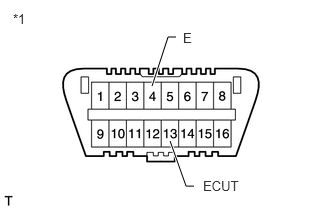
| *1 | DLC3 |
Using SST, connect terminals 13 (ECUT) and 4 (E) of the DLC3.
- SST
- 09843-18040
- NOTICE:
- ·
Always use the specified SST to connect terminals of the DLC3.
·If the connecting position is wrong, trouble occurs.
·Perform the check with the vehicle stopped.
Turn the ignition switch to ON and start the check.
- HINT:
-
When two or more DTC are stored in the memory, DTCs will be displayed in ascending numerical order, and repeats from the first one 4 seconds after indicating the last one.
After checking the DTC, remove SST from the DLC3.
- HINT:
- ·
If no DTCs or no normal display are shown, there may be an open circuit between the DLC3 and the combination meter, or in the diagnosis communication lines, or be a malfunction in the combination meter.
·If any unknown DTCs are output, there may be a malfunction in the computer.
CLEAR DTC (Not using the GTS or Techstream )
Disconnect the battery cable for 60 seconds or more.