NAVIGATION / MULTI INFO DISPLAY NAVIGATION SYSTEM / MULTI INFORMATION SYSTEM GENERAL GENERAL
OUTLINE
An extension box, into which the navigation ECU is built, is used.
Since the extension box is mounted under the radio and display receiver assembly, a navigation system that supports flash Solid State Drive (SSD) type map data media can be used.
A fuel consumption screen is provided in consideration of the environment.
Google Sync Function
The Google sync function is supported, enabling the user to view and operate the following Google-provided web services on the navigation system. This function requires access to the internet from a tethering-compatible cellular phone or mobile Wi-Fi router, which is connected to the radio and display receiver assembly via Bluetooth or Wi-Fi communication.
Google street view shows panoramic images along streets. The street view of the desired location can be downloaded to the radio and display receiver assembly.
Wi-Fi Communication (Models with Navigation ECU (High Grade Type))
A wireless LAN antenna is integrated in the radio and display receiver assembly, enabling Wi-Fi communication to a user's tethering-compatible cellular phone or mobile Wi-Fi router.
- HINT:
- ·
Wi-Fi communication may be unavailable depending on the vehicle conditions, surrounding conditions such as radio wave conditions around the radio and display receiver assembly, distance to the device or device conditions. In addition, during Wi-Fi communication, the communication may be cut or become unstable due to the conditions described above.
·If a tethering-compatible cellular phone is already connected to the radio and display receiver assembly via Bluetooth, a connection via Wi-Fi communication is not available. To connect via Wi-Fi, cancel the Bluetooth connection and then establish a Wi-Fi connection.
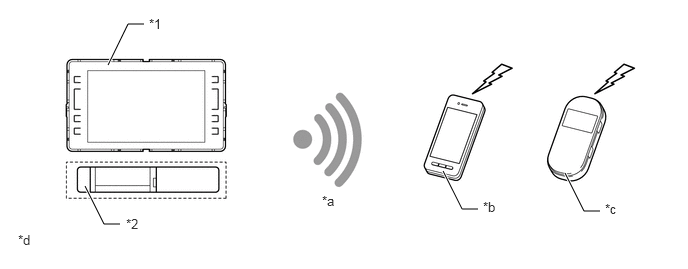
| *1 | Radio and Display Receiver Assembly | *2 | Navigation ECU |
| *a | Connection via Wi-Fi | *b | Cellular Phone |
| *c | Mobile Wi-Fi Router | *d | The illustrations shown are examples only. The illustrations may differ from the actual audio head unit. |
Mobile Assistant (Models with Navigation ECU)
Apple's Siri Eyes Free Mode can be used with a compatible Apple device connected to the navigation system via Bluetooth.
By pressing and holding the off hook switch on the steering wheel, the user can ask Siri questions without taking their eyes off the road. To minimize distraction, the device's screen will not light up. With the Eyes Free feature, users can ask Siri to call contacts, select and play music, hear and compose text messages, use Maps and get directions, read notifications, find calendar information, add reminders, and more.
When the Mobile Assistant function is used to call a contact or listen to music stored on the user's device, the system will automatically transition to the phone call or audio screen.
- HINT:
-
Some Siri features are limited in Eyes Free Mode. If the user attempts to use an unavailable function, Siri will inform the user that the function is not available.
SPECIFICATION
| Component | System | |
|---|---|---|
| Multimedia System
(Navigation ECU) |
||
|
*: Models with navigation ECU (high grade type) |
||
| Multi-display | 8.0-inch LCD Wide VGA | |
| Navigation Computer | Harman International | |
| Gyro Sensor | Piezoelectric Ceramic Element | |
| Language Supported | Voice Guidance | English, French, Italian, Spanish, German, Dutch, Russian, Polish, Greek, Portuguese, Swedish, Norwegian, Danish, Finnish, Turkish, Ukrainian, Hungarian, Czech, Slovak, Romanian and Flemish |
| Voice Recognition* | English, French, Italian, Spanish, German, Dutch, Russian, Polish, Greek, Portuguese, Swedish, Danish, Finnish, Turkish and Czech | |
MAIN FEATURES
Voice Recognition System
When the voice recognition system starts operating, the commands that the system is able to recognize are displayed on the multi-display.
Commute Function
By setting the day of the week and hour of departure to a destination often visited (such as a workplace or one's home), the commuting function will automatically indicate the destination when a user departs on the set day of the week and hour. By doing this, the user will become able to obtain traffic information about their commuting routes with no further settings required each time they commute.
Creating a portal account is made possible by operating the radio and display receiver assembly.
- HINT:
-
*: If a user creates a portal account using the radio and display receiver assembly, he/she must check it by e-mail within 7 days after creation and finalize it.
Information Tile Function
This function allows a user to check the audio information and the application information while displaying the map screen. The user is also able to check a variety of information without preventing the map screen from being unseen.
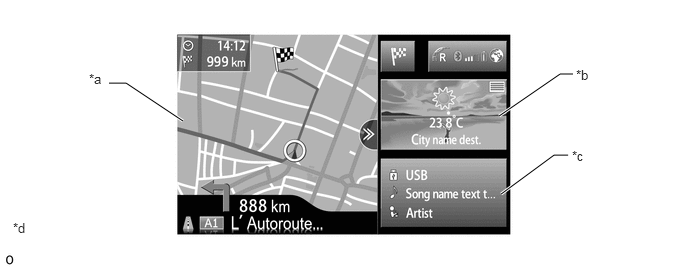
| *a | Map Screen | *b | Application Information |
| *c | Audio Information | *d | The illustration shown is an example only. The illustration may differ from the actual vehicle screen. |
Application Function
Pressing the application switch on the map screen displays the application lists registered in the map screen.
Users are able to use their desired application without any complicated operation by selecting the application he/she wishes to use from the application list*. However, only one application can be used at a time, simultaneous use of several applications is not supported.
- HINT:
-
*: The default setting has 5 applications installed. A further 4 applications can be added.
Part of the application will be displayed in the information tile of the map screen.
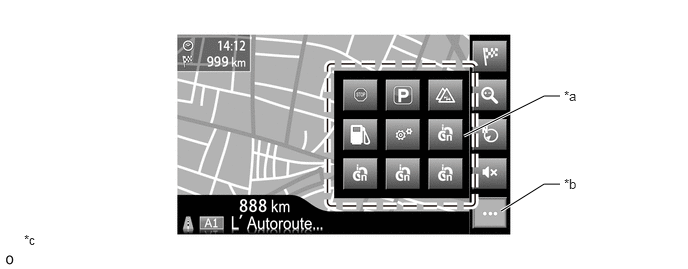
| *a | Application List | *b | Application Switch |
| *c | The illustration shown is an example only. The illustration may differ from the actual vehicle screen. | - | - |
Connected Service
The following services are available by accessing the Toyota portal site from a tethering-compatible cellular phone, which is connected to the radio and display receiver assembly (with extension box) via Bluetooth communication.
To use these connected services, Bluetooth settings are required and a portal account is required.
To get a portal account, access the Toyota portal site (URL: www.my.toyota.eu).*
- HINT:
-
*: A portal account can also be created by operating the radio and display receiver assembly.
| Contents | Outline | |
|---|---|---|
| Online Search | New establishments, such as restaurants and bars, that are not registered in the navigation system can be set as a destination. | |
| Importing Memory Points and Routes | Downloading via a Cellular Phone or Mobile Wi-Fi Router | Memory points and routes that were searched for using a personal computer can be set as a destination and can be registered as memory points. |
| Downloading from a USB Memory Device | ||
| Vehicle Customization | The vehicle equipment operation settings can be partially changed by remote operation via the Toyota portal site. | |
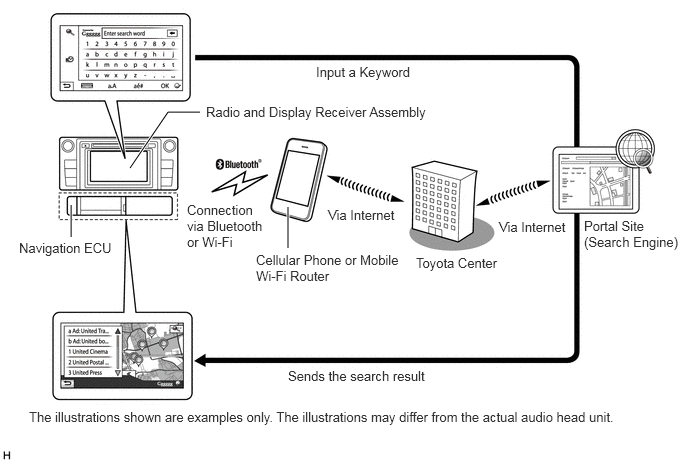
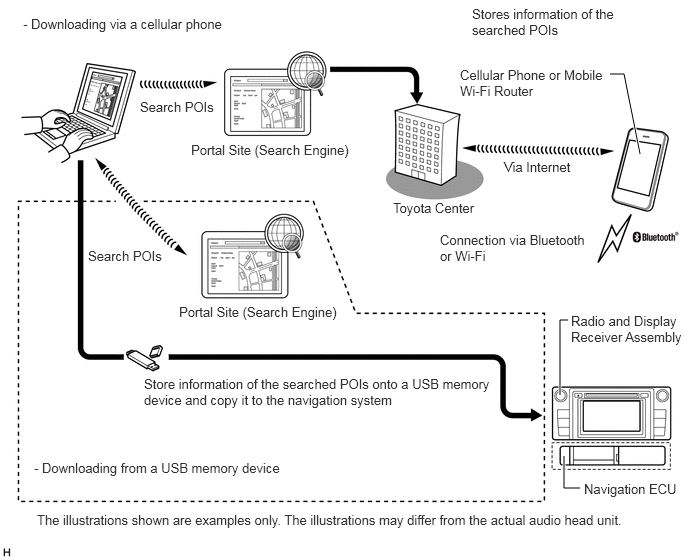
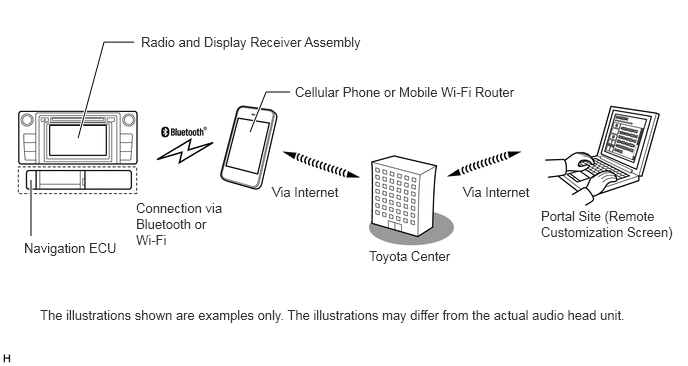
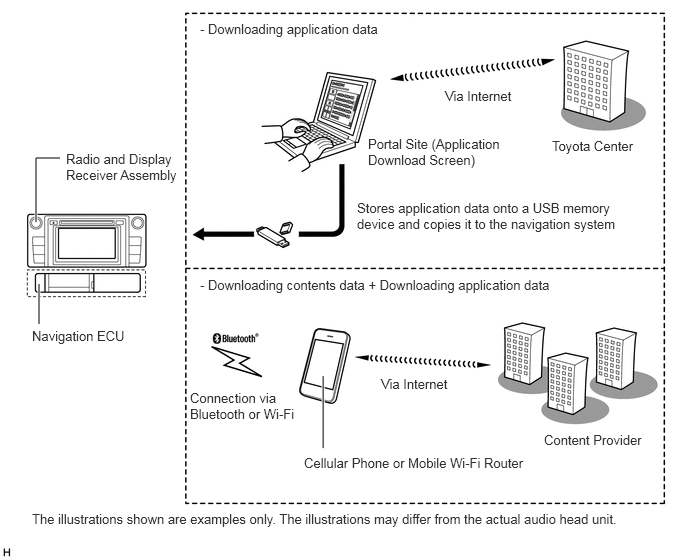
The main functions of the multi-display are listed below.
| Function | Outline | |
|---|---|---|
| Navigation System | Through the use of the Global Positioning System (GPS) and map data, the navigation system analyzes the position of the vehicle and indicates the position on the map that is displayed on the screen.
In addition, it is possible to use the system to register memory points and navigate to a destination. |
|
| Audio/Video System | Serves as the display and controls for the following:
·
Radio operation ·
Bluetooth-compatible portable player operation ·
iPod/iPhone operation ·
USB audio system operation (USB type) ·
Portable audio player operation (AUX type) |
|
| Hands-free System | When a Bluetooth-compatible cellular phone is registered to the navigation system, the driver can make and receive calls or talk hands-free on the cellular phone by operating the switches on the screen/steering pad. | |
| Speech Command System (Models with Navigation ECU High Grade Type) | Operates the navigation, audio, and hands-free systems based on voice commands. | |
| Monitor System | Displays a view of the area behind the vehicle that is captured by the television camera mounted on the back door when the shift lever is moved to R. | |
| Others | Fuel Consumption Screen | Fuel consumption information such as average fuel consumption per minute, current fuel consumption per minute, past fuel consumption record and energy monitor is displayed. |
| Language Select | The language of the screen buttons, pop-up messages and the voice guidance can be changed. | |
| Beep Setting | The beep sound can be turned off. | |
| Keyboard Layout | The keyboard layout can be changed. | |
| Delete Personal Data | Deletes or returns registered or changed personal settings to their default conditions:
For example: ·
General settings ·
Navigation settings ·
Audio settings ·
Telephone settings |
|
| Screen Adjustment | The brightness or contrast of the screen can be adjusted to suit the brightness of the surroundings. | |
| Diagnosis | This menu contains the following items:
·
Failure Diagnosis -
System Check -
Diagnosis Recorder ·
Function Check/Setting -
Panel & Steering Switch -
Touch Switch -
Vehicle Signal -
EXT BOX -
DAB Reception Check (Models with Digital Audio Broadcast (DAB) Tuner) ·
Service Information -
Version Information ·
Product Information |
|