METER / GAUGE / DISPLAY METER / GAUGE SYSTEM DETAILS COMBINATION METER
FUNCTION
Buzzer
The table below shows the warning and reminder functions of the buzzer in the combination meter assembly.
|
*1: Models with simple intelligent parking assist system *2: Models with speed limiter control system *3: Models with Toyota safety sense *4: Models for Middle East *5: Models with road sign assist system *6: Models with GPF |
|
| Priority | Item |
| 1 | READY |
| 2 | Simple Intelligent Parking Assist Indication Pattern 1 (Once)*1 |
| 3 | Simple Intelligent Parking Assist Indication Pattern 1 (Twice)*1 |
| 4 | Simple Intelligent Parking Assist Indication Pattern 2 (Once)*1 |
| 5 | Simple Intelligent Parking Assist Indication Pattern 2 (Twice)*1 |
| 6 | Simple Intelligent Parking Assist Indication Pattern 3 (Once)*1 |
| 7 | Engine Stall Warning |
| 8 | Entry and Start System Warning (Intermittent) |
| 9 | Reverse Notification |
| 10 | Door Open when Shift Lever not in P Warning |
| 11 | Hybrid Battery Check Request Notification |
| 12 | Speed Limit Exceed Warning*2 |
| 13 | Brake Force Reduction Warning |
| 14 | Brake Fluid Low Warning |
| 15 | EPS Warning (Intermittent) |
| 16 | Power Switch Operation while Driving Warning |
| 17 | Vehicle Roll-away Notification Pattern 2 |
| 18 | Accelerator Depression with N Position |
| 19 | Accelerator Depression Hold Warning |
| 20 | Lane Tracing Assist System Warning*3 |
| 21 | Warning Buzzer for Shift Lever in P Advice |
| 22 | Hybrid System Warning (Intermittent: 0.2 seconds cycle) |
| 23 | Hybrid System Warning (Intermittent: 0.4 seconds cycle) |
| 24 | Hybrid System Warning (Intermittent: 0.7 seconds cycle) |
| 25 | Hybrid System Warning (Intermittent: 1.2 seconds cycle) |
| 26 | Hybrid System Warning (Continuous) |
| 27 | Hybrid System Warning (Once) |
| 28 | Towing Prohibition Notification |
| 29 | Vehicle Roll-away Notification Pattern 1 |
| 30 | Parking Brake Engaged Warning |
| 31 | HV Battery Low Warning (SOC: 18 % or less) |
| 32 | Brake System Temperature Warning/Active Test |
| 33 | Speed Limit Exceed Warning*4 |
| 34 | Engine Oil Pressure Warning |
| 35 | Hands off Steering Wheel Warning*3 |
| 36 | Lane Tracing Assist System Cancel Warning*3 |
| 37 | Seat Belt Warning (Level 2) |
| 38 | Seat Belt Warning (Level 1) |
| 39 | Alert Buzzer for Driving with Door Ajar |
| 40 | Entry and Start System Warning (Intermittent, Maximum 9 Times) |
| 41 | Hybrid System Start while Driving Notice |
| 42 | EV Driving Mode Reject Warning |
| 43 | Low Speed Zone Leading Vehicle Lost Warning*3 |
| 44 | Dynamic Radar Cruise Control Cancellation due to Low Speed Warning*3 |
| 45 | Vehicle Sway Warning*3 |
| 46 | Road Sign Assist Indication*5 |
| 47 | EPS Warning (Once) |
| 48 | Engine Coolant Temperature Warning |
| 49 | Hybrid Unit Overheat Warning |
| 50 | Brake Hold Warning |
| 51 | Multi-information Display Warning |
| 52 | Engine Malfunction Warning |
| 53 | Gasoline Particulate Filter System Warning*6 |
| 54 | Light Reminder |
| 55 | HV Battery Low Cooling Performance Warning |
| 56 | Entry and Start System Warning (Once) |
| 57 | Immobiliser Certification Reminder*2 |
| 58 | Turn Signal/Hazard Warning Operation |
Multi-information Display
Display Function Flow
The multi-information display can be switched as shown in the flow chart below:
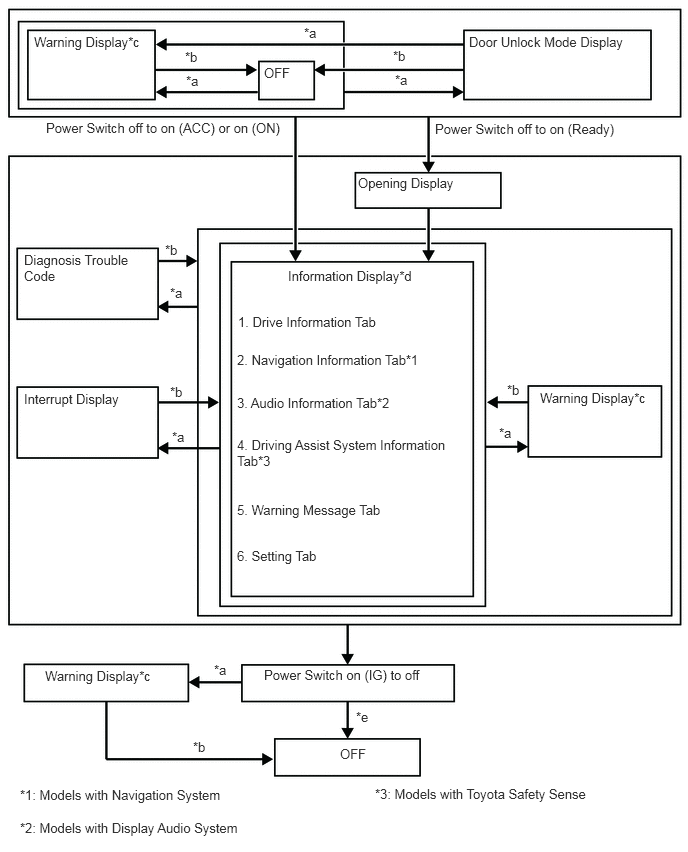
| Item | Display Change Condition |
|---|---|
| *a | Conditions are met. |
| *b | Conditions are not met. |
| *c | If there are multiple display requests, items will be displayed in sequence |
| *d | Item or display is selected by operating the steering pad switch |
| *e | The ending display is displayed for a certain period of time after the power switch is turned off. |
Display Tab Operation
The information currently displayed can be switched using the RIGHT/LEFT switch of the steering pad switch assembly.
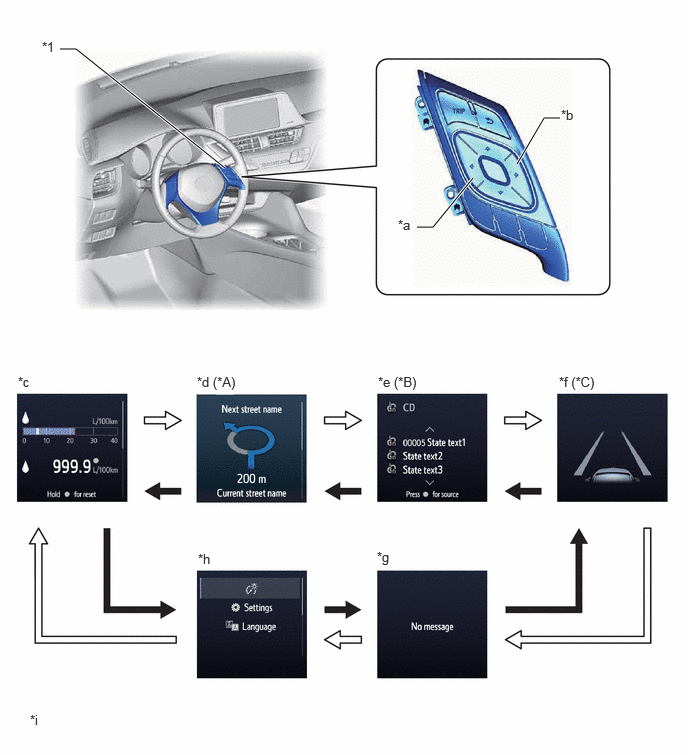
| *A | Models with Navigation System | *B | Models with Display Audio System |
| *C | Models with Toyota Safety Sense | - | - |
| *1 | Steering Pad Switch Assembly | - | - |
| *a | LEFT Switch | *b | RIGHT Switch |
| *c | Drive Information Tab | *d | Navigation Information Tab |
| *e | Audio Information Tab | *f | Driving Assist System Information Tab |
| *g | Warning Message Tab | *h | Setting Tab |
| *i | The illustrations shown are examples only. The illustrations may differ from the actual vehicle screen. | - | - |

|
RIGHT switch operation | 
|
LEFT switch operation |
Drive Information
The drive information tab shows vehicle information such as drivable range and fuel consumption.
The drive information display can be changed using the UP/DOWN switch of the steering pad switch assembly.
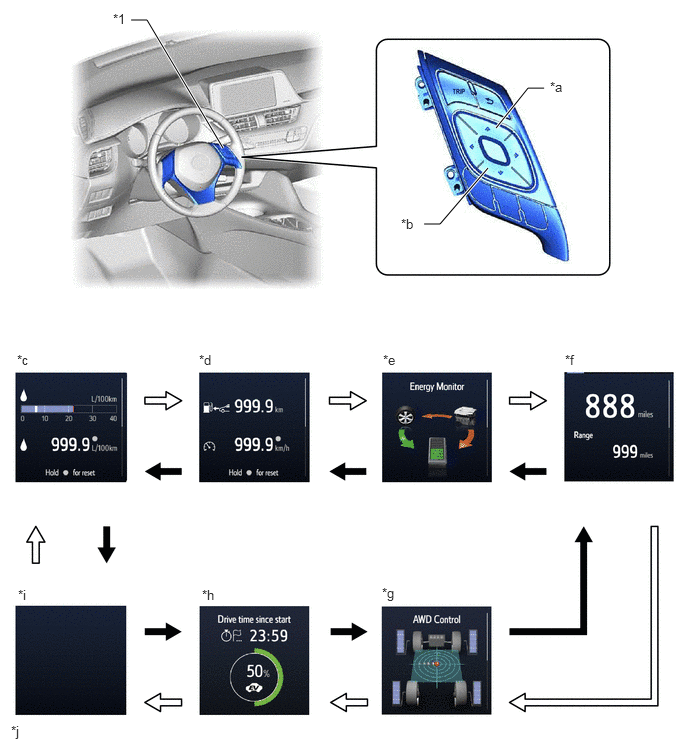
| *1 | Steering Pad Switch Assembly | - | - |
| *a | UP Switch | *b | DOWN Switch |
| *c | Drive Information 1 | *d | Drive Information 2 |
| *e | Energy Monitor | *f | Digital Vehicle Speed and Cruising Range Display |
| *g | G Monitor | *h | EV % Display |
| *i | Blank | *j | The illustrations shown are examples only. The illustrations may differ from the actual vehicle screen. |
|
|
DOWN switch operation |
|
UP switch operation |
Setting Function
The items displayed on the multi-information display can be customized.
The following items can be selected on the information setting screen.
| Item | Available Setting |
|---|---|
| Lane Center | Setting for lane centering function can be set to on/off: -
ON -
OFF |
| Warning Sensitivity | Alert sensitivity of alert system can be changed: -
High -
Standard |
| Vehicle Sway Warning | Vehicle sway warning can be selected: -
ON -
OFF |
| Vehicle Sway Warning Sensitivity | Vehicle sway warning sensitivity can be selected: -
High -
Standard -
Low |
| Item | Available Setting |
|---|---|
| PCS | The pre-collision system can be set to on/off: -
On -
Off |
| The pre-collision system warning timing | The pre-collision system warning timing can be selected: -
Early (Icon is displayed) -
Middle (Icon is displayed) -
Late (Icon is displayed) |
| Item | Available Setting |
|---|---|
| BSM | The blind spot monitor system can be set to on/off: -
ON -
OFF |
| RCTA | The RCTA function can be set to on/off: -
ON -
OFF
|
| Item | Available Setting |
|---|---|
| TOYOTA Parking Assist-sensor System | The parking support alert system can be set to on/off: -
On -
Off |
The buzzer volume can be selected: -
1 (Icon is displayed) -
2 (Icon is displayed) -
3 (Icon is displayed) |
| Item | Available Setting |
|---|---|
| PKSB | The parking support brake system can be set to on/off: -
On -
Off |
| Item | Available Setting |
|---|---|
| Drive Mode | The drive mode can be changed: -
SPORT -
NORMAL -
ECO |
| Item | Available Setting |
|---|---|
| Display Brightness | Select to adjust brightness of the instrument panel light. |
| Item | Available Setting | |
|---|---|---|
|
*1: Models with road sign assist system *2: Available settings differ by destination. |
||
| RSA*1 | The road sign assist system can be set to on/off: -
ON -
OFF |
|
| Notification Method*2 | Notification method can be selected: -
Above Speed Limit: (1)
No Notification (2)
Only visual (3)
Visual & Audio -
Overtaking: (1)
No Notification (2)
Only visual (3)
Visual & Audio -
Others: (1)
No Notification (2)
Only visual (3)
Visual & Audio |
|
| Notification Level*2 | Excess speed notification level can be selected: -
10 km/h (5 mph) -
5 km/h (3 mph) -
2 km/h (1mph) Excess speed notification level can be selected: -
5 km/h -
3 km/h -
1 km/h |
|
| TPMS Setup | The tire pressure monitor system can be initialized. | |
| Item | Available Setting |
|---|---|
|
*: Models with display audio system |
|
| Language | The language used on the multi-information display can be selected: -
English (Default) -
German -
French -
Spanish -
Italian -
Portuguese -
Dutch -
Swedish -
Norwegian -
Danish -
Russian -
Finnish -
Greek -
Polish -
Ukrainian -
Turkish -
Hungarian -
Czech -
Slovak -
Romanian |
| Unit | The unit displayed on the multi-information display can be selected: -
km (km/L) -
km (L/100 km) -
miles (MPG) |
| EV Mode Indicator Light | The EV Mode Indicator Light can be switched: -
ON (Default) -
OFF |
| Drive Information 1 | 2 items can be selected among the following: -
Current Fuel Consumption (Bar Display) (Default of upper area) -
Current Fuel Consumption (Value Display) -
Total Average Fuel Consumption between Rest Operations (Default of lower area) -
Average Fuel Consumption after Hybrid System Start-up -
Average Fuel Consumption after Refueling -
Total Average Vehicle Speed between Reset Operations -
Average Vehicle Speed after Hybrid System Start-up -
Total Elapsed Time between Reset Operations -
Elapsed Time after Hybrid System Start-up -
Cruising Range -
Cruising Range after Hybrid System Start-up -
Blank |
| Drive Information 2 | 2 items can be selected among the following: -
Current Fuel Consumption (Bar Display) -
Current Fuel Consumption (Value Display) -
Total Average Fuel Consumption between Rest Operations -
Average Fuel Consumption after Hybrid System Start-up -
Average Fuel Consumption after Refueling -
Average Vehicle Speed after Hybrid System Start-up -
Average Vehicle Speed after Engine Start-up -
Total Elapsed Time between Reset Operations -
Elapsed Time after Hybrid System Start-up -
Cruising Range (Default of upper area) -
Cruising Range after Hybrid System Start-up -
Blank |
| Interruption Display | The following displays that appear as soon as the set conditions are met can be switched to ON (Default) or OFF: -
Incoming Telephone Display* |
| Initialization | The set items can be initialized. |
Warning Mode Function
When a warning is necessary, the warning display interrupts the current display on the multi-information display.
The buzzer in the combination meter assembly may sound depending on the item displayed on the multi-information display.
| Priority | Display | Buzzer |
|---|---|---|
|
*1: Models with Toyota safety sense *2: Models with projector headlight *3: Models with parking support brake system *4: Models with Toyota parking assist-sensor system *5: Models for Middle East *6: Models with speed limiter control system *7: Models with simple intelligent parking assist system *8: Models with blind spot monitor system *9: Models with road sign assist system *10: Models with acoustic vehicle alerting system *11: Models with RCTA function *12: Models with GPF *13: Models with washer fluid level warning system *14: Models with intrusion sensor |
||
| 1 | Cdy-2 | - |
| Cdy-4 | - | |
| Cdy-2E | - | |
| Cdy-4E | - | |
| Cdy-2 | - | |
| Cdy-4 | - | |
| RES-1 | - | |
| RES-2 | - | |
| RESOLVER-1 NOT ADJUSTED | - | |
| RESOLVER-2 NOT ADJUSTED | - | |
| ADJUSTING FORWARD CAMERA*1 | - | |
| Headlight system Uninitialized. Visit your dealer.*2 | - | |
| BRAKE!*1 | - | |
| Push and Hold POWER Switch for Emergency Stop | - | |
| Shift to N Position & Push POWER Switch to Restart | - | |
| Hybrid System Stopped. Shift to P Position. | - | |
| Hybrid System Stopped. Stop in a Safe Place. | - | |
| DIAGNOSE TRACTION BATTERY. | - | |
| 2 | Switch to Brake.*3 | Sounds |
| Press brake pedal*3 | Sounds | |
| BRAKE!*3 | Sounds | |
| Object Detected, Acceleration Reduced.*3 | Sounds | |
| Braking Power Low. Stop in a Safe Place, See Owner's Manual. | Sounds | |
| Shift to P Before Exiting Vehicle | Sounds | |
| Hybrid System Malfunction. Do Not Tow Vehicle. | Sounds | |
| Shift is in N. Release Accelerator Before Shifting. | Sounds | |
| Depress Brake When Vehicle is Stopped. Hybrid System May Overheat. | Sounds | |
| Traction battery needs to be protected. Shift into P to restart. | Sounds | |
| Hybrid System Malfunction. | Sounds | |
| Check Engine. | Sounds | |
| Hybrid Battery System Malfunction. | Sounds | |
| Accelerator system Malfunction. | Sounds | |
| Hybrid system stopped. | Sounds | |
| Engine stopped. | Sounds | |
| Visit Your Dealer. | Sounds | |
| Output Power Greatly Reduced. Visit Your Dealer. | Sounds | |
| Output Power Reduced. Visit Your Dealer. | Sounds | |
| Stop in a Safe Place, See Owner's Manual. | Sounds | |
| Stop in a Safe Place within 0.5 km. | Sounds | |
| Stop in a Safe Place Within 0.3 miles. | Sounds | |
| Stop in a Safe Place Within 1.0 km. | Sounds | |
| Stop in a Safe Place Within 0.6 miles. | Sounds | |
| Stop in a Safe Place Within 1.5 km. | Sounds | |
| Stop in a Safe Place Within 0.9 miles. | Sounds | |
| Stop in a Safe Place Within 2.0 km. | Sounds | |
| Stop in a Safe Place Within 1.2 miles. | Sounds | |
| Stop in a Safe Place Within 5.0 km. | Sounds | |
| Stop in a Safe Place Within 3.1 miles. | Sounds | |
| Stop in a Safe Place Within 10 km. | Sounds | |
| Stop in a Safe Place Within 6.2 miles. | Sounds | |
| Output Power Reduced. Avoid Shifting to N. | Sounds | |
| Avoid Shifting to N. Visit Your Dealer. | Sounds | |
| Hybrid System Stopped, Stop in a Safe Place. | Sounds | |
| Hybrid System Stopped, Stop in a Safe Place. | Sounds | |
| Shift to P. See Owner's Manual. | Sounds | |
| Power Steering Malfunction. Steering Power Low. Visit Your Dealer. | Sounds | |
| Abnormal Voltage. Steering Power Low. Visit Your Dealer. | Sounds | |
| EPB Applied. | Sounds | |
| EPB Release Unavailable, Depress Brake Pedal for EPB Release. | Sounds | |
| Release Accelerator. | Sounds | |
| Engine Coolant Temperature High. Stop in a Safe Place. See Owner's Manual. | Sounds | |
| Charging System Malfunction. Stop in a Safe Place. See Owner's Manual. | Sounds | |
| Engine Oil Pressure Low. Stop in a Safe Place. See Owner's Manual. | Sounds | |
| Brake Hold Active. Depress Brake and Switch to Deactivate. | Sounds | |
| Brake Hold Unavailable. Driver Door Open. | Sounds | |
| EPB Can't be Released. Close Door and Fasten Your Seatbelt. | Sounds | |
| Brake Hold Unavailable. Driver Seatbelt Unbuckled. | Sounds | |
| Brake Hold Unavailable. Hood or Trunk Open. | Sounds | |
| Brake hold unavailable. | - | |
| Accelerator and Brake Pedals Depressed Simultaneously. | - | |
| VSC Turned Off. Pre-Collision Brake System Unavailable.*1 | - | |
| Pre-Collision System Off.*1 | - | |
| Accelerator pedal is pressed. | - | |
| Vehicle start unavailable Until traction battery inspected Contact dealer | - | |
| 3 | Shift to P Before Exiting Vehicle | Sounds |
| Parking assist Malfunction Visit your dealer*4 | Sounds | |
| Parking assist unavailable. Clean parking assist sensor*4 | Sounds | |
| Parking assist unavailable.*4 | Sounds | |
| Check Fuel Cap | Sounds | |
| Traction battery needs to be protected. Refrain from the use of N position. | Sounds | |
| Antilock Brake System Malfunction. Visit Your Dealer. | Sounds | |
| Braking Power Low. Visit Your Dealer. | Sounds | |
| Hybrid System Overheated. Reduced Output Power. | Sounds | |
| Speed Limit Exceeded*5 | - | |
| 4 | Radar Cruise Control Unavailable See Owner's Manual*1 | Sounds |
| Radar Cruise Control unavailable.*1 | Sounds | |
| Cruise Control unavailable. | Sounds | |
| Radar cruise control unavailable Press brake to resume driving*1 | - | |
| Cruise control Malfunction Visit Your Dealer. | Sounds | |
| Cruise Control Fault Press Brake to Deactivate Visit Your Dealer. | Sounds | |
| 5 | Power Steering Malfunction. Visit Your Dealer. | Sounds |
| Vehicle May Roll. Shift to P. | Sounds | |
| Brake Hold Fault. Depress Brake to Deactivate. Visit Your Dealer. | Sounds | |
| Brake Hold Warning. Depress Brake on Slope. | Sounds | |
| EPB Activation Incomplete. | Sounds | |
| Key Not Detected, Check Key Location. | Sounds | |
| LTA. Hold Steering Wheel.*1 | - | |
| LTA Steering Assist Unavailable, Hold Steering Wheel.*1 | Sounds | |
| LTA. Hold Steering Wheel.*1 | Sounds | |
| LTA Malfunction. Visit Your Dealer.*1 | Sounds | |
| 6 | EPB Frequently Operated, Wait a Minute. | Sounds |
| Speed Limiter Malfunction Visit Your Dealer*6 | Sounds | |
| EPB Malfunction. Visit Your Dealer. | Sounds | |
| LTA Unavailable Below Approximately 50 km/h.*1 | - | |
| LTA Unavailable Below Approximately 32 MPH.*1 | - | |
| LTA Unavailable at Current Speed.*1 | - | |
| 7 | Memory Error*7 | Sounds |
| Write Zero-Point of Steering Angle*7 | Sounds | |
| End of Adjustment*7 | Sounds | |
| IPA System Check Visit Your Dealer*7 | Sounds | |
| Check Engine. Visit Your Dealer. | - | |
| Check Engine. Reduced Engine Power. Visit Your Dealer. | - | |
| Reduced Engine Power. Visit Your Dealer. | - | |
| Engine Maintenance Required. Visit Your Dealer. | - | |
| Engine Stopped. Stop in a Safe Place. | Sounds | |
| Engine Stopped. Shift to P. | Sounds | |
| Engine Stopped. Shift to N. | Sounds | |
| Firmly Depress The Brake & Then Start Engine. | Sounds | |
| Depress Brake and Then Start Engine. | Sounds | |
| Vehicle May Roll. Park The Vehicle On Flat Road. | Sounds | |
| Entry & Start System Malfunction. See Owner's Manual. | Sounds | |
| Blind Spot Monitor Unavailable.*8 | Sounds | |
| Pre-Collision System Malfunction. Visit Your Dealer.*1 | Sounds | |
| Blind Spot Monitor System Malfunction. Visit Your Dealer.*8 | Sounds | |
| AWD System Malfunction. 2WD Mode Engaged Visit Your Dealer.*1 | Sounds | |
| EPB Unavailable. | Sounds | |
| RSA Malfunction Visit Your Dealer*9 | Sounds | |
| Low 12-Volt Battery. See Owner's Manual. | - | |
| EPB Automatically Applied. | Sounds | |
| Acoustic Vehicle Alerting System Malfunction. Visit your Dealer.*10 | Sounds | |
| Maintenance required for Traction battery cooling parts. See owner's manual. | - | |
| Pre-Collision System Radar in self calibration Unavailable See owner's manual.*1 | - | |
| Maintenance required for Traction battery at your dealer. | - | |
| Vehicle start will soon be unavailable Maintenance required for traction battery Visit Your Dealer | - | |
| 8 | Hybrid System Stopped. Steering Power Low. | Sounds |
| Turn Power Off. | Sounds | |
| Would You Like To Take A Break?*1 | Sounds | |
| Key Detected in Vehicle. | - | |
| Turn Lights Off. | Sounds | |
| Window Open. | Sounds | |
| Depress Brake Pedal and Touch POWER Switch with Key. | Sounds | |
| Not Ready to Drive. Depress Brake Pedal & Push POWER Switch to Start. | - | |
| Depress Brake Pedal & Push POWER Switch to Start. | - | |
| Shift to P Position to Start. | Sounds | |
| Maintenance required for Traction battery cooling parts. See owner's manual. | Sounds | |
| 9 | Brake Hold Malfunction. Visit Your Dealer. | Sounds |
| Brake Hold Less Effective in Icy Conditions. | - | |
| Depress Brake to Maintain Brake Hold. | Sounds | |
| Close Driver Door to Maintain Brake Hold. | Sounds | |
| Fasten Driver Seatbelt to Maintain Brake Hold. | Sounds | |
| Brake hold deactivated | Sounds | |
| Brake hold deactivated. Parking brake automatically applying | Sounds | |
| Parking Support Brake Malfunction Visit Your Dealer*3 | Sounds | |
| Drive-Start Control Malfunction. Visit Your Dealer. | Sounds | |
| Brake Override Malfunction. Visit Your Dealer. | Sounds | |
| Reverse Speed Control Activated. | Sounds | |
| Parking Support Brake Unavailable*3 | - | |
| Parking Support Brake Unavailable Remove the Dirt of Rear Camera*3 | - | |
| 10 | RCTA Malfunction Visit Your Dealer.*11 | Sounds |
| RCTA Unavailable.*11 | Sounds | |
| Key Battery Low. Replace Key Battery. | Sounds | |
| Engine Oil Level Low. Add or Replace Oil. | - | |
| Headlight System Malfunction. Visit Your Dealer.*2 | Sounds | |
| Exhaust filter full. Visit your dealer.*12 | - | |
| 11 | CHECKING PCS BRAKE*1 | - |
| Auto Power Off to Conserve Battery. | - | |
| LTA Unavailable*1 | Sounds | |
| LTA Steering Assist Active Lane Centering Active*1 | - | |
| LTA Steering Assist active.*1 | - | |
| Radar cruise active Please pay attention to other vehicles*1 | - | |
| Low Washer Fluid.*13 | - | |
| Traction Control Turned OFF. | - | |
| To Activate AHB, Switch Headlights to High Beam.*1 | - | |
| Depress Brake Pedal & Push POWER Switch to Start. | - | |
| Front camera Out of temperature range Unavailable Wait until normal temperature*1 | - | |
| Front camera Low visibility Unavailable See owner's manual.*1 | - | |
| Pre-Collision System Out of temperature range Unavailable See owner's manual.*1 | - | |
| Pre-Collision System Radar sensor blocked Unavailable Clean radar sensor*1 | - | |
| Front camera Unavailable See owner's manual.*1 | - | |
| Pre-Collision System Unavailable See owner's manual.*1 | - | |
| EV Mode Unavailable. | Sounds | |
| EV Mode Unavailable. System Warming Up. | Sounds | |
| EV Mode Unavailable. Hybrid Battery Low. | Sounds | |
| EV Mode Unavailable. Speed Range Exceeded. | Sounds | |
| EV Mode Unavailable. Reduce Acceleration to Activate. | Sounds | |
| EV Mode Deactivated. | Sounds | |
| EV Mode Deactivated. Hybrid Battery Low. | Sounds | |
| EV Mode Deactivated. Speed Range Exceeded. | Sounds | |
| EV Mode Deactivated. Accelerator Depressed Too Far. | Sounds | |
| Exhaust filter full. See owner's manual.*12 | - | |
| Exhaust filter regeneration in process.*12 | - | |
| Theft Sensor Turned Off.*14 | - | |
| Theft Sensor Turned On.*14 | - | |
| EPB Shift Interlock Function Activated. | Sounds | |
| EPB Shift Interlock Function Deactivated. | Sounds | |
| Turn the light control switch down, to off position for more than 1s. | Sounds | |
| 12 | A New Key has been Registered. Contact Your Dealer for Details. | - |
OPERATION
Hybrid System Indicator
The Hybrid System Indicator will begin to operate when both of the following conditions are met:
The hybrid system is operating (the READY indicator light is illuminated).
Shift position is not in P, N or R.