NAVIGATION / MULTI INFO DISPLAY NAVIGATION SYSTEM(for Single Knob Type) DETAILS MULTI-DISPLAY
CONSTRUCTION
The multi-display of the audio head unit uses an LCD (color LCD display) panel with capacitive touch panel. Furthermore, in accordance with the enlargement of the pane, by using HD resolutions, a high resolution multi-display is realized.
| Display aspect ratio | 16:9 |
| Display number of pixels (dot) | 1280 (horizontal) x 720 (vertical) |
| Display screen size (mm) | 176.64 (horizontal) x 99.36 (vertical) |
The outermost surface of the multi-display uses a glass that has been treated with an AR (Anti-Reflective) coating. Furthermore, by bonding the glass panel and LCD (color LCD display) panel with a special laminating technology (OCR material direct bonding technology), low reflection, high contrast, and an enhanced quality feel have been realized.
By using LEDs for the backlighting of the LCD (color LCD display) panel, a multi-display with high brightness and rich color reproduction has been realized.
FUNCTION
A Thin Film Transistor Liquid Crystal Display (TFT LCD) is used for the multi-display of the audio head unit. The multi-display shows the audio screen, Bluetooth hands-free screen,vehicle information screen, etc. and can be operated using touch operation, flick operation, pinch in/pinch out or drag operation.
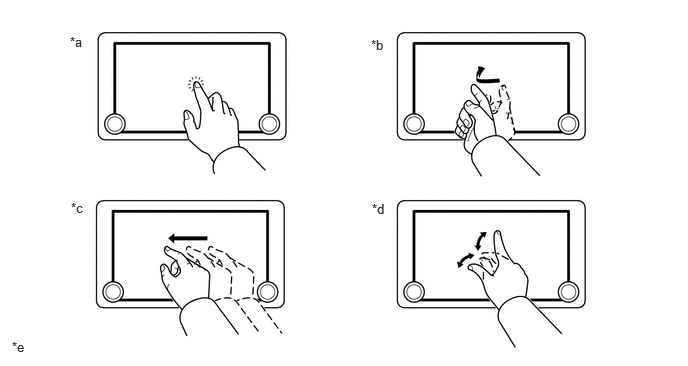
| *a | Touch Operation | *b | Flick Operation |
| *c | Drag Operation | *d | Pinch In/Pinch Out Operation
(Models with Navigation System) |
| *e | The illustrations shown are examples only. The illustrations may differ from the actual audio head unit. | - | - |
The audio source can be switched on the audio source selection screen. The arrangement of the audio sources displayed on the audio source screen can be changed according to the frequency of use.
The user can check the current time, Bluetooth connection status, signal strength, remaining battery level of a cellular phone, etc. using the status bar display.
Energy Monitor Function
Directions of energy transmission are displayed to indicate the current drive (engine, motor or both), charging status of the engine and the usage status of regenerated power.
The energy monitor status calculated by the hybrid vehicle control ECU is displayed.
Web Browser Function (Models with Web Browser Function)
By connecting to the internet, websites (news sites, blogs, streaming music sites, video sites, etc.) can be viewed.
By touching/operating each icon displayed on the screen (update, home, bookmark, settings, etc.), various functions equivalent to when browsing on a personal computer can be utilized.
Operations equivalent to that of a smartphone (tapping or pressing and holding, drag operations, flick operations, pinch in/out) can be performed on the display. By pressing, holding, and dragging, text can be copied.
- HINT:
-
The web browser function cannot be used while the vehicle is being driven.