2ZR-FXE COOLING COOLING FAN MOTOR ON-VEHICLE INSPECTION
CAUTION / NOTICE / HINT
- CAUTION:
- ·
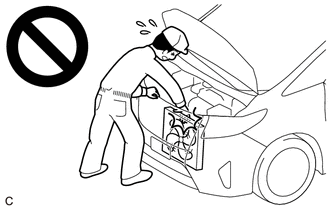
When working near the engine room while the engine has started or the power source mode is power switch on (IG), do not touch the rotating components such as the fan, etc.
·Touching rotating components such as the fan, etc. could result in your hand or clothing getting caught and pulled in.
PROCEDURE

 16363G
1.INSPECT COOLING FAN MOTOR LH
- CAUTION:
- ·
When working near the engine room while the engine has started or the power source mode is power switch on (IG), do not touch the rotating components such as the fan, etc.
·Touching rotating components such as the fan, etc. could result in your hand or clothing getting caught and pulled in.
Disconnect the cooling fan motor LH connector.
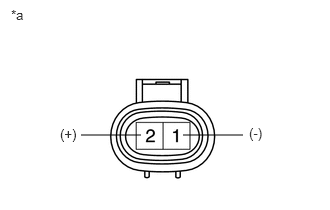
| *a | Component without harness connected
(Cooling Fan Motor LH) |
Check that the cooling fan motor LH operates smoothly when the auxiliary battery is connected to the cooling fan motor LH connector.
Measure the current while the cooling fan motor LH is operating.
- Standard Current:
Condition Specified Condition Auxiliary battery voltage applied at 20°C (68°F) 7.4 to 10.9 A
If the result is not as specified, replace the cooling fan motor LH.
Connect the cooling fan motor LH connector.
16363F
2.INSPECT COOLING FAN MOTOR RH
- CAUTION:
- ·
When working near the engine room while the engine has started or the power source mode is power switch on (IG), do not touch the rotating components such as the fan, etc.
·Touching rotating components such as the fan, etc. could result in your hand or clothing getting caught and pulled in.
Disconnect the cooling fan motor RH connector.
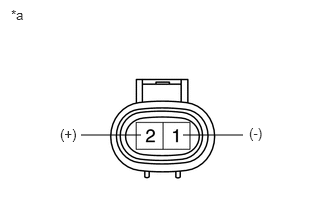
| *a | Component without harness connected
(Cooling Fan Motor RH) |
Check that the cooling fan motor RH operates smoothly when the auxiliary battery is connected to the cooling fan motor RH connector.
Measure the current while the cooling fan motor RH is operating.
- Standard Current:
Condition Specified Condition Auxiliary battery voltage applied at 20°C (68°F) 7.4 to 10.9 A
If the result is not as specified, replace the cooling fan motor RH.
Connect the cooling fan motor RH connector.