TELEMATICS TELEMATICS SYSTEM(for eCall) B1AC0 Telephone Speaker Cable Connection Malfunction
DESCRIPTION
If there is an open in a speaker circuit, the telematics transceiver detects it and stops output to the speakers.
Thus sound cannot be heard from the speakers even if there is no malfunction in the telematics transceiver or communication telematics box.
| DTC No. | Detection Item | DTC Detection Condition | Trouble Area |
|---|---|---|---|
| B1AC0 | Telephone Speaker Cable Connection Malfunction | The malfunction is detected in the telephone speaker circuit for approximately 10 seconds or more. | ·
Communication telematics box ·
Telematics transceiver ·
Harness or connector |
WIRING DIAGRAM
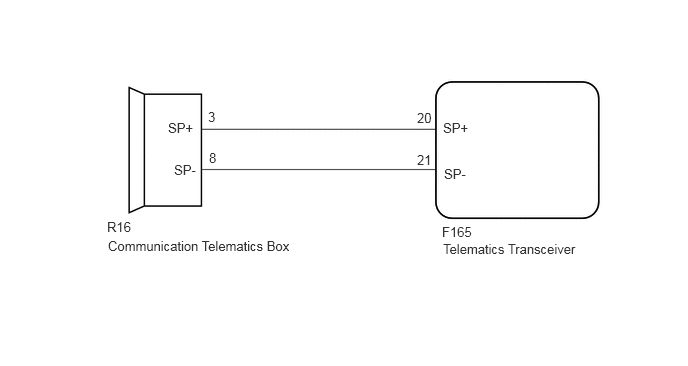
CAUTION / NOTICE / HINT
- NOTICE:
-
When replacing the telematics transceiver, make sure to replace it with a new one.
PROCEDURE
Turn the power switch off.
Connect the GTS to the DLC3.
Turn the power switch on (IG) and wait for 10 seconds.
Turn the GTS on.
Clear the DTCs.
Click hereAudio / Visual / Telematics>TELEMATICS>TELEMATICS SYSTEM (for eCall)>DTC CHECK / CLEAR
- Body Electrical > Telematics > Clear DTCs
- 50002 233
Check for DTCs and check that no DTCs are output.
Click hereAudio / Visual / Telematics>TELEMATICS>TELEMATICS SYSTEM (for eCall)>DTC CHECK / CLEAR
- Body Electrical > Telematics > Trouble Codes
- 50001 233
- OK:
No DTCs are output.
- Result:
Proceed to OK NG
OK
Click hereGeneral>INTRODUCTION>HOW TO TROUBLESHOOT ECU CONTROLLED SYSTEMS>HOW TO PROCEED WITH TROUBLESHOOTING
NG
Disconnect the R16 communication telematics box connector.
Disconnect the F165 telematics transceiver connector.
Measure the resistance according to the value (s) in the table below.
- Standard Resistance:
Tester Connection Condition Specified Condition R16-3 (SP+) - F165-20 (SP+) Always Below 1 Ω R16-8 (SP-) - F165-21 (SP-) Always Below 1 Ω R16-3 (SP+) or F165-20 (SP+) - Body ground Always 10 kΩ or higher R16-8 (SP-) or F165-21 (SP-) - Body ground Always 10 kΩ or higher
- Result:
Proceed to OK NG
OK
NG
Replace the communication telematics box.
Click hereAudio / Visual / Telematics>AUDIO / VIDEO>INSTRUMENT PANEL SPEAKER>REMOVAL
Clear the DTCs.
Click hereAudio / Visual / Telematics>TELEMATICS>TELEMATICS SYSTEM (for eCall)>DTC CHECK / CLEAR
- Body Electrical > Navigation System > Clear DTCs
- 50002 212
Recheck for DTCs and check that no DTCs are output.
Click hereAudio / Visual / Telematics>TELEMATICS>TELEMATICS SYSTEM (for eCall)>DTC CHECK / CLEAR
- Body Electrical > Navigation System > Trouble Codes
- 50001 212
- OK:
No DTCs are output.
- Result:
Proceed to OK NG
OK
NG
Replace the telematics transceiver with a new one.
Click hereAudio / Visual / Telematics>TELEMATICS>TELEMATICS TRANSCEIVER>REMOVAL
- Result:
Proceed to NEXT
NEXT