NAVIGATION / MULTI INFO DISPLAY NAVIGATION ANTENNA INSTALLATION
PROCEDURE

 86860
1.INSTALL NAVIGATION ANTENNA ASSEMBLY (for Radio and Display Type with Single Knob Type)
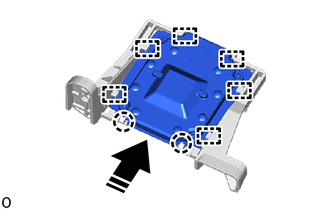

|
Install in this Direction |
Engage the guides and claws to install the navigation antenna assembly to the navigation antenna bracket as shown in the illustration.
86101M
2.INSTALL ANTENNA CORD SUB-ASSEMBLY (for Radio and Display Type with Single Knob Type)
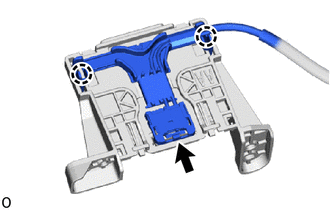
Connect the connector.
Engage the claws to install the antenna cord sub-assembly.
3.INSTALL NAVIGATION ANTENNA ASSEMBLY WITH BRACKET (for Radio and Display Type with Single Knob Type)
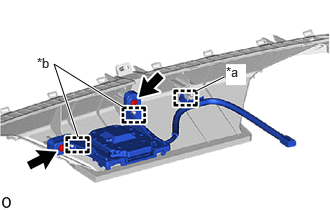
| *a | Clamp |
| *b | Guide |
Engage the guides and clamp.
Install the navigation antenna assembly with bracket with the 2 screws.
55950G
4.INSTALL DEFROSTER NOZZLE ASSEMBLY (for Radio and Display Type with Single Knob Type)
55401E
5.INSTALL INSTRUMENT PANEL SAFETY PAD SUB-ASSEMBLY (for Radio and Display Type with Single Knob Type)
86300J
6.INSTALL ROOF ANTENNA ASSEMBLY (for Radio and Display Type with Dual Knob Type)
When reusing the roof antenna assembly:
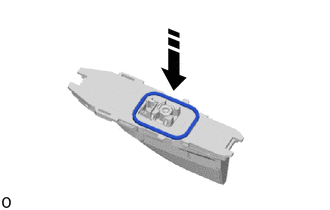
|
|
Install in this Direction |
Install a new seal as shown in the illustration.
|
|
Install in this Direction (1) |

|
Install in this Direction (2) |
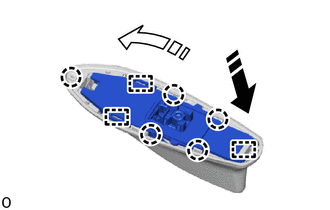
Engage the guides and claws to install the roof antenna assembly as shown in the illustration.
|
|
Install in this Direction |
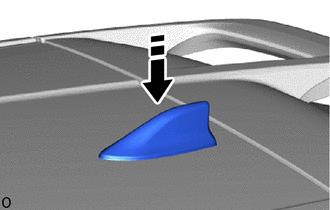
Install the roof antenna assembly with antenna outer cover as shown in the illustration.
Install a new holder with a new bolt.
- Torque:
- 9.5 N*m (97 kgf*cm, 84 in.*lbf)
Connect the connector.
63311C
7.INSTALL ROOF HEADLINING (for Radio and Display Type with Dual Knob Type)