RM32H0E
_58
Vehicle Interior
_060018
LIGHTING (INT)
_0407782
PERSONAL LIGHT(for TMC Made)
G
LIGHTING (INT) PERSONAL LIGHT(for TMC Made) INSPECTION
PROCEDURE

 81260A
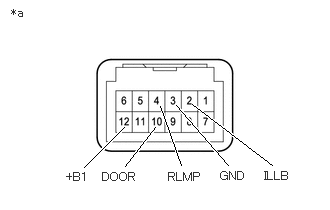
1.INSPECT MAP LIGHT ASSEMBLY
a.
1.302,1.729 1.615,1.323
true
0.875,1.74 1.292,1.323
true
1.885,1.719 1.667,1.104
true
2.375,1.719 1.833,1.094
true
2.833,1.719 2,1.083
true
0.115,0.063 0.427,0.219
0.313,0.156
10
false
*a
0.688,1.771 1.094,1.979
0.406,0.208
10
false
+B1
1.063,1.771 1.625,2
0.563,0.229
10
false
DOOR
1.75,1.771 2.313,2
0.563,0.229
10
false
RLMP
2.75,1.76 3.313,1.99
0.563,0.229
10
false
ILLB
2.292,1.76 2.854,1.99
0.563,0.229
10
false
GND
| *a | Component without harness connected
(Map Light Assembly) |
Check the map light.
i.
Apply battery voltage to the map light assembly and check that the map light comes on.
- OK:
Battery Connection Switch Condition Specified Condition Battery positive (+) → 12 (+B1)
Battery negative (-) → 3 (GND)Map light switch LH on Map light LH comes on Map light switch LH off Map light LH does not come on Map light switch RH on Map light RH comes on Map light switch RH off Map light RH does not come on Battery positive (+) → 12 (+B1)
Battery negative (-) → 10 (DOOR)Map light switch off and door switch on Map light comes on Map light switch off and door switch off Map light does not come on
If the result is not as specified, replace the map light bulb or map light assembly.
b.
Check the door switch.
i.
Measure the resistance according to the value(s) in the table below.
- Standard Resistance:
Tester Connection Switch Condition Specified Condition 10 (DOOR) - 4 (RLMP) Door switch on Below 1 Ω Door switch off 10 kΩ or higher
If the result is not as specified, replace the map light assembly.
c.
Check the switch illumination.
i.
Apply battery voltage to the map light assembly and check that the illumination comes on.
- OK:
Battery Connection Specified Condition Battery positive (+) → 2 (ILLB)
Battery negative (-) → 3 (GND)Illumination comes on
If the result is not as specified, replace the map light assembly.