CRUISE CONTROL CAMERA HEATER REMOVAL
PROCEDURE

 8646C
1.REMOVE FORWARD RECOGNITION CAMERA
86461
2.REMOVE FORWARD RECOGNITION HOOD
- NOTICE:
-
 0,0 0,0 false

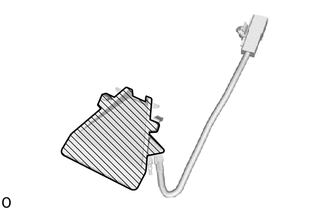
Inner Surface of Forward Recognition Hood
- ·
Do not touch the inner surface of the forward recognition hood.
·Do not apply force to the heating element of the forward recognition hood or an open circuit may result.
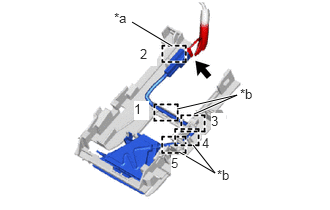
| *a | Clamp |
| *b | Guide |
Disconnect the connector.
- NOTICE:
-
Do not pull the harness forcibly when disconnecting the connector.
Disengage the clamp and guides to separate the forward recognition hood wire from the forward recognition bracket.
- NOTICE:
-
Do not pull the harness forcibly when disconnecting the connector.
- HINT:
-
Disengage the clamp and guides in the order shown in the illustration.

|
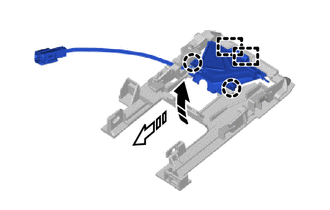
Remove in this Direction (1) |

|
Remove in this Direction (2) |
Disengage the claw in the direction indicated by the arrow (1) in the illustration.
Disengage the guides in the direction indicated by the arrow (2) in the illustration to remove the forward recognition hood.