DATA LIST / ACTIVE TEST
System information · Vehicles built from Oct 2006
| READ DATA LIST |
- HINT:
- Using the intelligent tester to read the DATA LIST allows the values or states of switches, sensors, actuators, and other items to be read without removing any parts. This non-intrusive inspection can be very useful as intermittent conditions or signals may be discovered before parts or wiring is disturbed. Reading the DATA LIST information early in troubleshooting is one way to save diagnostic time.
Connect the intelligent tester to the DLC3.
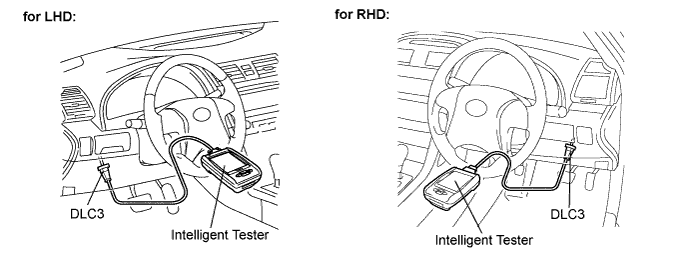

Turn the engine switch on (IG).
Read the DATA LIST.
| Tester Display |
Measurement Item/Range |
Normal Condition |
Diagnostic Note |
| Ignition Switch |
Engine switch on (IG) signal / ON or OFF |
ON: Engine switch on (ACC, IG) or start OFF: Engine switch off |
- |
| ACC Switch |
Engine switch on (ACC) signal / ON or OFF |
ON: Engine switch on (ACC, IG) or start OFF: Engine switch off |
- |
| Immobiliser |
Immobiliser system status / SET or UNSET |
SET: Key is not in cabin UNSET: Key is in cabin |
- |
| Master Key |
Master key code signal / MATCH or NO MATCH |
MATCH: Master key code is sent NO MATCH: Unmatched master key code is sent |
- |
| Sub Key |
Sub-key (Master key) code signal / MATCH or NO MATCH |
MATCH: Sub-key (master key) code is sent NO MATCH: Unmatched sub-key (master key) code is sent |
- |
| BCC Malfunction |
Transponder chip signal / OK or NG |
OK: Correct data sent NG: Incorrect data sent |
- |
| Abnormal Status |
Transponder chip data / OK or NG |
OK: Data OK NG: Data error |
- |
| Different Encrypt Code |
Transponder chip signal / OK or NG |
OK: Correct data sent NG: Incorrect data sent |
- |
| Different Serial Number |
Transponder chip signal / OK or NG |
OK: Correct data sent NG: Incorrect data sent |
- |
| Frame Error |
Transponder chip signal / OK or NG |
OK: Correct data sent NG: Incorrect data sent |
- |
| Response |
Transponder chip signal / OK or NG |
OK: Correct data sent NG: Incorrect data sent |
- |
| PERFORM ACTIVE TEST |
- HINT:
- Performing the intelligent tester's ACTIVE TEST allows relays, VSVs, actuators and other items to be operated without removing any parts. Performing the ACTIVE TEST early in troubleshooting is one way to save time. The DATA LIST can be displayed during the ACTIVE TEST.
Connect the intelligent tester to the DLC3.
Turn the engine switch on (IG).
Perform the ACTIVE TEST by following the directions on the tester screen.
| Tester Display |
Test Part |
Control Range |
Diagnostic Note |
| Security Indic |
Turn security indicator |
ON/OFF |
- |