CUSTOMIZE PARAMETERS
Troubleshooting · Vehicles built Jun 2006 – Sep 2006
Versions by build date: Jun 2006 – Sep 2006 from Oct 2006
- HINT:
- The following items can be customized.
- NOTICE:
- When the customer requests a change in a function, first make sure that the function can be customized.
- Be sure to make a note of the current settings before customizing.
- When troubleshooting a function, first make sure that the function is set to the default setting.
- When the customer requests a change in a function, first make sure that the function can be customized.
| AIR CONDITIONING SYSTEM |
| Display (Item) |
Default |
Contents |
Setting |
| Shift Set Temperature (Set Temp Shift) |
NORMAL |
To shift the temperature against the displayed temperature |
+2 C / +1 C / NORMAL / -1 C / -2 C |
| Air Inlet Mode (Air Inlet Mode) |
AUTO |
In case of turning the A/C ON when you desire to make the compartment cool down quickly, this is the function to change the mode automatically to RECIRCULATION mode |
MANUAL / AUTO |
| Compressor Mode (Compressor Mode) |
AUTO |
Function to turn the A/C ON automatically by pressing the AUTO button when the blower is ON and the A/C is OFF |
MANUAL / AUTO |
| Compressor / DEF Mode (Comprs / DEF Oper) |
LINK |
Function to turn the A/C ON automatically linked with the FRONT DEF button when the A/C is OFF |
NORMAL / LINK |
| Evaporator Control (Evap Ctrl) |
AUTO |
Function to set the evaporator control to the AUTOMATIC position (AUTO) to save power, or to the coldest position (MANUAL) to dehumidify the air and to prevent the windows from fogging up |
MANUAL / AUTO |
| Foot / DEF Auto Mode (Foot / DEF Mode) |
ON |
Function to turn the airflow from FOOT / DEF ON automatically when AUTO MODE is ON |
OFF / ON |
| Foot / DEF Auto Blow Up (Auto Blow Up) |
ON |
Function to change the blower level automatically when the defroster is ON |
OFF / ON |
| Ambient Temperature Shift (Ambient Tmp Sft) |
NORMAL |
Function to shift the ambient temperature against the displayed ambient temperature |
+3 C / +2 C / +1 C / NORMAL / -1 C / -2 C / -3 C |
| THEFT DETERRENT SYSTEM (w/o Smart Entry and Start System) |
| Display (Item) |
Default |
Contents |
Setting |
| Warning by Horn |
ON |
Function that makes vehicle horn and theft deterrent horn able to be used as a warning device |
ON / OFF |
| LIGHTING SYSTEM (for 2AZ-FE) |
| Display |
Default |
Contents |
Setting |
| Lighting Time |
15 s |
Changes the lighting time of the interior light and ignition key cylinder light after closing all of the doors. |
7.5 s / 15 s / 30 s |
| I/L ON W/Door Key Unlock |
ON |
Lights up the interior light and ignition key cylinder light when a door is unlocked. |
ON / OFF |
| I/L when ACC OFF |
ON |
Lights up the interior light and ignition key cylinder light when the ignition switch is turned from ACC to OFF. |
ON / OFF |
| Display |
Default |
Contents |
Setting |
| Response Time |
0.15 s |
Changes the delay timing of lighting the taillight when going into a tunnel in case the light control switch is in the AUTO position. |
1 s / 0.15 s |
| Sensitivity |
NORMAL |
Adjusts the sensitivity of the automatic light control system. *1 |
LIGHT2 / LIGHT1 / NORMAL / DARK1 / DARK2 |
| Disp Ex ON Sen |
NORMAL |
Changes the ambient brightness level required to dim the clock display illumination, etc.*1 |
LIGHT2 / LIGHT1 / NORMAL / DARK1 / DARK2 |
| Disp Ex OFF Sen |
NORMAL |
Changes the ambient brightness level required to cancel the dimming of the clock display illumination, etc. |
LIGHT2 / LIGHT1 / NORMAL / DARK1 / DARK2 |
- HINT:
- Sensitivity adjustment can hardly be confirmed. Check by driving the customer's vehicle.
| Ambient Brightness Level |
  |
||||
| Setting |
DARK2 |
DARK1 |
NORMAL |
LIGHT1 |
LIGHT2 |
| POWER DOOR LOCK CONTROL SYSTEM (for 2AZ-FE) |
| Display (Item) |
Default |
Contents |
Setting |
| UNLK/KEY TWICE (Unlock with 2 times D key operation) |
OFF |
|
ON / OFF |
| WIRELESS DOOR LOCK CONTROL SYSTEM (w/o Smart Entry and Start System) |
| Display (item) |
Default |
Function |
Setting |
| Wireless Control (Wireless door lock control function) |
ON |
Function that turns wireless door lock function ON/OFF |
ON / OFF |
| Hazard Answer Back (Hazard answer-back for wireless door lock control) |
ON |
|
ON / OFF |
| Open Door Warning (Door ajar warning) |
ON |
The buzzer sounds when LOCK is pressed when any of the doors are ajar. |
ON / OFF |
| Auto Lock Time |
30 s |
This function regulates the interval between unlocking and automatic relocking of doors. |
30 s / 60 s |
| Unlock 2 Operation (Wireless unlock operated twice) |
OFF |
This function unlocks the driver's door when the UNLOCK switch is pressed once, and unlocks all doors when pressed twice within 3 seconds. If set to OFF, pressing UNLOCK once unlocks all doors. |
ON / OFF |
| Wireless Buzzer Resp (Wireless buzzer answer-back) |
ON |
Wireless door lock buzzer response/ON or OFF |
ON / OFF |
| Panic Alarm Function |
ON |
This function operates the theft deterrent system when PANIC is pressed and held for 0.8 seconds. |
ON / OFF |
| Trunk Lid Operation (Wireless trunk opener function setting) |
Long1 |
This function changes operation method of transmitter to open luggage compartment door.
|
1tim ON / 2tim ON / Long1 / Long2* / Prohibit |
- HINT:
- *: If the customer requests a longer period of time, the holding time can be changed from Long1 to Long2.
| KEY REMINDER WARNING SYSTEM |
| Tester Display |
Default |
Contents |
Setting |
| Key Remind Volume |
Large |
Function to change volume of the key reminder warning buzzer. |
Large / Medium / Small |
| Key Remind Sound |
Normal |
Function to change cycle of the key reminder warning buzzer. |
Fast, Normal, Slow |
| METER/GAUGE SYSTEM |
| Tester Display |
Default |
Contents |
Setting |
| Key Remind Volume |
Large |
Function to change the volume of the key remind warning buzzer |
Large, Medium, Small |
| Key Remind Sound |
Normal |
Function to change the cycle of the key remind warning buzzer |
Fast, Normal, Slow |
| Seat-belt Warning Buzzer |
D/P ON (*1) |
Function to change the setting of the seat belt buzzer. |
D/P ON, D ON, P ON, D/P OFF (*1) |
| D ON (*2) |
D ON, D OFF (*2) |
- *1: for G.C.C. Countries
- *2: for Australia
- HINT:
- This setting is only valid for the buzzer which sounds at the 5 km/h (3 mph) or more.
| CLOCK ASSEMBLY (For Australia) |
Speed Warning Preset Mode:
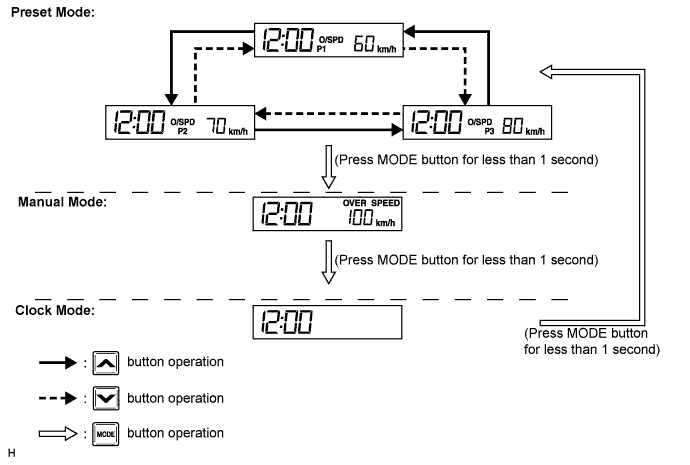
Turn the ignition switch to the ON position.
Press and hold the MODE button for 1 second or more.
Select the vehicle speed by pressing the arrow down/arrow up button.
Press the MODE button to set the new value.
- HINT:
- Set the vehicle speed over 130 km/h to disable above warning mode. (Speed limit warning display shows "--".)
Speed Warning Manual Mode:
Turn the ignition switch to the ON position.
Press the MODE button until manual mode appears.
The customized setting is displayed.
Select the vehicle speed by pressing the arrow down/arrow up button.
Press the MODE button to set the new value.
- HINT:
- Set the vehicle speed over 130 km/h to disable above warning mode. (Speed limit warning display shows "--".)
Clock Mode (Speed Limit Warning Disabled):
Turn the ignition switch to the ON position.
Press and hold the MODE button until clock mode appears. (Speed limit warning display is blank.)
Press the MODE button for 1 second or more.
Hours digit starts blinking.
Press the arrow down/arrow up button to adjust the hour.
Press the MODE button.
Minutes digit starts blinking.
Press the arrow down/arrow up button to adjust the minute.
Press the MODE button.
The minutes digit stops blinking, the colon start flashing, and exit the clock mode.
- HINT:
- Press MODE button once in manual mode or twice in preset mode, speed warning display will become blank and disable the speed warning function.
- Press the MODE button again to enable the speed limit warning again.
- Press MODE button once in manual mode or twice in preset mode, speed warning display will become blank and disable the speed warning function.
| SLIDING ROOF SYSTEM |
| Display (Item) |
Default |
Contents |
Setting |
| OPEN/DOOR KEY (Door key related OPEN) |
ON |
Function to manually open sliding roof linked with power window if holding driver's side and passenger's side door key for 1.5 seconds or more to unlock position when ignition switch is off |
ON / OFF |
| CLOSE/DOOR KEY (Door key related CLOSE) |
ON |
Function to manually close sliding roof linked with power window if holding driver's side and passenger's side door key for 1.5 seconds or more to lock position when ignition switch is off |
ON / OFF |
| OPEN/WIRELESS (Wireless key related OPEN) |
ON |
Function to manually open sliding roof linked with power window if pressing transmitter UNLOCK switch for 2.4 seconds or more when ignition switch is off |
ON / OFF |
| CLOSE/WIRELESS (Wireless key related CLOSE) |
ON |
Function to manually close sliding roof linked with power window if pressing transmitter LOCK switch for 2.4 seconds or more when ignition switch is off |
ON / OFF |
| DOOR KEY OPER (Door key related operation) |
SLIDE |
Function to select tilt up or slide open of manual sliding roof operation linked with power window Activated by holding driver's side door key for 1.5 seconds or more to unlock position when ignition switch is off |
TILT / SLIDE |
| WIRELESS OPER (Wireless key related operation) |
SLIDE |
Function to select tilt up or slide open of manual sliding roof operation linked with power window Activated by pressing transmitter UNLOCK switch for 2.4 seconds or more when ignition switch is off |
TILT / SLIDE |