No Sound can be Heard from Speakers
Circuit diagnosis · Vehicles built Jun 2006 – May 2009
Versions by build date: Jun 2006 – May 2009 from Jun 2009
INSPECTION PROCEDURE
| 1. CHECK AUDIO SETTINGS |
 |
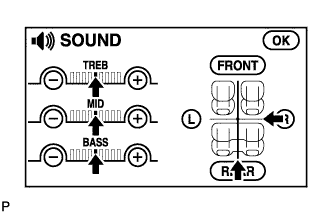
- Enter the sound adjustment screen by pressing the "SOUND" switch on the AUDIO display.
Set volume, fader, and balance to the initial values and check that sound is normal.
- OK:
- Audio system returns to normal.
- HINT:
- Sound quality adjustment items vary depending on the type of the amplifier.
|
OK |
 |
|
|
|
| NG |
|
 |
|
| PROCEED TO NEXT CIRCUIT INSPECTION SHOWN IN PROBLEM SYMPTOMS TABLE |
|