INSTALLATION
Removal / installation · Vehicles built Jun 2006 – May 2009
Versions by build date: Jun 2006 – May 2009 from Jun 2009
| 1. INSTALL LUGGAGE COMPARTMENT DOOR EMBLEM |

- HINT:
- When installing the emblem, heat the luggage compartment door outside garnish sub-assembly and emblem using a heat light.
- Heating temperature:
Item
Temperature
Luggage compartment door outside garnish sub-assembly
40 to 60°C (104 to 140°F)
Emblem
20 to 30°C (68 to 86°F)
- NOTICE:
- Do not heat the luggage compartment door outside garnish sub-assembly and emblem excessively.
Clean the luggage compartment door outside garnish sub-assembly surface.
Using a heat light, heat the luggage compartment door outside garnish sub-assembly surface.
Remove the double-sided tape from the luggage compartment door outside garnish sub-assembly.
Wipe off any tape adhesive residue with cleaner.
Clean the emblem. (If reusing the emblem)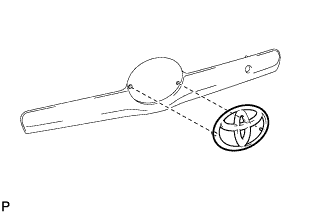

Using a heat light, heat the emblem.
Remove the double-sided tape from the emblem.
Wipe off any tape adhesive residue with cleaner.
Apply new double-sided tape to the emblem.
Install the emblem.
Using a heat light, heat the luggage compartment door outside garnish sub-assembly and emblem.
Remove the release paper from the emblem.
- HINT:
- After removing the release paper, keep the exposed adhesive free from foreign matter.
Install the emblem.
| 2. INSTALL LUGGAGE COMPARTMENT DOOR OUTSIDE GARNISH SUB-ASSEMBLY |
Engage the 2 clips and install the luggage compartment door outside garnish sub-assembly.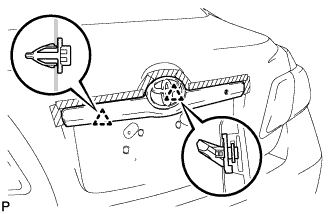
Install the 3 nuts.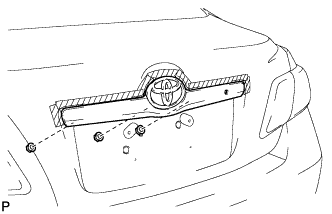
| 3. INSTALL LUGGAGE COMPARTMENT DOOR LOCK CYLINDER ASSEMBLY |
Install the luggage compartment door lock cylinder with the 2 nuts.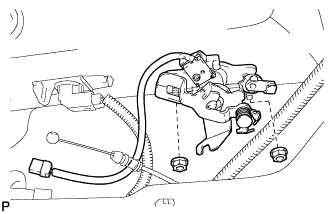
Connect the cable and connector.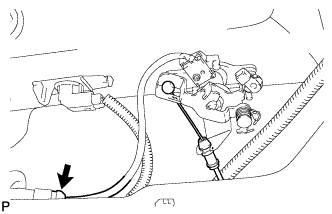
Connect the rod.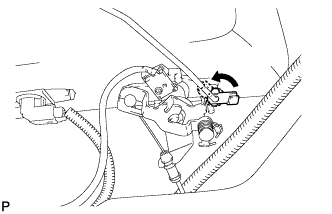
| 4. INSTALL LUGGAGE COMPARTMENT DOOR COVER |
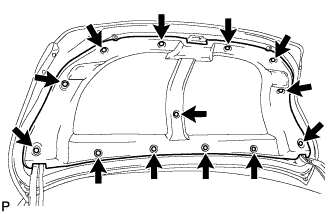
Install the luggage compartment door cover with the 13 clips.