REMOVAL
Removal / installation · Vehicles built from Jun 2009
Versions by build date: Oct 2006 – May 2009 from Jun 2009
| 1.
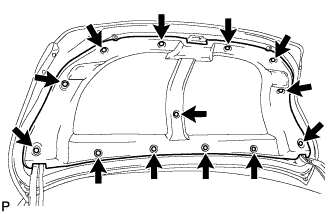
REMOVE LUGGAGE COMPARTMENT DOOR COVER
|
 |
- Using a clip remover, remove the 13 clips and luggage compartment door cover.
| 2.
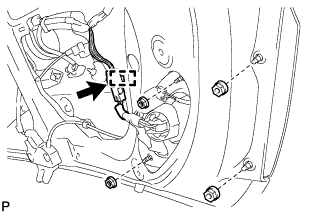
REMOVE REAR LIGHT ASSEMBLY LH
|
|
- Disconnect the connector and disengage the clamp.
Remove the 4 nuts and rear light assembly.
| 3.
REMOVE REAR LIGHT ASSEMBLY RH |
|
- HINT:
- Use the same procedures for the RH side and the LH side.
| 4.
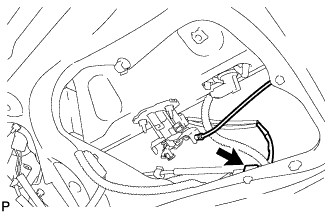
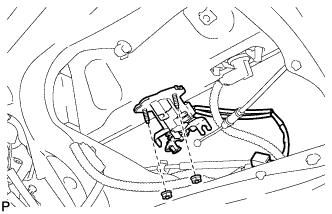
REMOVE LUGGAGE COMPARTMENT DOOR LOCK CYLINDER ASSEMBLY
|
|
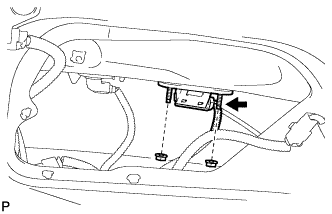
- Disconnect the cable and connector.
- Remove the 2 nuts and the luggage compartment door lock cylinder assembly.
| 5.
REMOVE LUGGAGE DOOR OPENING SWITCH ASSEMBLY (w/ Smart Entry and Start System)
|
|
Disconnect the connector.
- Remove the 2 nuts and the luggage door opening switch assembly.
| 6.
REMOVE BACK DOOR GARNISH RETAINER (w/ Smart Entry and Start System)
|
|
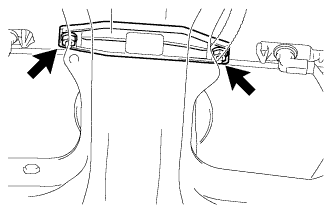
- Remove the 2 nuts.
- Disengage the 2 claws and remove the back door garnish retainer.
| 7.
REMOVE TELEVISION CAMERA ASSEMBLY (w/ Parking Assist Monitor System)
|
|
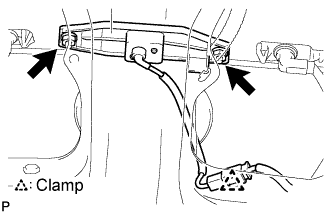
- Disengage the camera connector clamp.
Disconnect the television camera connector.
Remove the 2 nuts.
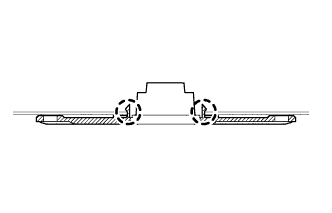
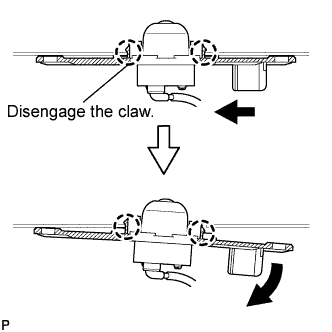
- Disengage the 2 claws to remove the television camera assembly as shown in the illustration.
| 8.
REMOVE LUGGAGE COMPARTMENT DOOR OUTSIDE GARNISH SUB-ASSEMBLY (w/o Smart Entry and Start System)
|
|
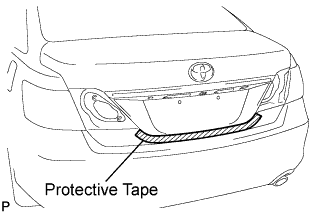
- Put protective tape around the luggage compartment door outside garnish sub-assembly.
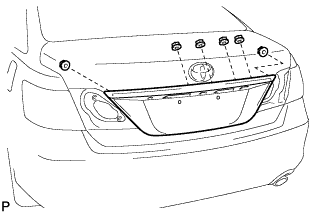
- Remove the 6 nuts.
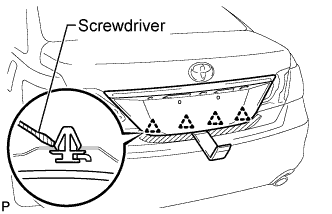
- Using a moulding remover, disengage the 4 clips and remove the luggage compartment door outside garnish sub-assembly.
- HINT:
- Disengage either lock on the clip to prevent the clip from breaking.
| 9.
REMOVE LUGGAGE COMPARTMENT DOOR OUTSIDE GARNISH SUB-ASSEMBLY (w/ Smart Entry and Start System)
|
|
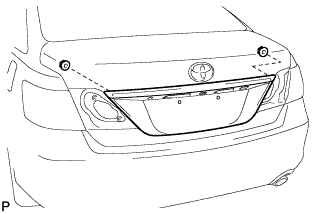
- Put protective tape around the luggage compartment door outside garnish sub-assembly.
- Remove the 2 nuts.
- Using a moulding remover, disengage the 4 clips and remove the luggage compartment door outside garnish sub-assembly.
- HINT:
- Disengage either lock on the clip to prevent the clip from breaking.
| 10.
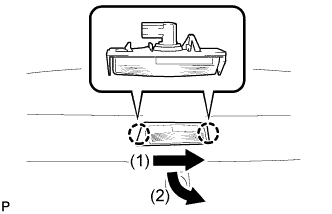
REMOVE LICENSE PLATE LIGHT ASSEMBLY |
|
Disconnect the connector.
- Disengage the 2 claws and remove the license plate light assembly as shown in the illustration.