INSTALLATION
Removal / installation · Vehicles built Oct 2006 – May 2009
Versions by build date: Oct 2006 – May 2009 from Jun 2009
| 1. INSTALL REAR SPOILER |

- HINT:
- When installing the rear spoiler, heat the vehicle body and rear spoiler using a heat light.
- Heating temperature:
Item
Temperature
Vehicle Body
40 to 60°C (104 to 140°F)
Rear Spoiler
20 to 30°C (68 to 86°F)
- NOTICE:
- Do not heat the vehicle body and rear spoiler excessively.
Clean the vehicle body surface.
Using a heat light, heat the vehicle body surface.
Remove the 2 No. 1 rear spoiler protectors from the vehicle body.
Wipe off any tape adhesive residue with cleaner.
Clean the rear spoiler. (If reusing the rear spoiler)
Using a heat light, heat the rear spoiler.
Remove the rear spoiler protector from the rear spoiler.
Wipe off any tape adhesive residue with cleaner.
Apply new rear spoiler protector to the rear spoiler.
Install the rear spoiler.
Using a heat light, heat the vehicle body and rear spoiler.
Remove the 2 release papers from the 2 No. 1 rear spoiler protectors.
- HINT:
- After removing the release paper, keep the exposed adhesive free from foreign matter.
Engage the 2 clips and install the rear spoiler.
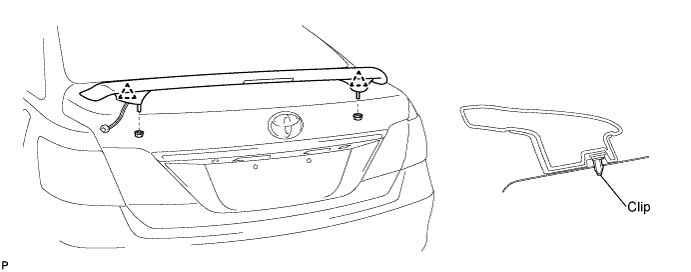

Install the 2 nuts.
Connect the connector.
| 2. INSTALL CENTER STOP LIGHT ASSEMBLY |
Connect the connector.
Install the center stop light assembly with the 2 screws.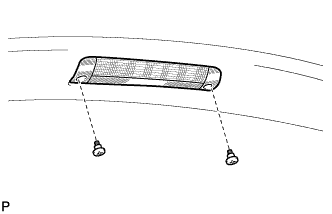
| 3. INSTALL LUGGAGE COMPARTMENT DOOR COVER |
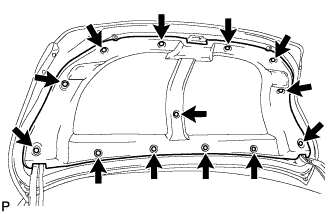
Install the luggage compartment door cover with the 13 clips.