INSTALLATION
Removal / installation · Vehicles built Jun 2006 – Sep 2006
Versions by build date: Jun 2006 – Sep 2006 Oct 2006 – May 2009 from Jun 2009
| 1. INSTALL STEERING PAD |

Check that the ignition switch is off.
Check that the battery negative (-) cable is disconnected.
- CAUTION:
- Wait for 90 seconds after disconnecting the cable to prevent airbag deployment.
Support the steering pad with one hand.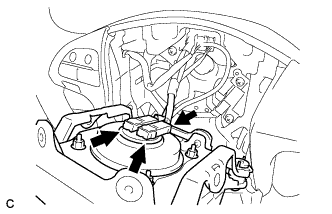

Connect the 2 airbag connectors to the steering pad.
- NOTICE:
- When handling the airbag connector, take care not to damage the airbag wire harness.
Connect the horn connector to the steering pad.
Confirm that the circumference groove of the "TORX" screw fits in the screw case, and place the steering pad onto the steering wheel assembly.
Using a "TORX" socket (T30), tighten the 2 "TORX" screws.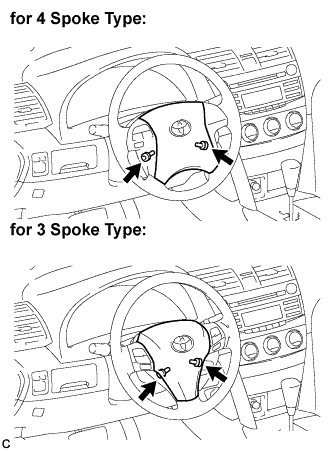
- Torque:
- 8.8 N*m{ 90 kgf*cm , 78 in.*lbf }
| 2. INSTALL NO. 3 LOWER STEERING WHEEL COVER |
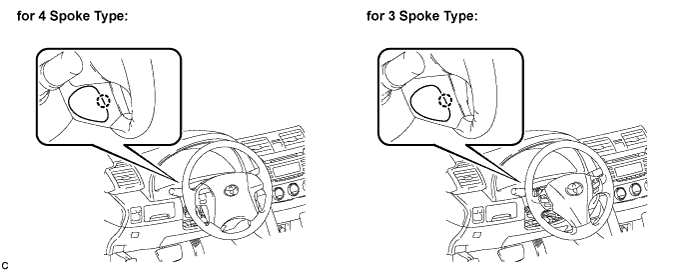
Engage the claw and install the No. 3 lower steering wheel cover.
| 3. INSTALL NO. 2 LOWER STEERING WHEEL COVER |
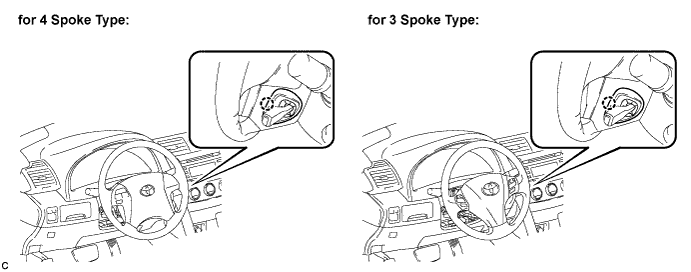
Engage the claw and install the No. 2 lower steering wheel cover.
| 4. CONNECT CABLE TO NEGATIVE BATTERY TERMINAL |
| 5. INSPECT STEERING PAD |
With the steering pad installed on the vehicle, perform a visual check. If there are any defects as mentioned below, replace the steering pad with a new one: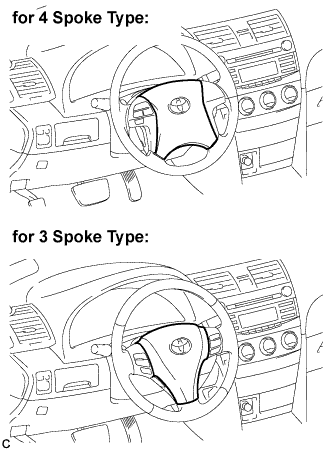
- Cuts, minute cracks or marked discoloration on the steering pad top surface or in the grooved portion.
- Cuts, minute cracks or marked discoloration on the steering pad top surface or in the grooved portion.
Make sure that the horn sounds.
- HINT:
- If the horn does not sound, inspect the horn system (Click here).
| 6. INSPECT SRS WARNING LIGHT |
Inspect the SRS warning light (Click here).