DATA LIST / ACTIVE TEST
System information · Vehicles built from Oct 2006
| DATA LIST |
- HINT:
- By accessing the DATA LIST displayed on the intelligent tester, it is possible to perform such functions as reading the values of switches and sensors without removing any parts. Reading the DATA LIST is the first step in troubleshooting and is one method to save diagnostic time.
Connect the intelligent tester to the DLC3.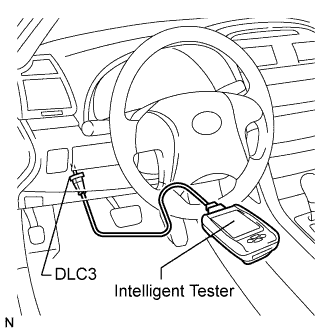

Turn the engine switch on (IG) and turn the intelligent tester on.
Operate the intelligent tester according to the steps on the display and select DATA LIST.
Entry & Start: Tester Display
Measurement Item/Range
Normal Condition
Diagnostic Note
Slck Sleep Cond
Steering lock ECU sleep condition / YES or NO
YES: Steering lock ECU sleep mode can be entered
NO: Steering lock ECU sleep mode cannot be entered
-
Slck Start Cond
Steering lock ECU start signal / YES or NO
YES: Steering lock ECU sent a start signal
NO: Steering lock ECU did not send a start signal
-
Eng Start Cond
Engine start condition / OK or NG
OK: Engine is allowed to start
NG: Engine is not allowed to start
-
Sensor Value
Sensor malfunction / NG (PAST) or OK
NG (PAST): Sensor malfunction
OK: No malfunction
-
Pwr Supply Shrt
Short in ECU / NG (PAST) or OK
NG (PAST): Short in ECU
OK: No malfunction
-
Pwr Supply Open
Open in ECU / NG (PAST) or OK
NG (PAST): Open in ECU
OK: No malfunction
-
Mtr Driver Shrt
Short in driver ECU / NG (PAST) or OK
NG (PAST): Short in driver ECU
OK: No malfunction
-
Mtr Driver Open
Open in driver ECU / NG (PAST) or OK
NG (PAST): Open in driver ECU
OK: No malfunction
-
Lck/Unlck Rec
Steering lock command reception record / YES or NO
YES: Steering lock/unlock signal received
NO: Steering lock/unlock signal no received
-
Lck Bar Stuck
Lock bar stuck malfunction / NG (PAST) or OK
NG (PAST): Lock bar stuck malfunction
OK: No malfunction
-
Push Start Err
Push button start function malfunction / NG (PAST) or OK
NG (PAST): Malfunction in push button start
OK: No malfunction
-
IG2
IG2 voltage / ON or OFF
ON: 10 to 14 V
OFF: Below 1 V
-
IG (Lin)
LIN bus IG status / ON or OFF
ON: LIN bus IG ON status
OFF: LIN bus IG OFF status
-
| ACTIVE TEST |
- HINT:
- Performing the ACTIVE TEST is one of the methods to save diagnostic time. It is possible to display the DATA LIST during the ACTIVE TEST.
Connect the intelligent tester to the DLC3.
Turn the engine switch on (IG) and turn the intelligent tester on.
Following the display on the intelligent tester, perform the ACTIVE TEST.
Entry & Start: Tester Display
Test Part
Control Range
Diagnostic Note
Security Ind
Security Indicator
ON or OFF
-