OPERATION CHECK
Troubleshooting · Vehicles built from Jun 2009
- HINT:
- This mode checks the color display on the display.
- Illustrations may differ from the actual vehicle depending on the device settings and options. Therefore, some detailed areas may not be shown exactly the same as on the actual vehicle.
- Because a touch panel display is not used for the audio unit, the preset switches are used to select items on the "Function Check/Setting" screen.
- This mode checks the color display on the display.
| STARTING DIAGNOSTIC MODE |
Turn the ignition switch to ACC.
Turn off the audio system.
While pressing preset switches "3" and "4" at the same time, press the "DISC" switch 3 times.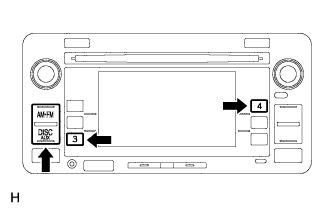

| FUNCTION CHECK/SETTING |
Press preset switch "2" to select "Function Check/Setting" from the "Service Menu" screen.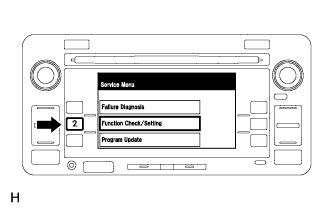
| PANEL & STEERING SWITCH CHECK |
Press preset switch "1" to select "Panel&Steering Switch" from the "Function Check/Setting" screen.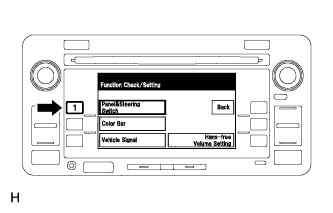
Operate each switch and check that the switch names and condition are correctly displayed.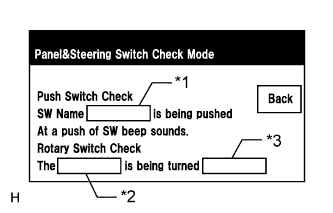
Display
Content
Push switch name/*1
- Name of the pressed switch is displayed.
- If more than one switch is pressed, "MULTI" is displayed.
Rotary switch name/*2
Name of the rotary switch is displayed.
Rotary switch direction/*3
Direction of the rotary switch is displayed.
- Name of the pressed switch is displayed.
| COLOR BAR CHECK |
Press preset switch "2" to select "Color Bar" from the "Function Check/Setting" screen.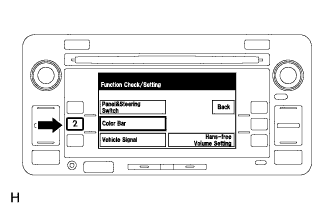
Using a preset switch, select a color bar from the "Color Bar Check Mode" screen.
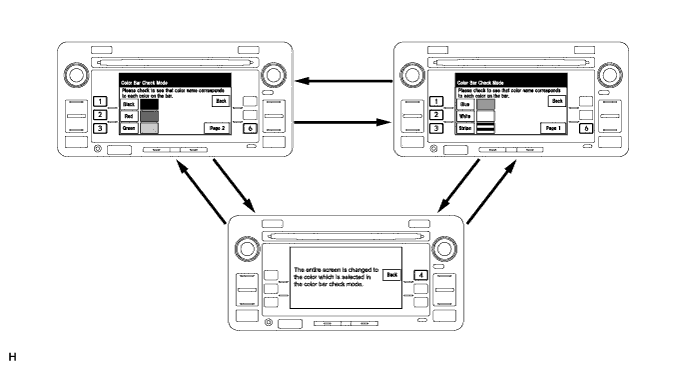
- HINT:
- The preset switches that correspond to the color switches are shown in the illustration.
- Pressing preset switch "6" will change the screen between page 1 and page 2.
- Pressing preset switch "4" will return to the "Color Bar Check Mode" screen.
- The preset switches that correspond to the color switches are shown in the illustration.
Check the display color.
- HINT:
- The entire screen turns to the color or stripe selected.
| VEHICLE SIGNAL CHECK |
Press preset switch "3" to select "Vehicle Signal" from the "Function Check/Setting" screen.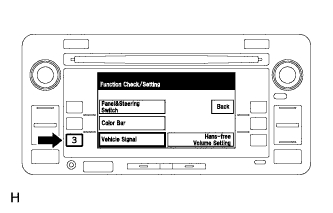
When the "Vehicle Signal Check Mode" screen is displayed, check all the vehicle signal conditions.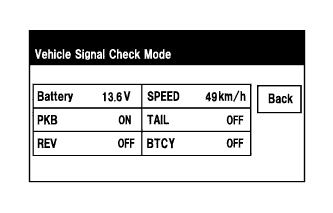
Screen Description Name
Content
Battery
Battery voltage is displayed.
PKB
Parking brake ON/OFF state is displayed.
REV
Reverse signal ON/OFF state is displayed.
SPEED
Vehicle speed signal ON/OFF state is displayed.
TAIL
TAIL signal (Light control switch) ON/OFF state is displayed.
BTCY
Luggage compartment door OPEN/CLOSE state is displayed.
- HINT:
- Only conditions having inputs are displayed.
- This screen is updated once per second when input signals to the vehicle are changed.
- Only conditions having inputs are displayed.
| FINISHING DIAGNOSTIC MODE |
There are 2 methods to end diagnostic mode. Use one of them.
Turn the ignition switch off.
Press the "DISC" switch for 1.7 seconds or more.