CUSTOMIZE PARAMETERS
Troubleshooting · Vehicles built Jun 2006 – Sep 2006
Versions by build date: Jun 2006 – Sep 2006 from Oct 2006
| COMBINATION METER ASSEMBLY |
*2: for Australia
- NOTICE:
- Be sure to record the current value before customizing.
- Be sure to record the current value before customizing.
- HINT:
- The following items can be customized using the intelligent tester.
| Tester Display |
Default |
Contents |
Setting |
| Key Remind Volume |
Large |
Function to change the volume of the key remind warning buzzer |
Large, Medium, Small |
| Key Remind Sound |
Normal |
Function to change the cycle of the key remind warning buzzer |
Fast, Normal, Slow |
| Seat-belt Warning Buzzer |
D/P ON (*1) |
Function to change the setting of the seat belt buzzer. |
D/P ON, D ON, P ON, D/P OFF (*1) |
| D ON (*2) |
D ON, D OFF (*2) |
- HINT:
- This setting is only valid for the buzzer which sounds at the 5 km/h (3 mph) or more.
| CLOCK ASSEMBLY (For Australia) |
Speed Warning Preset Mode:
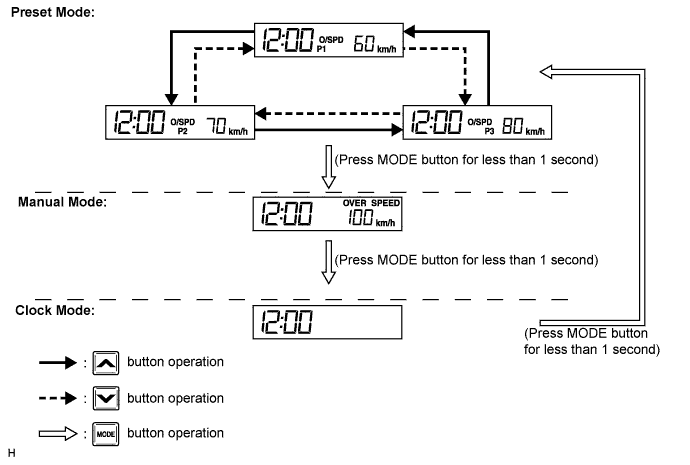

Turn the ignition switch to the ON position.
Press and hold the MODE button for 1 second or more.
Select the vehicle speed by pressing the arrow down/arrow up button.
Press the MODE button to set the new value.
- HINT:
- Set the vehicle speed over 130 km/h to disable above warning mode. (Speed limit warning display shows "--".)
Speed Warning Manual Mode:
Turn the ignition switch to the ON position.
Press the MODE button until manual mode appears.
The customized setting is displayed.
Select the vehicle speed by pressing the arrow down/arrow up button.
Press the MODE button to set the new value.
- HINT:
- Set the vehicle speed over 130 km/h to disable above warning mode. (Speed limit warning display shows "--".)
Clock Mode (Speed Limit Warning Disabled):
Turn the ignition switch to the ON position.
Press and hold the MODE button until clock mode appears. (Speed limit warning display is blank.)
Press the MODE button for 1 second or more.
Hours digit starts blinking.
Press the arrow down/arrow up button to adjust the hour.
Press the MODE button.
Minutes digit starts blinking.
Press the arrow down/arrow up button to adjust the minute.
Press the MODE button.
The minutes digit stops blinking, the colon start flashing, and exit the clock mode.
- HINT:
- Press MODE button once in manual mode or twice in preset mode, speed warning display will become blank and disable the speed warning function.
- Press the MODE button again to enable the speed limit warning again.
- Press MODE button once in manual mode or twice in preset mode, speed warning display will become blank and disable the speed warning function.