VEHICLE STABILITY CONTROL SYSTEM > DTC CHECK / CLEAR |
| DTC CHECK/CLEAR (INTELLIGENT TESTER) |
![]() |
Check the DTC.
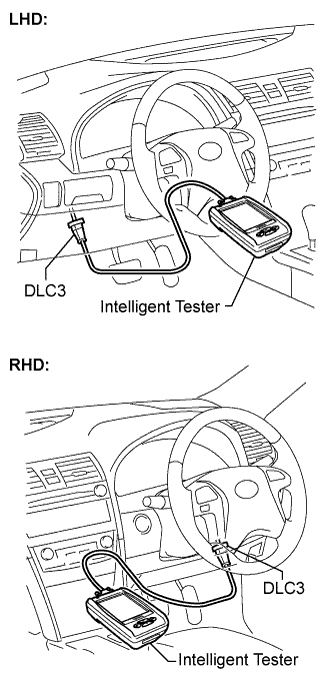
Connect the intelligent tester to the DLC3.
Turn the ignition switch on (IG).
Read the DTCs following the prompts on the tester screen.
Clear the DTC.
Connect the intelligent tester to the DLC3.
Turn the ignition switch on (IG).
Operate the intelligent tester to clear the codes.
| DTC CHECK/CLEAR (SST CHECK WIRE) |
![]() |
Check the DTC.
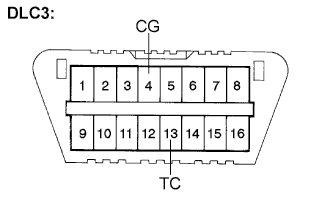
Using SST, connect terminals TC and CG of the DLC3.
Turn the ignition switch on (IG).
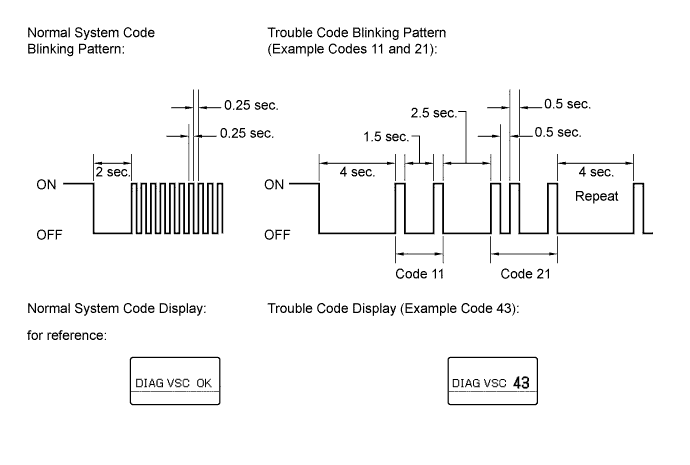
Observe the blinking pattern of the ABS warning and SLIP indicator lights and/or read the multi information display in order to identify the DTC.
| Trouble Area | See procedure |
| TC and CG terminal circuit |
Click here
|
| ABS warning light circuit |
Click here or Click here
|
| SLIP indicator light circuit |
Click here or Click here
|
As an example, the illustration below shows the blinking patterns of the normal system code and trouble codes 11 and 21 for ABS warning and SLIP indicator lights and/or display of the normal system code and trouble code 43 for the VSC on the multi information display.

The codes are explained in the code table (Click here).
After completing the check, disconnect terminals TC and CG of the DLC3, and turn off the display.
If 2 or more DTCs are detected at the same time, the DTCs will be displayed in ascending order.
Clear the DTC.
![]() |
Using SST, connect terminals TC and CG of the DLC3.
Turn the ignition switch on (IG).
![]() |
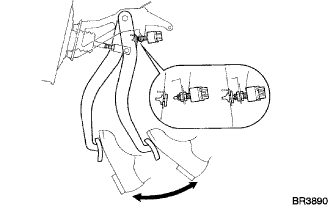
Clear the DTCs stored in the ECU by depressing the brake pedal 8 times or more within 5 seconds.
Check that the warning light or multi information display indicates the normal system code.
Remove the SST from the terminals of the DLC3.
| END OF DTC CHECK/CLEAR |
Turn the ignition switch on (IG).
Check that the ABS warning and SLIP indicator lights go off within approximately 3 seconds.