Cancel Condition
Turn the luggage compartment door lock cylinder assembly to the cancel position.
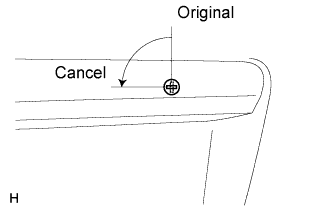 |
Original Condition
Turn the luggage compartment door lock cylinder assembly to the original position.
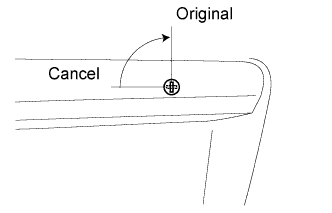 |
ENTRY AND START SYSTEM > CUSTOMIZE PARAMETERS |
| CUSTOMIZING FUNCTION WITH INTELLIGENT TESTER |
Connect the intelligent tester to the DLC3.
Turn the engine switch on (IG).
Turn the intelligent tester on.
Enter the following menus: Body / Entry & Start / Utility / Customize Setting.
Select the setting by referring to the table below.
| Tester Display | Default | Content | Setting |
| Ignition Available Area | All | Function that switches the entry ignition detection area. | Front or All |
| Park Wait Time | 2.5 s | Function that sets waiting time to permit opening the door after the door is locked with the entry lock function. | 0.5 s, 1.5 s, 2.5 s or 5 s |
| Trunk Open Mode | ON | Function that permits opening the luggage compartment door. | ON or OFF |
| Tester Display | Default | Content | Setting |
| Key Low Battery Warning | ON | Function that warns the driver that the key battery is low. | ON or OFF |
| KEY CANCEL |
The operation procedure is as follows:
Precondition:
Engine switch off, driver side door closed and unlocked
Press the UNLOCK switch of the key once.
Open the driver door within 5 seconds.
Press the UNLOCK switch of the key twice within 5 seconds.
Repeat open → close twice for the driver door within 30 seconds, and open again.
(Driver door: Open → Close → Open → Close → Open)
Press the UNLOCK switch of the key twice within 5 seconds.
Repeat open → close once for the driver door within 30 seconds, and open again.
(Driver door: Open → Close → Open)
Close the driver door within 5 seconds.
When key cancel is activated, the wireless door lock buzzer sounds twice.
To return to the original condition, perform the procedure again. When the original condition is returned, the wireless door lock buzzer sounds once.
| LUGGAGE COMPARTMENT DOOR OPEN CANCEL |
Cancel Condition
|
Turn the luggage compartment door lock cylinder assembly to the cancel position.
Original Condition
|
Turn the luggage compartment door lock cylinder assembly to the original position.