| B |  |
| REPLACE NAVIGATION RECEIVER ASSEMBLY (Click here) |
NAVIGATION SYSTEM > Radio Broadcast cannot be Received or Poor Reception |
| 1.CHECK NAVIGATION RECEIVER ASSEMBLY |
Check the radio automatic station search function.
Check the radio automatic station search function by activating it.
| Result | Proceed to |
| Automatic station search function does not stop | A |
| Automatic station search function stops on a station | B |
|
| ||||
| A | |
 |
| 2.CHECK OPTIONAL COMPONENTS |
Check optional components (sun-shade film, telephone antenna, etc.).
Check if any optional components that may decrease reception capacity, such as sunshade film or a telephone antenna, are installed.
| Result | Proceed to |
| Optional components are installed | A |
| Optional components are not installed | B |
|
| ||||
| A | ||
 | ||
| ||
| 3.CHECK NAVIGATION RECEIVER ASSEMBLY |
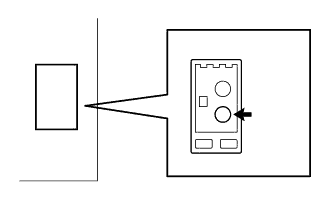 |
Preparation for check
Remove the antenna plug from the navigation receiver assembly.
Check for noise
Turn the ignition switch to ACC with the navigation receiver assembly connector connected.
Turn the radio on and tune into AM mode.
Place a screwdriver, thin wire, or other metal object on the navigation receiver assembly antenna jack and check that noise can be heard from the speaker.
|
| ||||
| OK | ||
| ||
| ||
