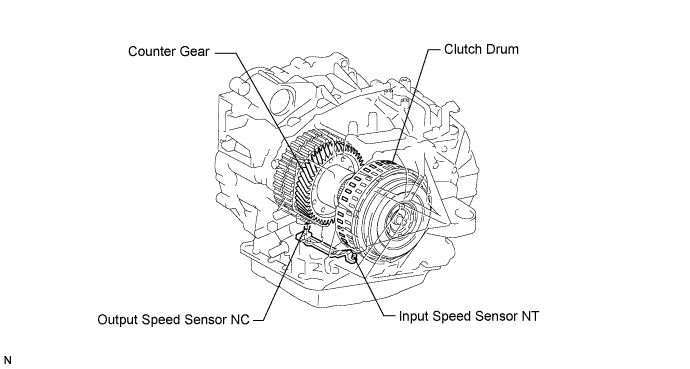
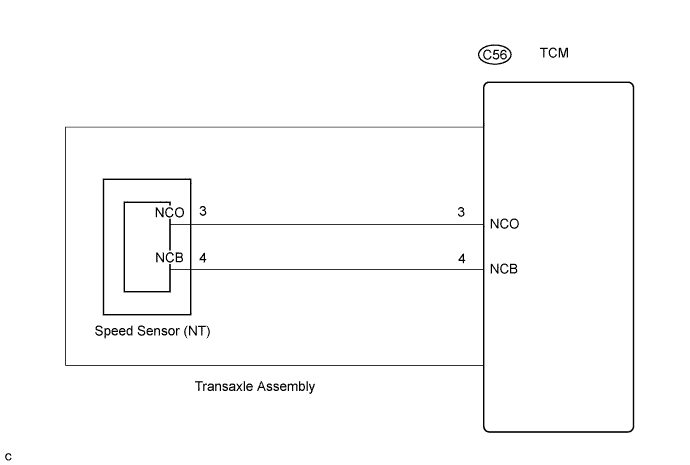
DTC P0791 Intermediate Shaft Speed Sensor "A" Circuit |
DTC P0793 Intermediate Shaft Speed Sensor "A" |
| DTC No. | DTC Detection Condition | Trouble Area |
| P0791 | When the speed sensor input voltage is either more than 1.9 V or less than 0.1 V for 2 seconds or more. |
|
| P0793 | When the vehicle speed is 15.5 mph (25 km/h) or higher, the counter gear speed is less than 300 rpm for 2 seconds or more. |
| DATA LIST |
Warm up the engine.
Turn the ignition switch off.
Connect the intelligent tester to the DLC3.
Turn the ignition switch on.
Turn on the tester.
Enter the following items: "Powertrain / ECT / Data List".
According to the display on the tester, read "Data List".
| Item | Measurement Item/ Range (display) | Normal Condition |
| SPD (NC) | Counter Gear Speed/ display: 50 r/min |
|
| 1.INSPECT SPEED SENSOR (SENSOR INSTALLATION) |
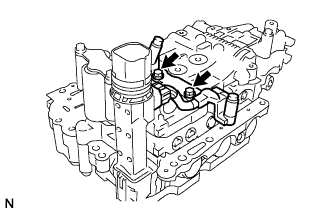 |
Make sure that the connector is properly connected, and check the speed sensor installation.
|
| ||||
| OK | |
 |
| 2.CHECK TRANSMISSION WIRE |
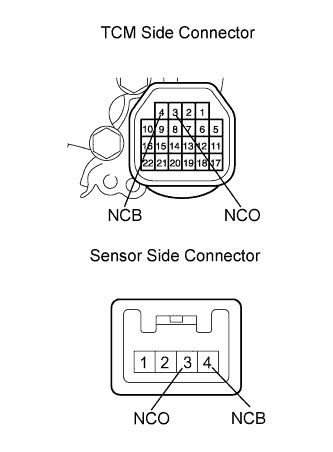 |
Remove the TCM.
Disconnect the speed sensor connector from the transmission wire.
Measure the resistance according to the value(s) in the table below.
| Tester Condition | Specified Condition |
| NCO - NCO | Below 1 Ω |
| NCB - NCB | Below 1 Ω |
| NCO - NCB | 10 kΩ or higher |
|
| ||||
| OK | |
|
| 3.REPLACE SPEED SENSOR |
| NEXT | |
|
| 4.CHECK IF DTC OUTPUT RECURS (SEE IF DTC P0791 AND/OR P0793 IS OUTPUT AGAIN) |
Connect the intelligent tester to the DLC3.
Start the engine and turn the intelligent tester main switch ON.
Perform the monitor drive pattern (Click here).
When you use intelligent tester:
Select the item "Powertrain / ECT / DTC / Current or Pending".
Read the DTCs using the intelligent tester.
| Display (DTC output) | Proceed to |
| Only "P0791 or P0793" is output | A |
| No output | B |
|
| ||||
| A | ||
 | ||
| ||
