 |
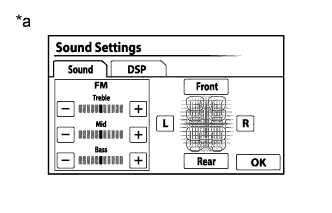
Display the "Sound Settings" screen.
NAVIGATION SYSTEM > Poor Sound Quality in All Modes (Low Volume) |
| 1.CHECK AUDIO SETTINGS |
|
Display the "Sound Settings" screen.
Set "Bass", "Mid" and "Treble" to the initial values and check that sound is normal.
| *a | Example |
|
| ||||
| OK | ||
 | ||
| ||
| 2.COMPARE WITH ANOTHER VEHICLE OF SAME MODEL |
Compare with another vehicle of the same model which does not have trouble to see if there is any difference in the sound quality.
|
| ||||
| OK | ||
| ||
| ||

