EXTERIOR PANELS / TRIM LUGGAGE COMPARTMENT DOOR OUTSIDE GARNISH REMOVAL
PROCEDURE

 64719A
1.REMOVE LUGGAGE COMPARTMENT DOOR COVER
2.REMOVE REAR LIGHT ASSEMBLY LH
3.REMOVE REAR LIGHT ASSEMBLY RH
- HINT:
-
Use the same procedure as for the LH side.
76801A
4.REMOVE LUGGAGE COMPARTMENT DOOR OUTSIDE GARNISH SUB-ASSEMBLY
w/ Smart Entry and Start System:
Disconnect the connector.
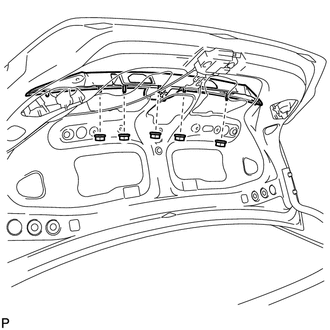
Remove the 5 nuts.
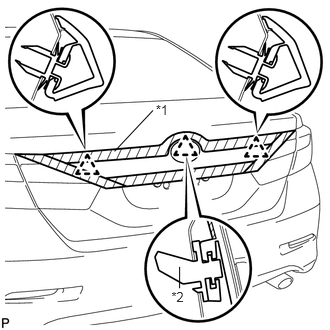
| *1 | Protective Tape |
| *2 | Back Door Outside Garnish Clip |
Put protective tape around the luggage compartment door outside garnish sub-assembly.
Disengage the 3 clips and remove the luggage compartment door outside garnish sub-assembly.
Remove the clip (back door outside garnish clip) and 2 clips from the luggage compartment door outside garnish sub-assembly.
Remove the 5 gaskets from the luggage compartment door outside garnish sub-assembly.
84944B
5.REMOVE LUGGAGE ELECTRICAL KEY SWITCH COVER (w/o Smart Entry and Start System)
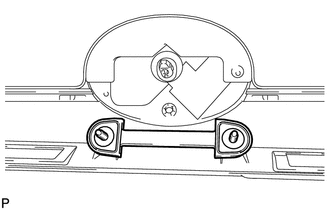
Remove the luggage electrical key switch cover.
84840
6.REMOVE LUGGAGE DOOR OPENING SWITCH ASSEMBLY (w/ Smart Entry and Start System)
75431
7.REMOVE LUGGAGE COMPARTMENT DOOR EMBLEM
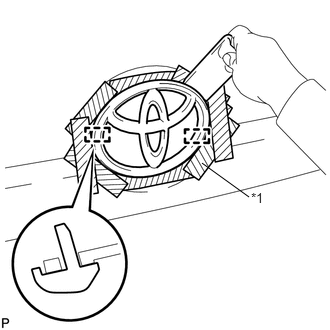
| *1 | Protective Tape |
Put protective tape around the luggage compartment door emblem.
Using a moulding remover, peel off the double-sided tape and disengage the 2 pins to remove the luggage compartment door emblem.
- NOTICE:
- ·
If reusing the luggage compartment door emblem, take care not to damage the luggage compartment door emblem.
·Be careful not to damage the vehicle body.