RM2030EQ
_56
Audio / Visual / Telematics
_014658
AUDIO / VIDEO
_0076716
AUDIO AND VISUAL SYSTEM(for Radio and Display Type)
J
AUDIO / VIDEO AUDIO AND VISUAL SYSTEM(for Radio and Display Type) No Sound can be Heard from Speakers
PROCEDURE
1.CHECK AUDIO SETTINGS
a.
0.094,0.063 0.427,0.344
0.333,0.281
10
false
*a
| *a | Example |
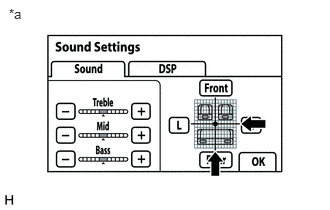
Display the "Sound Settings" screen.
b.
Set volume, fader and balance to the initial values and check that sound is normal.
- OK:
Audio system returns to normal.
- HINT:
-
Sound quality adjustment measures vary according to the type of amplifier.
- Result:
Proceed to OK NG
OK
END
NG
PROCEED TO NEXT SUSPECTED AREA SHOWN IN PROBLEM SYMPTOMS TABLE