NAVIGATION / MULTI INFO DISPLAY NAVIGATION SYSTEM / MULTI INFORMATION SYSTEM GENERAL GENERAL
OUTLINE
The multi-display of the navigation receiver assembly is a wide 7-inch Liquid Crystal Display (LCD) with a pressure sensitive touch panel, offering improved ease of use.
The map database of the navigation system is stored on the microSD card (disc player disc) installed in the navigation receiver assembly. A microSD card (disc player disc) which has the latest map database stored, can be purchased to replace the old one and update to the latest map database.
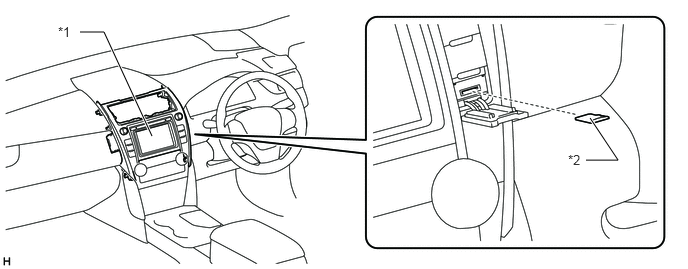
| *1 | Navigation Receiver Assembly | *2 | microSD Card (Disc Player Disc) |
A multiple display function is provided. Due to this function, a map screen and audio screen or vehicle information screen can be displayed on the navigation receiver assembly simultaneously. Displayed items are customizable, and the top screen of each function can be displayed by selecting the corresponding information screen.
Navigation information, such as directions and route information, can be displayed on the multi-information display on the combination meter assembly. (Models with multi-information display)
A fuel consumption screen is provided in consideration of the environment.
PRECAUTION
microSD Card (Disc Player Disc)
When ejecting the microSD card, observe the following precautions to avoid damaging it.
The microSD card (disc player disc) stores map data or various programs which are required to operate the navigation system. With the microSD card (disc player disc) removed, the navigation system will not operate properly. Do not remove the microSD card (disc player disc) unless necessary, such as for a map update.
Do not insert anything other than a microSD card (disc player disc) into the microSD card slot after removing the microSD card (disc player disc).
Do not insert a dusty or dirty microSD card (disc player disc) into the microSD card slot, as it may cause a malfunction.
After the microSD card (disc player disc) is inserted, make sure that it is secure in the microSD card slot.
When handling a microSD card (disc player disc), observe the following precautions. Failure to do so may cause a malfunction.
Do not touch the metal contacts of the microSD card (disc player disc) with your fingers or metal objects.

Do not bend, drop or strike a microSD card (disc player disc), as it is a precision electronic component and may become damaged.
Avoid the following environments when storing a removed microSD card (disc player disc). Failure to do so may cause the microSD card (disc player disc) to malfunction and generate errors in the navigation system.
Areas where static electricity or electrical noise is present
In extremely hot or humid areas
Areas exposed to direct-sunlight
Areas where condensation may form
Areas where corrosive gases may be generated
Do not peel the label on the microSD card or attach a new label or sticker.
SPECIFICATION
| Multi-display | 7.0-inch Wide LCD | |
| Navigation Computer | Fujitsu Ten | |
| Gyro Sensor | Piezoelectric Ceramic Element | |
| Map Data Media | microSD Card (Disc Player Disc) | |
| microSD Card | Fujitsu Ten | |
| Language Supported | Voice Guidance | English |
| Voice Recognition | English | |
MAIN FEATURES
Voice Recognition System
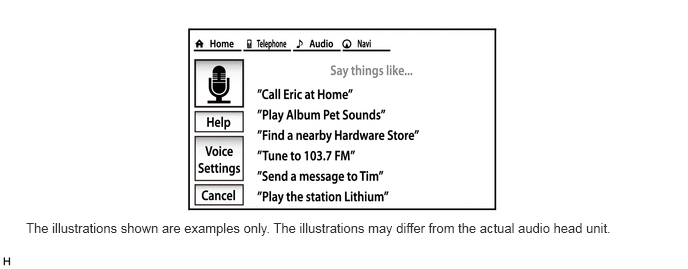
When the voice recognition system starts operating, the commands that the system is able to recognize are displayed on the multi-display.
In the aim of enabling the user to operate the system with minimal spoken words, the recognition command screen is designed to show not only sample spoken words for shortcut commands, but also tabs for the major functions such as Audio, Navi and Telephone. When a tab is selected, a detailed list of the voice recognition commands will be displayed for the corresponding function.
- HINT:
-
Other functions still can be operated by voice recognition commands when a tab is selected for a specific function.
The main functions of the multi-display are listed below.
| Function | Outline | |
|---|---|---|
| Navigation System | Through the use of the Global Positioning System (GPS) and map data, the navigation system analyzes the position of the vehicle and indicates the position on the map that is displayed on the screen.In addition, it is possible to use the system to register memory points and navigate to a destination. | |
| Audio/Video System | Serves as the display and controls for the following:
·
Radio operation ·
CD player operation ·
Bluetooth-compatible portable player operation ·
USB memory device operation (USB type) ·
iPod / iPhone operation ·
Portable audio player operation (AUX type) |
|
| Hands-free System | When a Bluetooth-compatible cellular phone is registered to the navigation system, the driver can make and receive calls or talk hands-free on the cellular phone by operating the switches on the screen/steering pad. | |
| Speech Command System | Operates the navigation, audio, and hands-free systems based on voice commands. | |
| TOYOTA Parking Assist-sensor System
(Models with TOYOTA Parking Assist-sensor System) |
Detects obstacles and displays information on the multi-display to inform the driver. | |
| Parking Assist Monitor System
(Models with Parking Assist Monitor System) |
Displays a view of the area behind the vehicle that is captured by the television camera mounted on the luggage compartment door when the shift lever is moved to R. | |
| Others | Fuel Consumption Screen | Fuel consumption information such as average fuel consumption per minute, current fuel consumption per minute, past fuel consumption record and energy monitor is displayed. |
| Screen Theme Color Setting | The screen theme color can be changed. | |
| Beep Setting | The beep sound can be turned off. | |
| Keyboard Layout | The keyboard layout can be changed. | |
| Delete Personal Data | Deletes or returns registered or changed personal settings to their default conditions. For example:
·
General settings ·
Navigation settings ·
Audio settings ·
Telephone settings |
|
| Screen Adjustment | The brightness or contrast of the screen can be adjusted to suit the brightness of the surroundings. | |
| Map Database Update | Replace the old microSD card with a microSD card, which has the latest map database stored to entirely update the map database. | |
| Diagnosis | This menu contains the following items:
·
Failure Diagnosis ·
System Check ·
SD Check ·
Diagnosis Recorder ·
Function Check / Setting ·
Panel & Steering Switch ·
Touch Switch ·
Microphone Check ·
System Sensors Check ·
Vehicle Signal ·
HF Voice Quality Setting ·
Camera Setting (Models with parking assist monitor system) ·
DAB Reception Check ·
Service Information ·
Program Update ·
Version Information ·
Product Information |
|