AUDIO / VIDEO REAR PACKAGE TRAY SPEAKER REMOVAL
PROCEDURE

 1.REMOVE REAR SEAT CUSHION ASSEMBLY
72693
2.REMOVE REAR SEAT CUSHION LOCK HOOK
73480
3.DISCONNECT REAR SEAT INNER WITH CENTER BELT ASSEMBLY LH
4.REMOVE REAR SIDE SEATBACK ASSEMBLY RH
5.REMOVE REAR SIDE SEATBACK ASSEMBLY LH
73360C
6.DISCONNECT REAR NO. 1 SEAT OUTER BELT ASSEMBLY RH
73370C
7.DISCONNECT REAR NO. 1 SEAT OUTER BELT ASSEMBLY LH
62331A
8.DISCONNECT REAR DOOR OPENING TRIM WEATHERSTRIP RH
62332A
9.DISCONNECT REAR DOOR OPENING TRIM WEATHERSTRIP LH
62471A
10.REMOVE ROOF SIDE INNER GARNISH RH
62472A
11.REMOVE ROOF SIDE INNER GARNISH LH
- HINT:
-
Use the same procedure as for the RH side.
73373
12.REMOVE REAR SEAT SHOULDER BELT COVER
64330
13.REMOVE PACKAGE TRAY TRIM PANEL ASSEMBLY (w/o Rear Sunshade)
64330
14.REMOVE PACKAGE TRAY TRIM PANEL ASSEMBLY (w/ Rear Sunshade)
86160B
15.REMOVE REAR SPEAKER ASSEMBLY
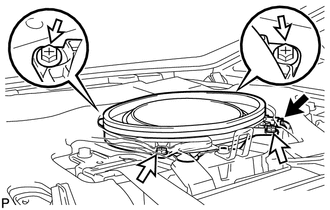
Disconnect the connector.
Remove the 4 screws and rear speaker assembly.
- NOTICE:
-
Do not touch the cone part of the speaker.
- HINT:
-
If the rear speaker assembly is difficult to remove, turn back the No. 1 upper back panel hole cover so that the rear speaker assembly can be removed.
86160Y
16.REMOVE REAR NO. 2 SPEAKER ASSEMBLY (for 10 Speakers)
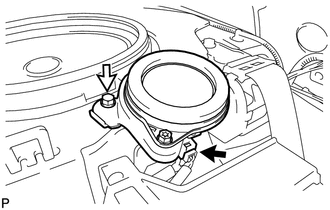
Disconnect the connector.
Remove the bolt and rear No. 2 speaker assembly.
- NOTICE:
-
Do not touch the cone part of the speaker.