INTERIOR PANELS / TRIM FRONT CONSOLE BOX INSTALLATION
PROCEDURE

 1.INSTALL REAR CONSOLE BOX ASSEMBLY
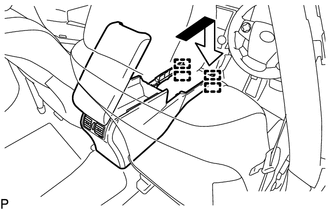
Engage the 4 guides as shown in the illustration.
Install the rear console box assembly with the 2 bolts and 2 screws.
58815A
2.INSTALL CONSOLE BOX CARPET
Install the console box carpet.
58864B
3.INSTALL NO. 4 CONSOLE BOX DUCT
Engage the claw to install the No. 4 console box duct.
58801E
4.INSTALL UPPER CONSOLE BOX SUB-ASSEMBLY (w/o Wireless Charger)
w/ Power Outlet Socket:
Connect the connector.
Engage the clamp.
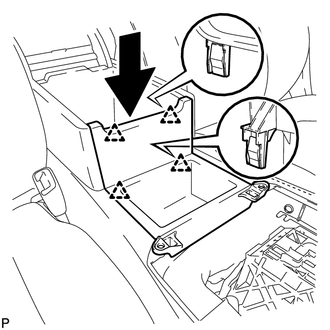
Engage the 4 clips as shown in the illustration.
Install the upper console box sub-assembly with the 2 screws.
861C0
5.INSTALL MOBILE WIRELESS CHARGER CRADLE ASSEMBLY (w/ Wireless Charger)
55625B
6.INSTALL INSTRUMENT PANEL CUP HOLDER TRAY
Install the front console upper panel garnish.
Install the instrument panel cup holder tray with the 6 screws.
55618A
7.INSTALL CONSOLE BOX CUP HOLDER
Install the console box cup holder to the rear console upper panel sub-assembly.
58805C
8.INSTALL REAR CONSOLE UPPER PANEL SUB-ASSEMBLY
33504F
9.INSTALL SHIFT LEVER KNOB SUB-ASSEMBLY
53922B
10.INSTALL FRONT PANEL GARNISH LH
53921B
11.INSTALL FRONT PANEL GARNISH RH