METER / GAUGE SYSTEM > GENERAL


OUTLINE


  1. Combination Meter Assembly

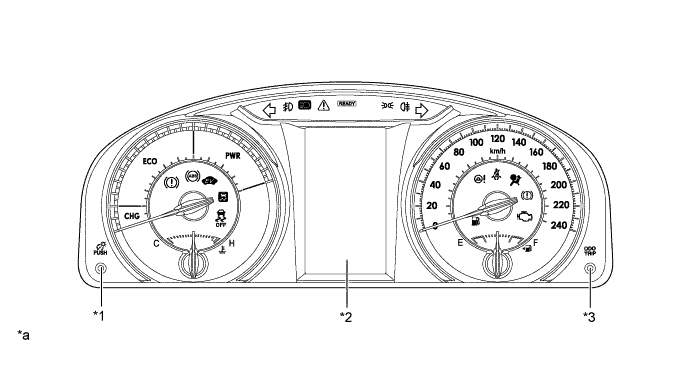
    1. A combination meter assembly, which has a color type multi-information display, is provided.


    2. A multi-information display on which various kinds of information is displayed is integrated.


      Y171791E01


      Text in Illustration 
      *1
      Rheostat Switch
      *2
      Multi-information Display
      *3
      ODO/TRIP Switch
      -
      -
      *a
      The illustration shown is an example only.
      -
      -


MAJOR DIFFERENCE
  1. The new models have been modified from the previous models as shown below:

    1. The exterior design has been changed.

    2. The design and functions of the combination meter assembly have been changed.


MAIN FEATURES
  1. Opening/Ending Ceremony

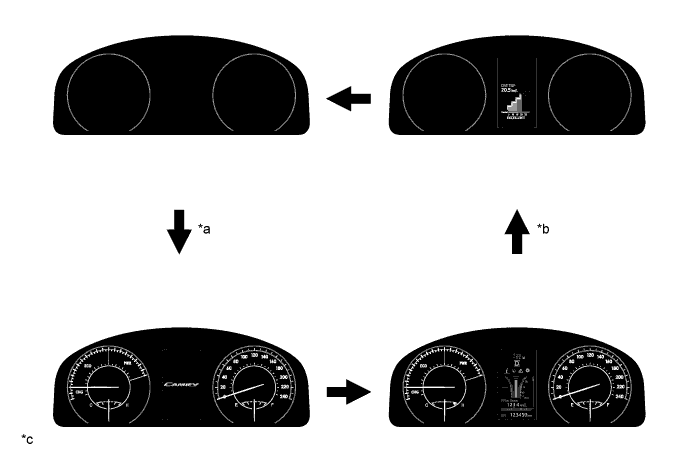
    1. An opening/ending ceremony which allows for anticipation of a pleasant drive is used. The ceremony operates as follows:

      1. When the power switch is turned on (IG), the needles, gauges and panels of the speedometer, hybrid system indicator, engine coolant temperature gauge and fuel gauge and the multi-information display illuminate.

      2. When the power switch is turned off, all the illuminations fade out. During this period, the multi-information display shows the Eco Drive Level for 3 seconds.


        Y171792E01


        Text in Illustration 
        *a
        IG ON
        *b
        IG OFF
        *c
        The illustrations shown are examples only.
        -
        -


  2. Hybrid System Indicator

    1. The hybrid system indicator displays the total of the HV battery and engine output as the hybrid system output.


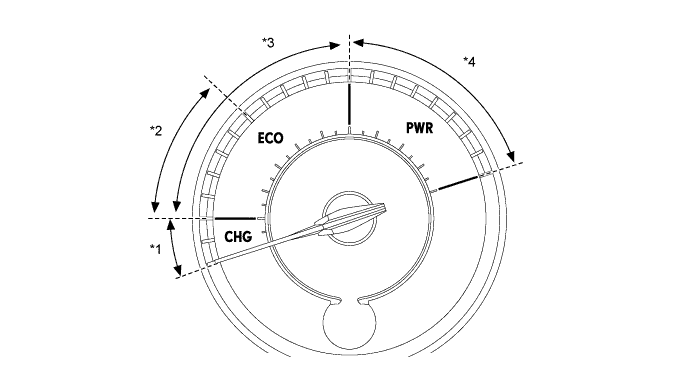
    2. The scale for the hybrid system indicator is divided into 3 areas (Charge, Eco, Power). The role of each area is as follows.

      Area
      Function
      Charge
      The Charge area indicates when energy is being regenerated.
      Eco
      1. The Eco area indicates when the vehicle is being driven in an Eco-friendly manner.
      2. The Hybrid Eco area indicates that the vehicle is driven in a manner that promotes frequent motor only operation. (Based on various conditions, the power management ECU controls if the engine should be stopped to enhance fuel efficiency.)
      Power
      The Power area indicates that the Eco-friendly driving range is being exceeded (during full power driving etc.).


      Y172246E01


      Text in Illustration 
      *1
      Charge Area
      *2
      Hybrid Eco Area
      *3
      Eco Area
      *4
      Power Area

  3. Multi-information Display

    1. The multi-information display is located at the center of the combination meter assembly.

    2. The multi-information display shows the following information.

      Item
      Outline
      Shift Position Indicator
      The current shift position is displayed.
      Outside Temperature
      1. The outside temperature is displayed.
      2. When the outside temperature drops below 3°C (37°F), an ice warning light illuminates to warn the driver to drive with caution due to possibly icy road conditions. After the ice warning light flashes 10 times, the light stays on. When the temperature reaches 5°C (41°F), the light goes off.
      Indicator
      When the display conditions are met, the following indicators illuminate.
      1. Cruise Control Indicator
      2. Cruise SET Indicator
      3. EV Mode Indicator
      Information
      The following information can be displayed on the multi-information display by switching the tabs.
      1. Drive Information
      2. Warning Message
      3. Settings

      HINT:
      The tab can be switched using the RIGHT (PAGE) switch of the steering pad switch assembly.

      Vehicle Power Source State
      The vehicle power source state is displayed.
      ODO/TRIP Meter
      1. The odometer, trip meter A or trip meter B are displayed.
      2. The item shown can be switched by pressing the ODO/TRIP switch knob.
      Warning Message
      A warning display will interrupt the current display on the multi-information display immediately when a warning is necessary.
      Light Control Rheostat
      Meter panel luminance can be changed by using the rheostat switch knob.

    3. The drive information shows the following information.

      Item
      Outline
      Drive Information
      1. The items selected on the setting screen can be displayed. 2 items can be selected in drive information 3 among the following:
        1. Total Average Vehicle Speed between Reset Operations
        2. Average Vehicle Speed after Engine Start-up
        3. Total Elapsed Time between Reset Operations
        4. Elapsed Time after Engine Start-up
        5. Cruising Range
        6. Cruising Range after Engine Start-up
        7. Total Cruising Range between Reset Operations
        8. Blank
      1. In addition to the above functions, the following items can be displayed.
        1. Drive Information 1 (Current Fuel Consumption (Bar Display) and Total Average Fuel Consumption between Reset Operations (Bar Display))
        2. Drive Information 2 (Eco Drive Level)
        3. Energy Monitor
        4. Blank

      HINT:
      The item shown can be changed using the UP/DOWN switch of the steering pad switch assembly.