Combination Meter Assembly
Buzzer Function
- The table below shows the warning and reminder functions of the buzzer in the combination meter assembly.
1 READY 2 Seat Belt Warning (Level 2) 3 Seat Belt Warning (Level 1) 4 Brake System Warning 5 EPS Warning 6 Smart Entry and Start System Warning 1 (Continuous) 7 Smart Entry and Start System Warning 2 (Intermittent) 8 Key Reminder Indicating Buzzer 9 Brake System Temperature Warning 10 Hill-start Assist Control Reset Indication 11 Hill-start Assist Control Set Indication 12 Smart Entry and Start System Warning 2 (Continuous, 9 times at the maximum) 13 Smart Entry and Start System Warning (Once) 14 Multi-information Display Warning 15 Accelerator Depression with Neutral (N) Selected 16 Smart Entry and Start System Warning (Intermittent) 17 Hybrid System Check (Intermittent) 18 Hybrid System Check (Once) 19 HV Battery Low Warning 20 HV Battery Charge Request 21 Immobiliser Certification Reminder 22 Shift Position (P) Request 23 Parking Brake Engaged Warning 24 Door Open while Driving Warning 25 Headlight Reminder 26 Shift Operation Reject Warning 27 EV Drive Mode Reject Warning 28 Sliding Roof Open Warning* 29 Turn Signal/Hazard Warning Operation - - - *: Models with sliding roof system
- The table below shows the warning and reminder functions of the buzzer in the combination meter assembly.
Multi-information Display
Display Flow Function
- The multi-information display flow can be switched as shown in the flow chart below:
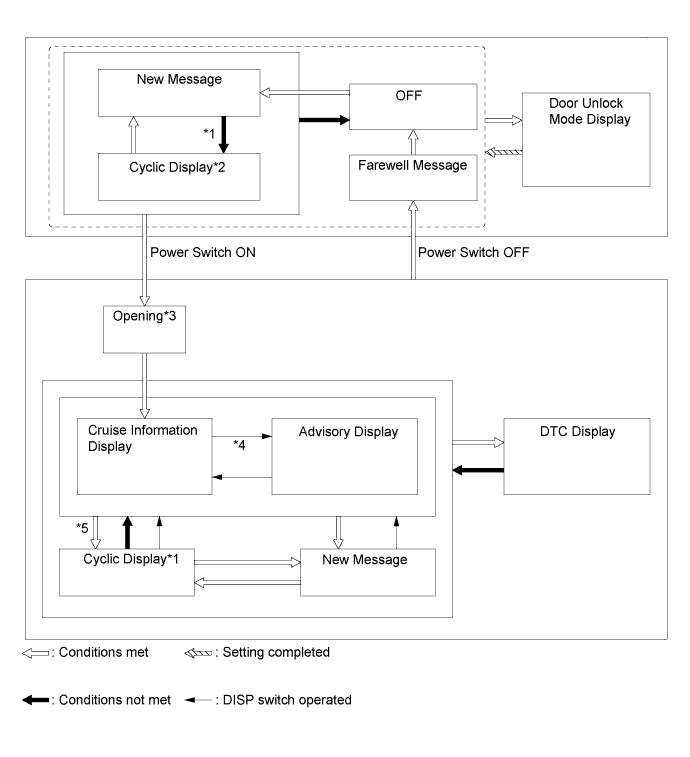
No. Transition Condition *1 Conditions are not met and all new messages have been displayed. *2 If the display conditions for 2 or more messages are met, relevant messages are alternately displayed for 2 seconds each. *3 If the power switch is turned off during the "Opening" display, the "Opening" display will be shown from the beginning. *4 If the DISP switch is used to change from an advisory message to the cruise information display screen, repeatedly operating the DISP switch will cycle through the cruise information screens and then return the advisory message if the display conditions are still met. *5 If the DISP switch is not operated for more than 6 seconds with any of the caution or warning message display conditions still met, the relevant caution or warning messages are displayed.
- The multi-information display flow can be switched as shown in the flow chart below:
Cruise Information Mode Function
- The cruise information is displayed in the following order each time the DISP switch of the steering pad switch assembly is pressed.
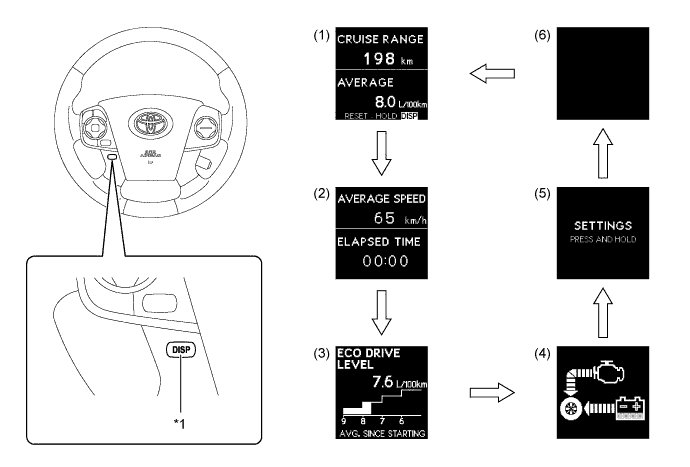
Text in Illustration *1 DISP Switch - - 
DISP switch pressed briefly. - - - The cruise information mode items displayed are as follows:
No. Information Outline (1) Cruising Range - Displays a value that has been calculated by the combination meter assembly. When the power switch is turned on (IG), the combination meter assembly calculates the range based on continuously monitoring and storing information on fuel consumption data, and the residual fuel volume.
- This display is updated every 10 seconds.
Average Fuel Consumption - Displays a value that has been calculated by the combination meter assembly based on the distance driven and the fuel consumption volume (fuel injection signal from the ECM).
- This display is updated every 10 seconds.
(2) Average Speed - Displays the average vehicle speed calculated by the combination meter assembly based on the engine start signal and vehicle speed signal.
- This display is updated every 10 seconds.
Elapsed Time Displays the length of time since the engine was started. (3) Eco Drive Level Display - Displays the average fuel consumption calculated since the engine was started. Uses 4 different height bars to display the level.
- This display is updated every 10 seconds.
(4) Energy Monitor - Displays the energy transmission direction for checking the current drive method (engine, motor or both), whether the engine is being used to generate power or whether energy is being regenerated.
- The energy flow, which appears in the form of an arrow, also shows the SOC of the HV battery in 8 levels.
- This display is updated every 0.3 seconds.
(5) Settings Customizes the combination meter assembly language display and EV drive indicator light and instantaneous fuel consumption gauge deactivated or activated display states. (6) Blank Screen - - The cruise information is displayed in the following order each time the DISP switch of the steering pad switch assembly is pressed.
Eco Drive Level
- The eco drive level changes among 4 levels to indicate the average fuel consumption.
- After the power switch is turned off, the eco drive level display appears for 3 seconds in the multi-information display. When the average fuel consumption is 5.8 L/100 km or less, the "EXCELLENT!" message flashes.
Average Fuel Consumption Level (L/100 km) Multi-information Display Level 0 (9 or more) 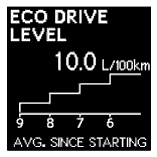
Level 1 (8 to 9) 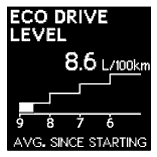
Level 2 (7 to 8) 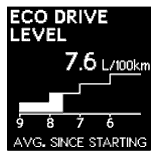
Level 3 (6 to 7) 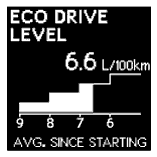
Level 4 (less 6) When driving 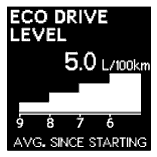
After power source is turned off 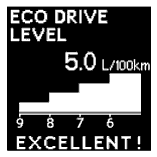
- The eco drive level changes among 4 levels to indicate the average fuel consumption.
Customization Function
- In the settings screen of cruise information mode, pressing and holding the DISP switch enters setting mode.
- Press the DISP switch briefly to select the item to be customized. Press and hold the DISP switch to confirm the selection.
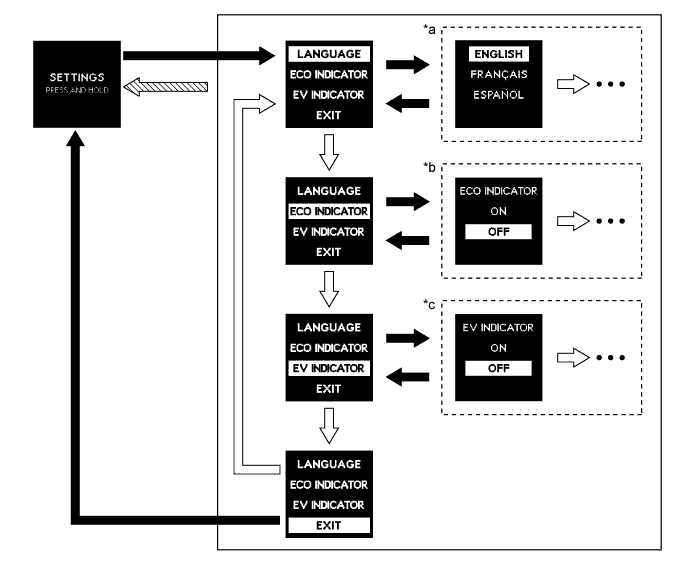
Text in Illustration *a Language Setting *b Instantaneous Fuel Consumption Gauge *c EV Drive Indicator Light ON/OFF Setting - - DISP switch pressed briefly. 
DISP switch pressed and held. 
If the vehicle has reached a speed of 8 km/h (5 mph) - - - In setting mode, the following items of the combination meter assembly can be customized.
Item Available Setting Language - English
- French
- Spanish
Instantaneous Fuel Consumption Gauge - On
- Off
EV Drive Indicator Light - On
- Off
- In the settings screen of cruise information mode, pressing and holding the DISP switch enters setting mode.
Warning Mode Function
- When a warning is necessary, the warning display interrupts the display in the multi-information display.
- The master warning light may illuminate or blink and the buzzer in the combination meter assembly may sound depending on the item in the multi-information display.
Priority Indication/Warning Master Warning Light Buzzer 1 MAINTENANCE MODE - - CERTIFICATION MODE - - 2 Door Open (While Driving)*1 Blinks Sounds Door Open - - Clearance Sonar Obstruction Detection*2 - - CHECK SONAR*2 Illuminates Sounds CLEAN SONAR*2 Illuminates Sounds 3 AUTO POWER OFF TO CONSERVE BATTERY - - 4 SHIFT TO P POSITION Blinks Sounds SHIFT TO P POSITION WHEN PARKED Blinks Sounds N POSITION Blinks Sounds TRACTION BATTERY PRESERVATION MODE RESTART AFTER SHIFTING TO THE P POSITION Blinks Sounds 5 TRACTION BATTERY LOW. CHARGE WHEN NOT IN N POSITION Blinks Sounds RELEASE PARKING BRAKE Blinks Sounds KEY NOT DETECTED Blinks Sounds 6 CHECK HYBRID SYSTEM Illuminates Sounds CHECK ENTRY & START SYSTEM Blinks Sounds 7 CHECK CRUISE CONTROL SYSTEM Illuminates Sounds 8 TURN POWER OFF Blinks Sounds 9 KEY DETECTED IN VEHICLE Blinks Sounds MOONROOF OPEN*3 Blinks Sounds DEPRESS BRAKE PEDAL, TOUCH POWER SWITCH WITH KEY Blinks Sounds DEPRESS BRAKE PEDAL AND PUSH POWER SWITCH TO START Blinks Sounds STEERING LOCK ACTIVE Blinks Sounds SHIFT TO P POSITION TO START Blinks Sounds 10 KEY BATTERY LOW Illuminates Sounds HYBRID SYSTEM OVERHEAT Illuminates Sounds 11 DRIVING FORCE LIMITED - - LOW WASHER FLUID - - POWER ON - - Engine Start Ready State - - EV MODE CURRENTLY NOT AVAILABLE - Sounds EV MODE NOT AVAILABLE WARMING UP - Sounds EV MODE NOT AVAILABLE LOW BATTERY - Sounds EV MODE NOT AVAILABLE EXCESSIVE SPEED - Sounds EV MODE NOT AVAILABLE EXCESSIVE ACCELERATION - Sounds EV MODE DEACTIVATED - Sounds EV MODE DEACTIVATED LOW BATTERY - Sounds EV MODE DEACTIVATED EXCESSIVE SPEED - Sounds EV MODE DEACTIVATED EXCESSIVE ACCELERATION - Sounds - *1: If the vehicle has reached a speed of 5 km/h (3 mph).
- *2: Models with TOYOTA parking assist-sensor system
- *3: Models with sliding roof system
- When a warning is necessary, the warning display interrupts the display in the multi-information display.