Before connecting the connector, check that the position of the white housing lock is correct as shown in the illustration.
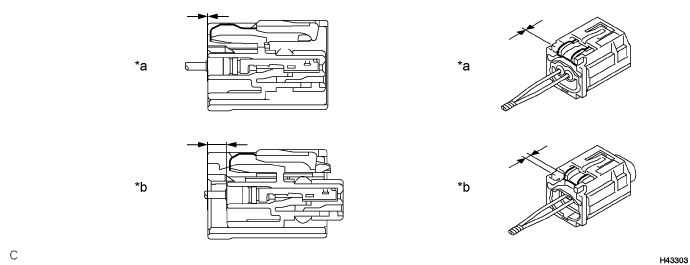
| *a | Incorrect | *b | Correct |
REAR AIRBAG SENSOR > INSTALLATION |
| 1. INSTALL SIDE NO. 2 AIRBAG SENSOR ASSEMBLY |
Check that the power switch is off.
Check that the cable is disconnected from the negative (-) auxiliary battery terminal.
Before connecting the connector, check that the position of the white housing lock is correct as shown in the illustration.
| *a | Incorrect | *b | Correct |
Insert the pin (stopper) into the body hole and install the side No. 2 airbag sensor assembly to the vehicle body with the bolt.
Connect the connector to the side No. 2 airbag sensor assembly.
Be sure to engage the connectors until they are locked (when locking, make sure that a click sound can be heard).
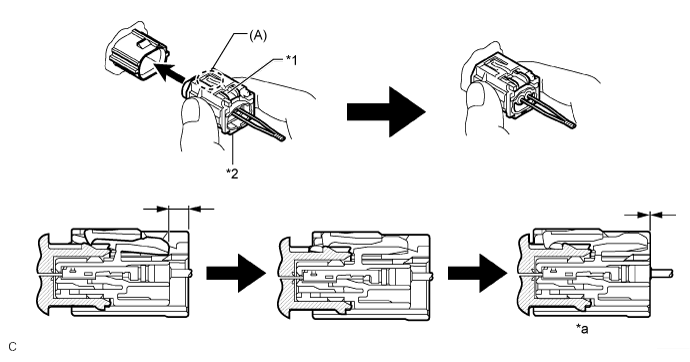
| *1 | White Housing Lock | *2 | Yellow CPA |
| *a | Connection is Completed | - | - |
Check that there is no looseness in the installation parts of the side No. 2 airbag sensor assembly.
| 2. INSTALL REAR SIDE SEATBACK ASSEMBLY |
Place the rear side seatback assembly LH in the cabin.
Engage the hook to install the rear side seatback assembly LH with the bolt.
Connect the rear seat outer belt to the rear seat shoulder belt guide LH.
| 3. INSTALL REAR SEAT CUSHION LOCK HOOK |
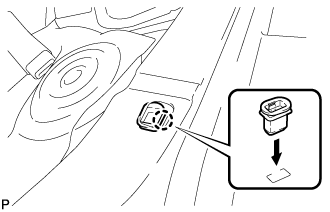 |
Engage the claw to install a new rear seat cushion lock hook.
| 4. INSTALL REAR SEAT CUSHION ASSEMBLY |
Place the rear seat cushion assembly in the cabin.
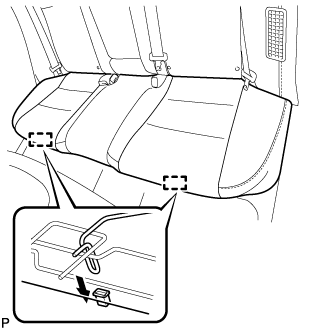 |
Engage the 2 hooks of the rear seat cushion assembly to the vehicle body as shown in the illustration.
Confirm that the rear seat cushion assembly is firmly installed.
| 5. CONNECT CABLE TO NEGATIVE AUXILIARY BATTERY TERMINAL |
| 6. INSTALL LUGGAGE TRIM SERVICE HOLE COVER |
Engage the claw to connect the luggage trim service hole cover.
| 7. PERFORM DIAGNOSTIC SYSTEM CHECK |
| 8. INSPECT SRS WARNING LIGHT |