 |
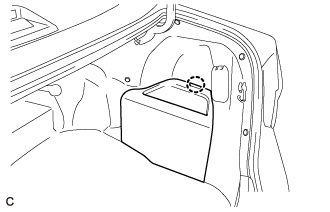
Disengage the claw to remove the luggage trim service hole cover.
REAR AIRBAG SENSOR > REMOVAL |
| 1. PRECAUTION |
| 2. REMOVE LUGGAGE TRIM SERVICE HOLE COVER |
|
Disengage the claw to remove the luggage trim service hole cover.
| 3. DISCONNECT CABLE FROM NEGATIVE AUXILIARY BATTERY TERMINAL |
| 4. REMOVE REAR SEAT CUSHION ASSEMBLY |
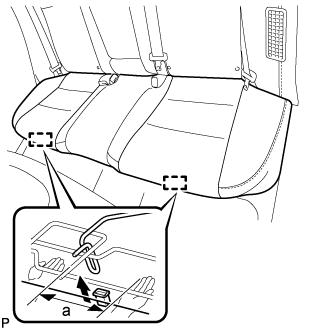 |
Disengage the hook of the seat cushion from the vehicle body as shown in the illustration.
| a | 100 mm (3.94 in.) or less |
Choose a hook to disengage first. Place your hands near the hook as shown in the illustration. Then lift the seat cushion to disengage the hook.
Repeat the step above for the other hook.
Remove the rear seat cushion assembly.
| 5. REMOVE REAR SEAT CUSHION LOCK HOOK |
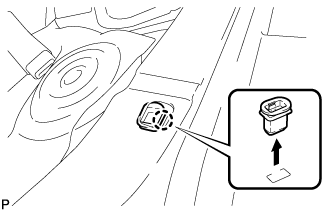 |
Disengage the claw and remove the rear seat cushion lock hook.
| 6. REMOVE REAR SIDE SEATBACK ASSEMBLY |
Disconnect the rear seat outer belt from the rear seat shoulder belt guide LH.
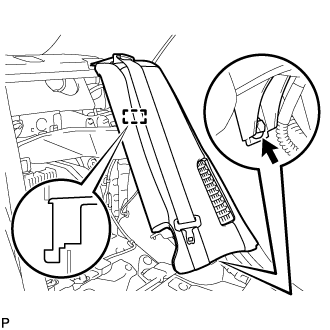 |
Remove the bolt.
Disengage the hook and remove the rear side seatback assembly LH.
| 7. REMOVE SIDE NO. 2 AIRBAG SENSOR ASSEMBLY |
Check that the power switch is off.
Check that the cable is disconnected from the negative (-) auxiliary battery terminal.
Disconnect the connector from the side No. 2 airbag sensor assembly.
Push down the white housing lock and slide the yellow CPA. (At this time, the connector cannot be disconnected yet.)
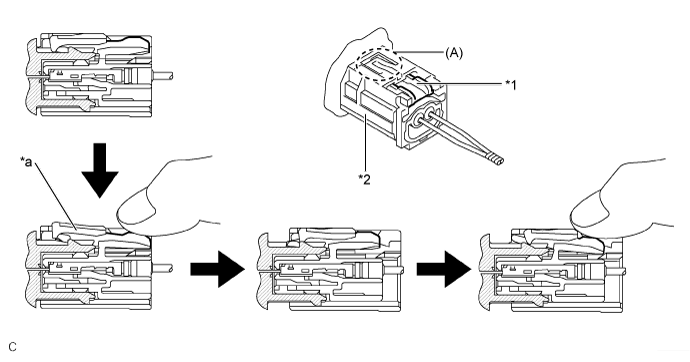
| *1 | White Housing Lock | *2 | Yellow CPA |
| *a | Connector Lock is Released | - | - |
Push down the white housing lock again and disconnect the connector.
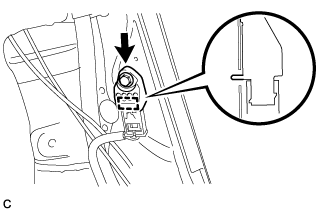 |
Remove the bolt and side No. 2 airbag sensor assembly from the vehicle body.
After disconnecting the connector, check that the position of the white housing lock is correct as shown in the illustration.
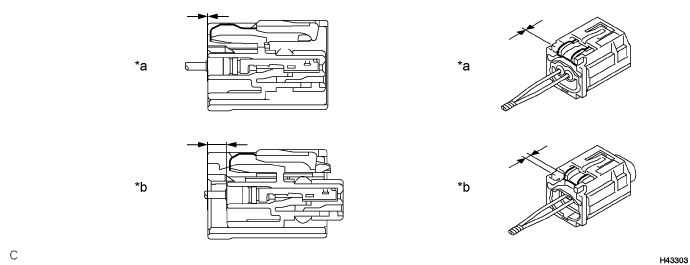
| *a | Incorrect | *b | Correct |