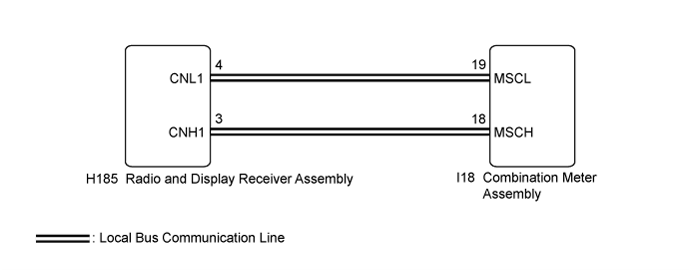
DTC B150A Lost Communication with HMI-LAN |
| DTC No. | DTC Detection Condition | Trouble Area |
| B150A | After the combination meter assembly receives a registration information signal, which is sent by the radio and display receiver assembly when the power switch is on (ACC), 1 or more times, the combination meter assembly does not receive the signal for 30 seconds or more. |
|
| 1.CHECK FOR DTC |
Check if audio and visual system DTCs are output (Click here).
| Result | Proceed to |
| Audio and visual system DTCs are not output. | A |
| Audio and visual system DTCs are output. | B |
|
| ||||
| A | |
 |
| 2.CHECK HARNESS AND CONNECTOR (COMBINATION METER ASSEMBLY - RADIO AND DISPLAY RECEIVER ASSEMBLY) |
Disconnect the I18 combination meter assembly connector.
Disconnect the H185 radio and display receiver assembly connector.
Measure the resistance according to the value(s) in the table below.
| Tester Connection | Condition | Specified Condition |
| I18-19 (MSCL) - H185-4 (CNL1) | Always | Below 1 Ω |
| I18-18 (MSCH) - H185-3 (CNH1) | Always | Below 1 Ω |
| I18-19 (MSCL) - Body ground | Always | 10 kΩ or higher |
| I18-18 (MSCH) - Body ground | Always | 10 kΩ or higher |
|
| ||||
| OK | |
|
| 3.REPLACE COMBINATION METER ASSEMBLY |
Replace the combination meter assembly with a new or known good one (Click here).
Turn the power switch on (IG) and wait 30 seconds.
Check for DTCs (Click here).
| Result | Proceed to |
| DTC B150A is not output. | A |
| DTC B150A is output. | B |
|
| ||||
| A | ||
 | ||
| ||
