 |
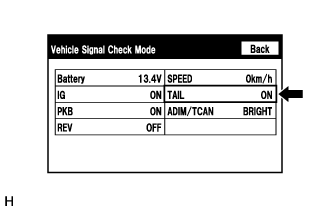
Enter the "Vehicle Signal Check Mode" screen.
Refer to Check Vehicle Signal in Operation Check (Click here).
NAVIGATION SYSTEM (for Navigation Receiver Type) > Illumination for Panel Switch does not Come on with Tail Switch ON |
| 1.CHECK VEHICLE SIGNAL (OPERATION CHECK) |
|
Enter the "Vehicle Signal Check Mode" screen.
Refer to Check Vehicle Signal in Operation Check (Click here).
Check that the display changes between ON and OFF according to the light control switch operation.
| Light Control Switch | Display |
| Tail or head | ON |
| Off | OFF |
| Result | Proceed to |
| NG | A |
| OK (for TMMK Made) | B |
| OK (for TMC Made) | C |
|
| ||||
|
| ||||
| A | ||
 | ||
| ||
