 |
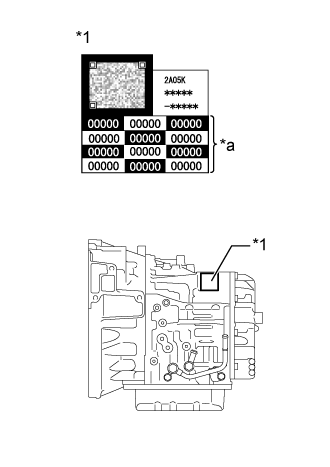
Record the transaxle compensation code specified on the QR code label.
| *1 | QR Code Label |
| *a | Transaxle Compensation Code |
- HINT:
- The transaxle compensation code is printed on the QR code label.
AUTOMATIC TRANSAXLE SYSTEM > REGISTRATION |
| 1. INPUT TRANSAXLE COMPENSATION CODE INTO ECM (Procedure 1) |
|
Record the transaxle compensation code specified on the QR code label.
| *1 | QR Code Label |
| *a | Transaxle Compensation Code |
Make sure the shift lever is in P or N.
Connect the GTS to the DLC3.
Turn the engine switch on (IG).
Turn the GTS on.
Enter the following menus: Powertrain / Transmission / Utility / A/T Code Registration.
Select "Set Compensation Code".
Register the transaxle compensation code.
Press "Input".
Manually input the transaxle compensation code. The code is a 60-digit alphanumeric value printed on the QR code label. After inputting the code, press "OK".
Check that the transaxle compensation code displayed on the screen is correct by comparing it with the 60-digit alphanumeric value on the QR code label.
Press "NEXT" to register the transaxle compensation code to the ECM.
Press "EXIT".
| 2. TRANSFER TRANSAXLE COMPENSATION CODE (Procedure 2) |
Make sure the shift lever is in P or N.
Connect the GTS to the DLC3.
Turn the engine switch on (IG).
Turn the GTS on.
Read the transaxle compensation code.
Enter the following menus: Powertrain / Transmission / Utility / A/T Code Registration.
Select "Read Compensation Code".
Press "Save".
Press "Save" or "Overwrite".
Press "EXIT".
Turn the engine switch off.
Replace the ECM.
Register the transaxle compensation code.
Turn the engine switch on (IG).
Turn the GTS on.
Enter the following menus: Powertrain / Transmission / Utility / A/T Code Registration.
Select "Set Compensation Code".
Press "Open".
Press "Open" again to proceed.
Press "Exit".