Before connecting the connector, check that the position of the white housing lock is correct as shown in the illustration.
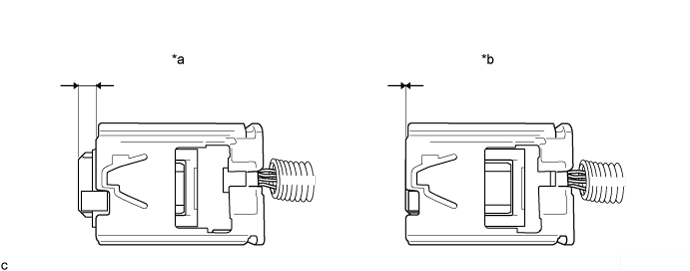
| *a | Correct | *b | Incorrect |
REAR AIRBAG SENSOR (for TMMK Made) > INSTALLATION |
| 1. INSTALL SIDE NO. 2 AIRBAG SENSOR ASSEMBLY |
Check that the engine switch is off.
Check that the cable is disconnected from the negative (-) battery terminal.
Before connecting the connector, check that the position of the white housing lock is correct as shown in the illustration.
| *a | Correct | *b | Incorrect |
Insert the pin (stopper) into the body hole and install the side No. 2 airbag sensor assembly to the vehicle body with the bolt.
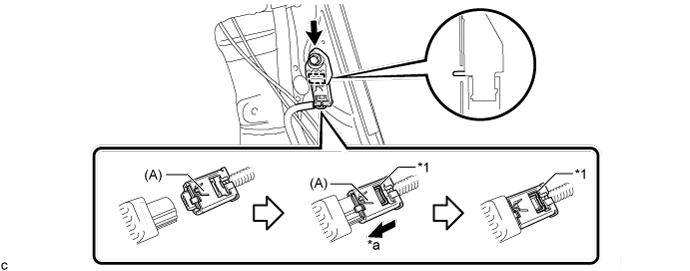
| *1 | White housing lock | - | - |
| *a | Slide | - | - |
Connect the connector to the side No. 2 airbag sensor assembly.
Be sure to engage the connectors until they are locked (when locking, make sure that a click sound can be heard).
Check that there is no looseness in the installation parts of the side No. 2 airbag sensor assembly.
| 2. INSTALL REAR SIDE SEATBACK ASSEMBLY |
Engage the hook.
Install the rear side seatback assembly LH with the 2 bolts.
Connect the connector.
Connect the rear seat outer belt assembly to the rear seat shoulder belt guide.
| 3. INSTALL REAR SEAT CUSHION LOCK HOOK |
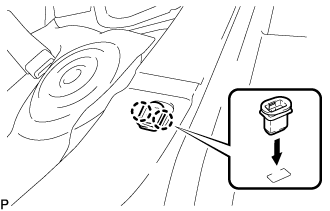 |
Engage the 2 claws to install a new rear seat cushion lock hook as shown in the illustration.
| 4. INSTALL REAR SEAT CUSHION ASSEMBLY |
Place the rear seat cushion assembly in the cabin.
Pass the 2 rear seat inner belt assemblies through the rear seat cushion assembly.
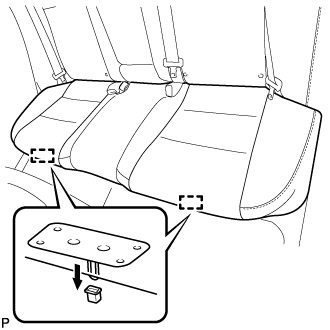 |
Engage the 2 rear seat cushion frame hooks on the front side of the rear seat cushion assembly to the 2 rear seat cushion lock hooks as shown in the illustration.
Confirm that the rear seat cushion assembly is securely installed.
| 5. CONNECT CABLE TO NEGATIVE BATTERY TERMINAL |
| 6. PERFORM DIAGNOSTIC SYSTEM CHECK |
| 7. INSPECT SRS WARNING LIGHT |