Zero point calibration and sensitivity check procedure
Check that both of the following conditions are met:
- The vehicle is parked on a level surface.
- No objects are placed on the front passenger seat.
- The vehicle is parked on a level surface.
Adjust the seat position according to the table below.
Adjustment Item Position Slide Direction Rearmost position Headrest Height Lowest position Recline Angle Upright position Turn the engine switch off.
Connect the GTS to the DLC3.
Turn the engine switch on (IG).
Turn the GTS on.
Enter the following menus: Body Electrical / Occupant Detection / Utility / Zero Point Calibration & Sensitivity Check.
Perform zero point calibration and sensitivity check by following the prompts on the GTS screen.
- NOTICE:
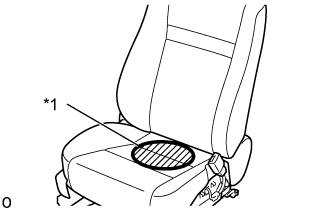
- Place the weight in the area shown in the illustration.
Text in Illustration *1 Weight Position - OK:
- "Zero Point Calibration is complete." and "Sensitivity Check is complete." are displayed.
- HINT:
- When performing sensitivity check, use a solid metal weight (the check result may not appear properly if a liquid weight is used).
- Refer to the GTS operator's manual for further details.
- If zero point calibration does not complete, replace the front seat frame with adjuster assembly RH.
- When performing sensitivity check, place the weight on the seat cushion so that it contacts the seatback.
- If sensitivity deviates from the specified range, retighten the bolts of the front passenger seat without deforming the seat rail. After performing this procedure, if sensitivity is not within the specified range, replace the front seat frame with adjuster assembly RH.