WIRELESS CHARGING SYSTEM > OPERATION CHECK |
| WIRELESS CHARGING SYSTEM OPERATION CHECK |
|
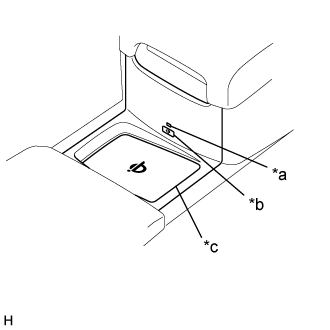
| *a | Indicator Light (Green/Amber) |
| *b | Mobile Wireless Charger Switch |
| *c | Charging Area |
Turn the engine switch on (IG or ACC).
Turn the wireless charging system on and check that the indicator light (green) illuminates.
Place a rechargeable device on the charging area and check that the indicator light (amber) illuminates, indicating charging is in progress.
Check that the indicator light (green) illuminates when charging is complete.
Turn the wireless charging system off and check that the indicator light turns off.