Enter test mode by using either of the following methods:
Method 1 (Recommended)
Connect the GTS to the DLC3.
Turn the ignition switch to ON.
Turn the GTS on.
Enter the following menus: Body Electrical / Telematics / Utility / Emergency Call Check
According to the display on the GTS, perform Emergency Call Check to enter test mode.
Method 2
- Turn the taillights on and off at an interval of 10 seconds or less as follows: for Light Control Switch with Off Position:
Operate the light control switch as follows: Off → Tail → Off → Tail → Off → Tail → Off → Tail → Off → Tail →Off → Tail → Off → Tail → Off → Tail → Off → Tail → Off → Tail. - for Light Control Switch without Off Position:
Expose the automatic light control sensor to a light and then operate the light control switch as follows: AUTO → Tail → AUTO → Tail → AUTO → Tail → AUTO → Tail → AUTO → Tail →AUTO → Tail → AUTO → Tail → AUTO → Tail → AUTO → Tail → AUTO → Tail. - for Light Control Switch without Off Position (if the above procedure cannot be completed successfully):
Turn the light control switch to the AUTO position, expose the automatic light control sensor to a light and then cover and uncover the light control sensor to turn the taillights on and off as follows: Off → On → Off → On → Off → On → Off → On → Off → On →Off → On → Off → On → Off → On → Off → On → Off → On.
- Turn the taillights on and off at an interval of 10 seconds or less as follows: for Light Control Switch with Off Position:
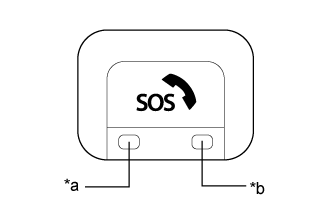
Check that the manual (SOS) switch indicators begin blinks 5 times over 10 seconds and then turn off. Push the manual (SOS) switch for less than 3 seconds within 15 seconds after the indicators begin to blink to enter test mode.
Text in illustration *a Manual (SOS) Switch Green Indicator *b Manual (SOS) Switch Red Indicator
 |