TELEMATICS MAYDAY BATTERY REMOVAL
CAUTION / NOTICE / HINT
The necessary procedures (adjustment, calibration, initialization, or registration) that must be performed after parts are removed and installed, or replaced during mobilephone battery removal/installation are shown below.
| Replaced Part or Performed Procedure | Necessary Procedure | Effect/Inoperative Function when Necessary Procedure not Performed | Link |
|---|---|---|---|
| Mobilephone battery | Reset mobilephone battery condition | Emergency call service | ( )for ERA-GLONASS ( )for Toyota Connected Services
|
- CAUTION:
- ·
Risk of explosion if the battery is replaced by an incorrect type. Replace battery with the same type.
·Risk of explosion or the leakage of flammable liquid or gas.
-Do not use in /store in /bring into environment of extremely high temperature or extremely low pressure due to the very high altitude.
-Do not attempt to burn, crush, or cut used battery.
PROCEDURE

 1. PRECAUTION
2.REMOVE TELEMATICS TRANSCEIVER WITH BRACKET
86725
3.REMOVE MOBILEPHONE BATTERY
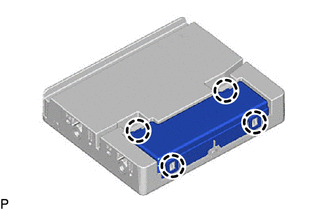
Disengage the 4 claws to remove the transceiver cover.
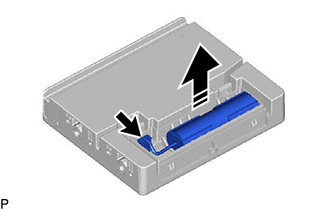

|
Remove in this Direction |
Disconnect the connector.
Remove the mobilephone battery as shown in the illustration.