RM33A0E
_59
Vehicle Exterior
_065395
LIGHTING (EXT)
_0327012
HAZARD WARNING SWITCH
A
LIGHTING (EXT) HAZARD WARNING SWITCH REMOVAL
PROCEDURE

 55900
1.REMOVE AIR CONDITIONING CONTROL ASSEMBLY
55405B
2.REMOVE CENTER INSTRUMENT CLUSTER FINISH PANEL SUB-ASSEMBLY (w/o Radio Receiver)
55405B
3.REMOVE CENTER INSTRUMENT CLUSTER FINISH PANEL SUB-ASSEMBLY (for 7 Inch Display)
55405B
4.REMOVE CENTER INSTRUMENT CLUSTER FINISH PANEL SUB-ASSEMBLY (for 9 Inch Display)
5.REMOVE CENTER INSTRUMENT CLUSTER FINISH PANEL ASSEMBLY
84330
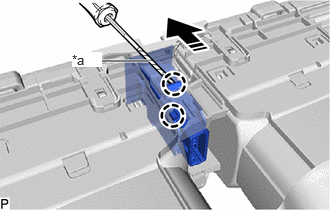
6.REMOVE HAZARD WARNING SIGNAL SWITCH ASSEMBLY
a.
0.938,0.635 1.552,0.635
true
0.75,0.542 1.063,0.698
0.313,0.156
10
true
*a
| *a | Protective Tape |

|
Remove in this Direction |
Using a screwdriver with its tip wrapped with protective tape, disengage the 2 claws and remove the hazard warning signal switch assembly as shown in the illustration.