METER / GAUGE / DISPLAY METER / GAUGE SYSTEM DETAILS COMBINATION METER
FUNCTION
Buzzer
The table below shows the warning and reminder functions of the buzzer in the combination meter assembly.
|
*1: Models with Toyota Safety Sense *2: Models for the Near and Middle East *3: Models with road sign assist system |
|
| Priority | Item |
| 1 | READY |
| 2 | Reverse Warning |
| 3 | Pre-collision System Warning*1 |
| 5 | Driver Seat Belt Warning (Maximum 5 Times) |
| 6 | P Position Select Advice |
| 7 | Power Switch Operation while Driving Warning |
| 8 | Driver Seat Belt Warning (Once) |
| 9 | Front Passenger Seat Belt Warning (Once) |
| 10 | Rear Seat Belt Warning (Once) |
| 11 | Seat Belt Warning(Level 2) |
| 12 | Seat Belt Warning(Level 1) |
| 13 | Seat Belt Warning (Level 1) |
| 14 | Vehicle Proximity Warning*1 |
| 15 | Pedestrian Warning/Vehicle Distance Time Alert*1 |
| 16 | Lane Tracing Assist System Cancel Warning*1 |
| 17 | Unexpected Vehicle Motion Warning (Level 1) |
| 18 | Unexpected Vehicle Motion Warning (Level 2) |
| 19 | Brake Force Reduction Warning |
| 20 | Brake Fluid Low Warning |
| 21 | Engine Oil Pressure Warning |
| 22 | EPS Warning |
| 23 | Lane Tracing Assist System Warning*1 |
| 24 | Engine Coolant Temperature Warning |
| 25 | Door Open when Shift Lever not in P Warning |
| 26 | Smart Entry and Start System Warning (Intermittent 1) |
| 27 | Brake System Temperature Warning / Active Test |
| 28 | Brake System Temperature Warning |
| 29 | Brake Pedal Operation Request*1 |
| 30 | Smart Entry and Start System Warning (Intermittent 2) (Maximum 9 Times) |
| 31 | Smart Entry and Start System Warning (Once) |
| 32 | Multi-information Display Warning |
| 33 | Accelerator Depression in N Position |
| 34 | Accelerator Hold Warning |
| 35 | Hybrid System Warning (Intermittent) |
| 36 | Hybrid System Warning (Continuous) |
| 37 | Hybrid System Warning (Once) |
| 38 | Towing Prohibition Notification |
| 39 | Auxiliary Battery Charging Malfunction Warning |
| 40 | Hybrid Battery Low Warning (Continuous) |
| 41 | Hybrid Battery Low Warning (Intermittent) |
| 42 | Hybrid Unit Overheat Warning |
| 43 | Electric Parking Brake System Cancel Warning |
| 44 | Brake Hold System Control Not Release Warning |
| 45 | Dynamic Radar Cruise Control Cancelation due to Low Speed Warning*1 |
| 46 | Low Speed Zone Leading Vehicle Lost Warning*1 |
| 47 | Hands off Steering Wheel Warning*1 |
| 48 | Dynamic Radar Cruise Control Warning* |
| 50 | Immobiliser Certification Reminder |
| 51 | HV Battery Diagnosis Request Notification |
| 52 | Speed Limit Exceed Warning*2 |
| 53 | Parking Brake Engaged Warning |
| 54 | Door Open while Driving Warning |
| 55 | Vehicle Sway Warning*1 |
| 56 | Road Sign Assist Indication*3 |
| 57 | Sport Shift Reject Warning |
| 58 | ACC Over Speed Warning* |
| 59 | EV Drive Mode Reject Warning |
| 60 | Light Reminder |
| 61 | PBA Notification*1 |
| 62 | ALM Notification*1 |
| 63 | Brake Inspections Standby Mode Notification*1 |
| 64 | Radar Axis Adjustment Complete Notification*1 |
| 65 | Camera Axis Adjustment Complete Notification*1 |
| 66 | FPB/PB Notification / Brake Inspection Normal Return Notification / Radar Axis Adjustment Incomplete Notification / Camera Adjustment Start Notification*1 |
| 67 | Turn Signal/Hazard Warning Operation |
Multi-information Display
Display Function Flow
The multi-information display can be switched as shown in the flow chart below:
- HINT:
-
The following illustration shows the flow of the opening and ending ceremony from when the power switch is off and then the engine is started, to when the power switch is turned off again.
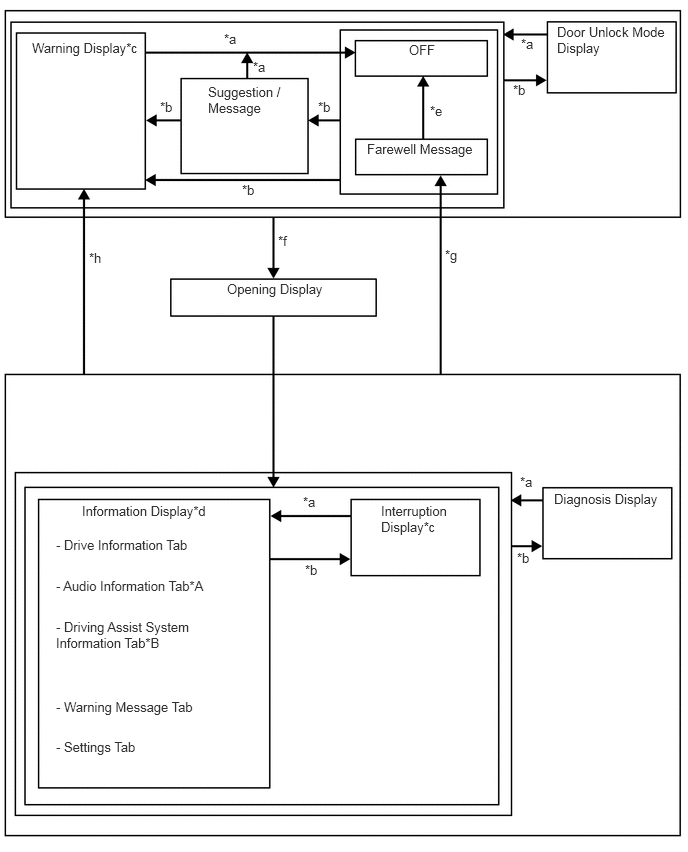
| *A | Models with audio system |
| *B | Models with Toyota Safety Sense |
| *a | Conditions are not met |
| *b | Conditions are met |
| *c | If there are multiple display requests, items will be displayed in sequence. |
| *d | Item or display is selected by operating the steering pad switch assembly. |
| *e | ODO display is displayed for a certain period of time after the power switch is turned off. |
| *f | Power switch off to on (ACC) |
| *g | Power switch on (IG) to off (Conditions are not met) |
| *h | Power switch on (IG) to off (Conditions are met) |
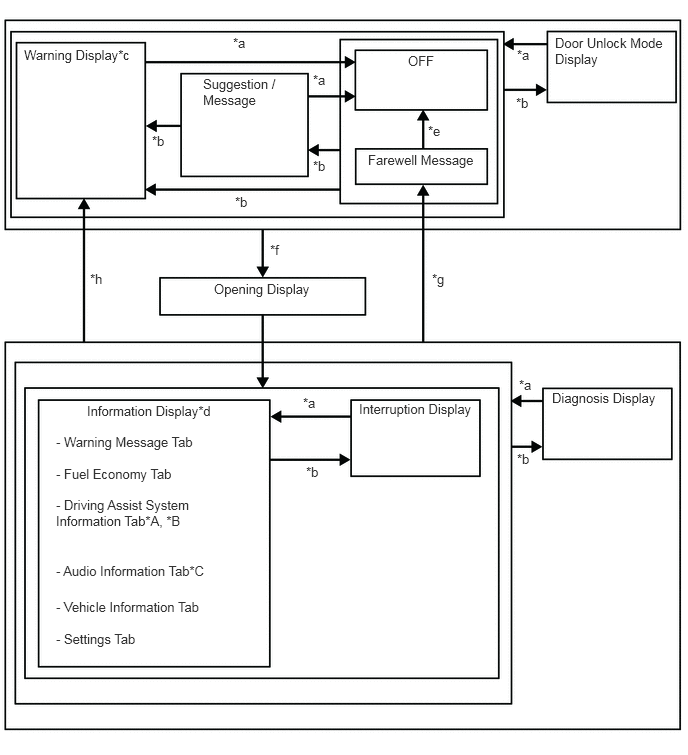
| *A | Models with Toyota Safety Sense |
| *B | Models with navigation system |
| *C | Models with audio system |
| *a | Conditions are not met |
| *b | Conditions are met |
| *c | If there are multiple display requests, items will be displayed in sequence. |
| *d | Item or display is selected by operating the steering pad switch assembly. |
| *e | ODO display is displayed for a certain period of time after the power switch is turned off. |
| *f | Power switch off to on (ACC) |
| *g | Power switch on (ACC) to off (Conditions are not met) |
| *h | Power switch on (ACC) to off (Conditions are met) |
Display Tab Operation (Models with 4.2 Inch Multi-information Display)
The information currently displayed can be switched using the RIGHT/LEFT switch of the steering pad switch assembly.
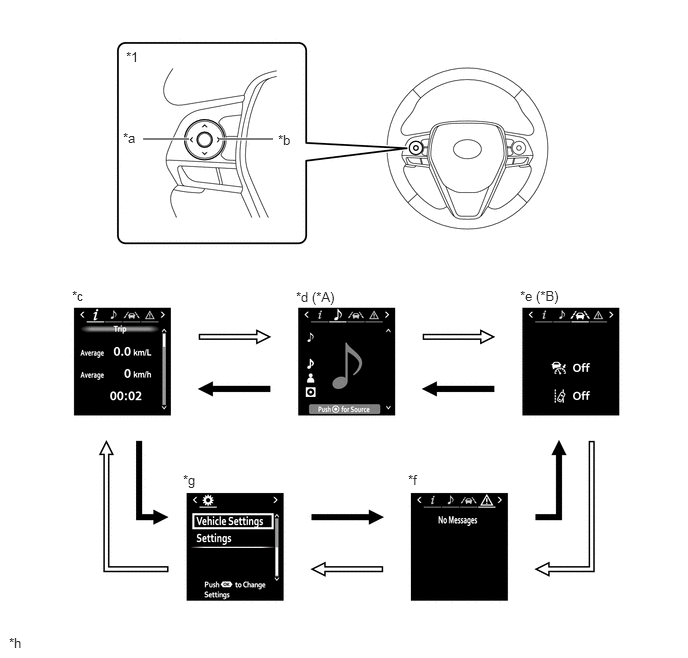
| *A | Models with Audio System | *B | Models with Toyota Safety Sense |
| *1 | Steering Pad Switch Assembly | - | - |
| *a | LEFT Switch | *b | RIGHT Switch |
| *c | Drive Information Tab | *d | Audio Information Tab |
| *e | Driving Assist System Information Tab | *f | Warning Message Tab |
| *g | Settings Tab | *h | The illustrations shown are examples only. |

|
RIGHT switch operation | 
|
LEFT switch operation |
Display Tab Operation (Models with 7 Inch Multi-information Display)
The information currently displayed can be switched using the UP/DOWN switch of the steering pad switch assembly.
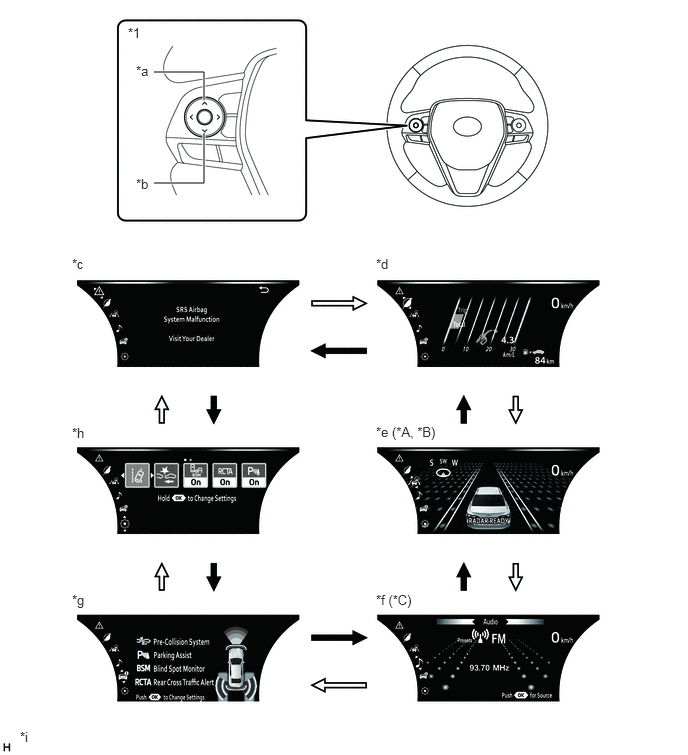
| *A | Models with Toyota Safety Sense | *B | Models with Navigation System |
| *C | Models with Audio System | - | - |
| *1 | Steering Pad Switch Assembly | - | - |
| *a | UP Switch | *b | DOWN Switch |
| *c | Warning Message Tab | *d | Fuel Economy Tab |
| *e | Driving Assist System Information Tab | *f | Audio Information Tab |
| *g | Vehicle Information Tab | *h | Settings Tab |
| *i | The illustrations shown are examples only. | - | - |
|
|
DOWN switch operation |
|
UP switch operation |
Drive Information Mode Function (Models with 4.2 Inch Multi-information Display)
The drive information tab shows vehicle information such as drivable range and fuel consumption.
The drive information display can be switched using the UP/DOWN switch of the steering pad switch assembly.
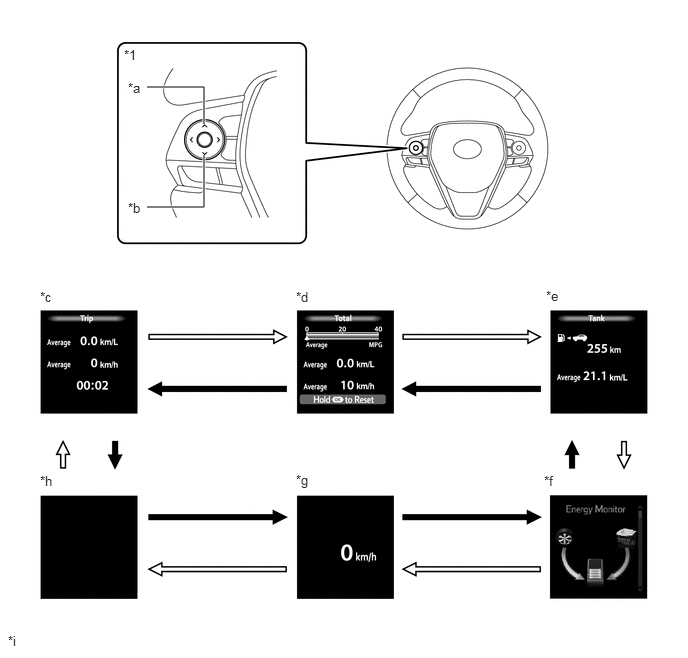
| *1 | Steering Pad Switch Assembly | - | - |
| *a | UP Switch | *b | DOWN Switch |
| *c | Trip (After Start) | *d | Total (After Reset) |
| *e | Tank (After Refuel) | *f | Energy Monitor |
| *g | Vehicle Speed | *h | Blank |
| *i | The illustrations shown are examples only. | - | - |
|
|
DOWN switch operation |
|
UP switch operation |
Setting Function (Models with 4.2 Inch Multi-information Display)
The items displayed on the multi-information display can be customized.
The following items can be selected on the information setting screen.
| Item | Available Setting |
|---|---|
| Rr sunshade | Rr sunshade Open/Close: -
Open -
Close |
| Item | Available Setting |
|---|---|
| Lane Center | Function can be set to on/off: -
On -
Off |
| Sensitivity | Alert sensitivity can be changed: -
High -
Std. |
| Sway Warning | Function can be set to on/off: -
On -
Off |
| Sway Sensitivity | Sensitivity of function can be changed: -
High -
Std. -
Low |
| Item | Available Setting |
|---|---|
| Toyota Parking Assist-sensor | Function can be set to on/off: -
On -
Off |
| Item | Available Setting |
|---|---|
| PKSB | Function can be set to on/off: -
On -
Off |
| Item | Available Setting |
|---|---|
| PCS | The pre-collision system can be set to on/off: -
On -
Off |
| Sensitivity | A pre-collision system warning timing can be selected: -
Far (Icon is displayed) -
Middle (Icon is displayed) -
Near (Icon is displayed) |
| Item | Available Setting | |
|---|---|---|
| DRCC | Curve speed restrain | Speed restrain amount switching: -
Strong (Icon is displayed) -
Weak (Icon is displayed) -
Off |
| Item | Available Setting |
|---|---|
| BSM | Function can be set to on/off: -
On -
Off |
| Item | Available Setting |
|---|---|
| RCTA | The RCTA can be set to on/off: -
On -
Off |
| Item | Available Setting |
|---|---|
| RCD | Function can be set to on/off: -
On -
Off |
| Item | Available Setting |
|---|---|
| HUD | Function can be set to on/off: -
On -
Off |
| HUD Brightness / Position |
| Item | Available Setting | ||
|---|---|---|---|
| RSA | System can be set to on/off: -
On -
Off |
||
| Notification Method | Excess Speed | Notification method can be selected: -
Notification -
Only visual -
visual and audible |
|
| Overtaking | Notification method can be selected: -
Notification -
Only visual -
visual and audible |
||
| Other Signs | Notification method can be selected: -
No Notification -
Only visual -
visual and audible |
||
| Notification Level | 'Notification level can be selected: -
10 km/h -
5 km/h -
2 km/h |
||
| Item | Available Setting | |
|---|---|---|
|
*: Models with Blind Spot Monitor System |
||
| BSM* | Brightness | The blind spot monitor system indicator brightness adjustment: -
Bright -
Dim |
| Sensitivity | The pre-collision warning timing can be selected: -
Early (Icon is displayed) -
Std. (Icon is displayed) -
Late (Icon is displayed) -
Only Blind Spots (Icon is displayed) |
|
| RCTA* | Volume | Alert Volume Adjustment: -
1 -
2 -
3 |
| Toyota Parking Assist-sensor | Volume | Alert Volume Adjustment: -
1 -
2 -
3 |
| HUD Driving Support | Tachometer Settings | Function can be set to on/off: -
On -
Off |
| Navigation | Function can be set to on/off: -
On -
Off |
|
| Lane | Function can be set to on/off: -
On -
Off |
|
| Driving Assist | Function can be set to on/off: -
On -
Off |
|
| Compass | Function can be set to on/off: -
On -
Off |
|
| Audio | Function can be set to on/off: -
On -
Off |
|
| HUD Rotation | ·
The tilt of the HUD image can be changed. ·
When changing the tilt of the HUD image counterclockwise, press the left switch of the steering pad switch assembly. ·
When changing the tilt of the HUD image clockwise, press the right switch of the steering pad switch assembly. |
|
| TPMS | ·
Set Pressure ·
ID Select |
|
| Rear Seat Reminder | Function can be set to on/off: -
On -
Off |
|
| Item | Available Setting | |
|---|---|---|
|
*: Available display units differ by destination |
||
| Language | The language used on the multi-information display can be selected:
|
|
| Unit* | The unit displayed on the multi-information display can be selected: -
km (L/100 km) -
km (km/L) -
miles (MPG imperial) |
|
| EV (Icon is displayed) | The EV driving indicator light can be switched: -
On -
Off |
|
| Drive Info | 2 items can be selected among the following: -
Current Fuel Consumption (Bar Display)/Average Fuel Consumption (Mark Display) -
Total Average Fuel Consumption Between Reset Operations -
Average Fuel Consumption After Engine Start-up -
Average Fuel Consumption After Refueling -
Total Average Vehicle Speed Between Reset Operations -
Average Vehicle Speed After Engine Start-up -
Total Elapsed Time Between Reset Operations -
Elapsed Time After Engine Start-up -
Cruising Range -
Cruising Range After Engine Start-up -
Blank |
|
| Clock | Adjust Time | Select to adjust the hour/minute.
|
| Pop-Up Display | The following displays that appear as soon as the set conditions are met can be switched to ON or OFF: -
TbT Navigatio -
Telephone -
Brightness |
|
| Default Settings | Are You Sure You Want to Restore to Factory Settings? | The set items can be initialized. |
Setting Function (Models with 7 Inch Multi-information Display)
The items displayed on the multi-information display can be customized.
The following items can be selected on the information setting screen.
| Item | Available Setting |
|---|---|
| Lane Center | Function can be set to on/off: -
On -
Off |
| Sensitivity | Alert sensitivity can be changed: -
High -
Std. |
| Sway Warning | Function can be set to on/off: -
On -
Off |
| Sway Sensitivity | Sensitivity of function can be changed: -
High -
Std. -
Low |
| Item | Available Setting |
|---|---|
| PCS | The pre-collision system can be set to on/off: -
On -
Off |
| Sensitivity | A pre-collision system warning timing can be selected: -
Far (Icon is displayed) -
Middle (Icon is displayed) -
Near (Icon is displayed) |
| Item | Available Setting | |
|---|---|---|
| DRCC | Curve speed restrain | Speed restrain amount switching: -
Strong (Icon is displayed) -
Weak (Icon is displayed) -
Off |
| Item | Available Setting | |
|---|---|---|
| BSM | Function can be set to on/off: -
On -
Off |
|
| Brightness | The blind spot monitor system indicator brightness adjustment: -
Bright -
Dim |
|
| Sensitivity | The pre-collision warning timing can be selected: -
Early (Icon is displayed) -
Std. (Icon is displayed) -
Late (Icon is displayed) -
Only Blind Spots (Icon is displayed) |
|
| Item | Available Setting | |
|---|---|---|
| RCTA | The RCTA can be set to on/off: -
On -
Off |
|
| Volume | Alert Volume Adjustment: -
1 -
2 -
3 |
|
| Item | Available Setting |
|---|---|
| RCD | Function can be set to on/off: -
On -
Off |
| Item | Available Setting |
|---|---|
| PKSB | Function can be set to on/off: -
On -
Off |
| Item | Available Setting | |
|---|---|---|
| Toyota Parking Assist-sensor | Function can be set to on/off: -
On -
Off |
|
| Volume | Alert Volume Adjustment: -
1 -
2 -
3 |
|
| Item | Available Setting | ||
|---|---|---|---|
| HUD | Function can be set to on/off: -
On -
Off |
||
| HUD Brightness / Position | |||
| HUD Driving Support | Tachometer Settings | Function can be set to on/off: -
On -
Off |
|
| Navigation | Function can be set to on/off: -
On -
Off |
||
| Lane | Function can be set to on/off: -
On -
Off |
||
| Driving Assist | Function can be set to on/off: -
On -
Off |
||
| Compass | Function can be set to on/off: -
On -
Off |
||
| Audio | Function can be set to on/off: -
On -
Off |
||
| HUD Rotation | ·
The tilt of the HUD image can be changed. ·
When changing the tilt of the HUD image counterclockwise, press the left switch of the steering pad switch assembly. ·
When changing the tilt of the HUD image clockwise, press the right switch of the steering pad switch assembly. |
||
| Item | Available Setting |
|---|---|
| Rr sunshade | Rr sunshade Open/Close: -
Open -
Close |
| Item | Available Setting | ||
|---|---|---|---|
| RSA | System can be set to on/off: -
On -
Off |
||
| Notification Method | Excess Speed | Notification method can be selected: -
Notification -
Only visual -
visual and audible |
|
| Overtaking | Notification method can be selected: -
Notification -
Only visual -
visual and audible |
||
| Other Signs | Notification method can be selected: -
No Notification -
Only visual -
visual and audible |
||
| Notification Level | 'Notification level can be selected: -
10 km/h -
5 km/h -
2 km/h |
||
| Item | Available Setting |
|---|---|
| TPMS | ·
Set Pressure ·
ID Select |
| Rear Seat Reminder | Function can be set to on/off: -
On -
Off |
| Item | Available Setting | |
|---|---|---|
|
*: Available display units differ by destination |
||
| Language | The language used on the multi-information display can be selected:
|
|
| Unit* | The unit displayed on the multi-information display can be selected: -
km (L/100 km) -
km (km/L) -
miles (MPG imperial) |
|
| EV (Icon is displayed) | The EV driving indicator light can be switched: -
On -
Off |
|
| Digital Speed | The Digital Speed on the multi-information display can be selected: -
On -
Off |
|
| Gadget Content | The gadget content displayed on the multi-information display can be selected: -
No Display -
Average Speed -
Distance Travelled -
Elapsed Time |
|
| Drive Info Calculation Type Selection | The gadget content displayed on the multi-information display can be selected: -
After Start -
After Reset -
After Refuel |
|
| Multi-information Display OFF | Multi-information display is turned off. | |
| Clock | Adjust Time | Select to adjust the hour/minute.
|
| Pop-Up Display | The following displays that appear as soon as the set conditions are met can be switched to ON or OFF: -
TbT Navigatio -
Telephone -
Brightness |
|
| Default Settings | Are You Sure You Want to Restore to Factory Settings? | The set items can be initialized. |
Warning Mode Function
When a warning is necessary, the warning display interrupts the current display on the multi-information display.
The master warning light may illuminate or blink and the buzzer in the combination meter assembly may sound depending on the item displayed on the multi-information display.
| Priority | Display | Master Warning Light | Buzzer |
|---|---|---|---|
|
*1: Models with Toyota Safety Sense *2: Models with intelligent clearance sonar system *3: This message is displayed together with one of the listed messages. *4: If the vehicle has reached a speed of 5 km/h (3 mph) *5: Models with blind spot monitor system *6: Models with sliding roof system *7: Models with tire inflation pressure display function *8: Models with rear camera function *9: Models for the Near and Middle East *10: Models with parking support brake system *11: Models with rear cross traffic alert function |
|||
| 1 | CDY-2 | - | - |
| CDY-2E | - | - | |
| RES-1 | - | - | |
| RES-2 | - | - | |
| RESOLVER-1 NOT ADJUSTED | - | - | |
| RESOLVER-2 NOT ADJUSTED | - | - | |
| 2 | BRAKE!*1 | - | Sounds |
| 3 | Switch to Brake*2 | Blinks | Sounds |
| Brake*2 | Blinks | Sounds | |
| Brake!*2 | Blinks | Sounds | |
| 4 | Power Steering Malfunction Steering Power Low Visit Your Dealer | Blinks/Illuminates | Sounds |
| 5 | Push and Hold power switch for Emergency Stop | Blinks | Sounds |
| Low Braking Power Stop in a Safe Place See Owner's Manual | Blinks | Sounds | |
| Object Detected Acceleration Reduced*2 | Blinks | Sounds | |
| Release Accelerator | Blinks | Sounds | |
| Secondary Collision Brake system Malfunction Visit Your Dealer | Illuminates | Sounds | |
| Accelerator and Brake Pedals Pressed Simultaneously | Blinks | - | |
| Steering Power Low Visit Your Dealer | Illuminates | Sounds | |
| Hybrid System Stopped Stop in a Safe Place | Blinks | - | |
| Shift to P Before Exiting Vehicle | Blinks | Sounds | |
| Hybrid System Malfunction Do Not Tow This Vehicle | Illuminates | Sounds | |
| Shift Is in N Release Accelerator Before Shifting | Blinks | Sounds | |
| Press Brake When Vehicle Is Stopped Hybrid System May Overheat | Blinks | Sounds | |
| Traction Battery Needs to be Protected Shift into P to Restart | Blinks | Sounds | |
| Hybrid System Malfunction*3
·
Visit Your Dealer ·
Output Power Greatly Reduced Visit Your Dealer ·
Output Power Reduced Visit Your Dealer ·
Stop in a Safe Place See Owner's Manual ·
Stop in a Safe Place within 0.3 miles ·
Stop in a Safe Place within 0.6 miles ·
Stop in a Safe Place within 0.9 miles ·
Stop in a Safe Place within 1.2 miles ·
Stop in a Safe Place within 3.1 miles ·
Stop in a Safe Place within 6.2 miles ·
Output Power Reduced Avoid Shifting to N ·
Avoid Shifting to N Visit Your Dealer ·
Hybrid System Stopped Stop in a Safe Place ·
Shift to P See Owner's Manual |
Illuminates | Sounds | |
| Check Engine*3
·
Visit Your Dealer ·
Output Power Greatly Reduced Visit Your Dealer ·
Output Power Reduced Visit Your Dealer ·
Stop in a Safe Place See Owner's Manual ·
Stop in a Safe Place within 0.3 miles ·
Stop in a Safe Place within 0.6 miles ·
Stop in a Safe Place within 0.9 miles ·
Stop in a Safe Place within 1.2 miles ·
Stop in a Safe Place within 3.1 miles ·
Stop in a Safe Place within 6.2 miles ·
Output Power Reduced Avoid Shifting to N ·
Avoid Shifting to N Visit Your Dealer ·
Hybrid System Stopped Stop in a Safe Place ·
Shift to P See Owner's Manual |
Illuminates | Sounds | |
| 5 | Hybrid Battery System Malfunction*3
·
Visit Your Dealer ·
Output Power Greatly Reduced Visit Your Dealer ·
Output Power Reduced Visit Your Dealer ·
Stop in a Safe Place See Owner's Manual ·
Stop in a Safe Place within 0.3 miles ·
Stop in a Safe Place within 0.6 miles ·
Stop in a Safe Place within 0.9 miles ·
Stop in a Safe Place within 1.2 miles ·
Stop in a Safe Place within 3.1 miles ·
Stop in a Safe Place within 6.2 miles ·
Output Power Reduced Avoid Shifting to N ·
Avoid Shifting to N Visit Your Dealer ·
Hybrid System Stopped Stop in a Safe Place ·
Shift to P See Owner's Manual |
Illuminates | Sounds |
| Accelerator System Malfunction*3
·
Visit Your Dealer ·
Output Power Greatly Reduced Visit Your Dealer ·
Output Power Reduced Visit Your Dealer ·
Stop in a Safe Place See Owner's Manual ·
Stop in a Safe Place within 0.3 miles ·
Stop in a Safe Place within 0.6 miles ·
Stop in a Safe Place within 0.9 miles ·
Stop in a Safe Place within 1.2 miles ·
Stop in a Safe Place within 3.1 miles ·
Stop in a Safe Place within 6.2 miles ·
Output Power Reduced Avoid Shifting to N ·
Avoid Shifting to N Visit Your Dealer ·
Hybrid System Stopped Stop in a Safe Place ·
Shift to P See Owner's Manual |
Illuminates | Sounds | |
| 5 | Hybrid system stopped*3
·
Visit Your Dealer ·
Output Power Greatly Reduced Visit Your Dealer ·
Output Power Reduced Visit Your Dealer ·
Stop in a Safe Place See Owner's Manual ·
Stop in a Safe Place within 0.3 miles ·
Stop in a Safe Place within 0.6 miles ·
Stop in a Safe Place within 0.9 miles ·
Stop in a Safe Place within 1.2 miles ·
Stop in a Safe Place within 3.1 miles ·
Stop in a Safe Place within 6.2 miles ·
Output Power Reduced Avoid Shifting to N ·
Avoid Shifting to N Visit Your Dealer ·
Hybrid System Stopped Stop in a Safe Place ·
Shift to P See Owner's Manual |
Illuminates | Sounds |
| Engine stopped*3
·
Visit Your Dealer ·
Output Power Greatly Reduced Visit Your Dealer ·
Output Power Reduced Visit Your Dealer ·
Stop in a Safe Place See Owner's Manual ·
Stop in a Safe Place within 0.3 miles ·
Stop in a Safe Place within 0.6 miles ·
Stop in a Safe Place within 0.9 miles ·
Stop in a Safe Place within 1.2 miles ·
Stop in a Safe Place within 3.1 miles ·
Stop in a Safe Place within 6.2 miles ·
Output Power Reduced Avoid Shifting to N ·
Avoid Shifting to N Visit Your Dealer ·
Hybrid System Stopped Stop in a Safe Place ·
Shift to P See Owner's Manual |
Illuminates | Sounds | |
| Engine Coolant Temp High Stop in a Safe Place See Owner's Manual | Illuminates | Sounds | |
| Charging System Malfunction Stop in a Safe Place See Owner's Manual | Illuminates | - | |
| Oil Pressure Low Stop in a Safe Place See Owner's Manual | Illuminates | Sounds | |
| Hybrid System Stopped Shift into P | Blinks | Sounds | |
| Parking Brake Unavailable Vehicle May Roll Park on Flat Road | Blinks | Sounds | |
| 6 | Braking Power Low Visit Your Dealer | - | Sounds |
| Steering Power Low Visit Your Dealer | Blinks | Sounds | |
| Power Steering Malfunction Visit Your Dealer | Illuminates | Sounds | |
| Door open (while driving)*4 | Blinks | Sounds | |
| Door open (while stopping) | - | - | |
| Traction Battery Needs to be Protected Refrain From the Use of N Position | Blinks | Sounds | |
| Speed Limit Exceeded*9 | - | - | |
| Would You Like to Take a Break?*1 | - | Sounds | |
| Hybrid system overheated Output power reduced | Illuminates | Sounds | |
| Low Auxiliary Battery See Owner's Manual | - | - | |
| Accelerator pedal is pressed | - | - | |
| Radar Cruise Control Unavailable Press Brake to Resume Driving*1 | - | - | |
| Cruise Control Malfunction Visit Your Dealer | Illuminates | Sounds | |
| 7 | Parking Brake Unavailable | Illuminates | Sounds |
| Release Parking Brake | Blinks | Sounds | |
| Antilock Brake System Malfunction Visit Your Dealer | - | Sounds | |
| PKSB Malfunction Visit Your Dealer*10 | Blinks | Sounds | |
| PKSB Malfunction Visit Your Dealer*10 | Blinks | - | |
| Parking Support Brake Unavailable Remove the Dirt of Rear Camera*10 | Blinks | - | |
| Hybrid System Stopped Steering Power Low | Illuminates | Sounds | |
| LTA Hold Steering Wheel*1 | Illuminates / - | Sounds / - | |
| LTA Steering Assist Unavailable Hold Steering Wheel*1 | Illuminates | - | |
| SRS Airbag System Malfunction Visit Your Dealer | Illuminates | Sounds | |
| LTA Malfunction Visit Your Dealer*1 | Illuminates | Sounds | |
| Front Camera Out of Temperature Range Unavailable Wait until Normal Temperature*1 | - | - | |
| Front Camera Unavailable See Owner's Manual*1 | - | - | |
| Transmission Oil Temp. High Stop in a safe place and See owner's manual | Blinks | Sounds | |
| Headlight System Malfunction Visit Your Dealer | Illuminates | Sounds | |
| Headlight Auto Leveling System Unavailable Visit Your Dealer | - | - | |
| Parking Brake Unavailable | Blinks | Sounds | |
| Radar Cruise Control Unavailable*1 | Illuminates | Sounds | |
| Cruise Control Fault Press Brake to Deactivate Visit Your Dealer*1 | Illuminates | Sounds | |
| Front Camera Low Visibility Unavailable See Owner's Manual*1 | - | - | |
| LTA Unavailable at Current Speed*1 | - | - | |
| Check fuel cap | Illuminates | Sounds | |
| 8 | Power Stopped Shifted From P | - | Sounds |
| Power Stopped No Fuel | - | Sounds | |
| Vehicle May Roll Shift to P | Blinks | Sounds | |
| EPB Automatically Applied | Blinks | Sounds | |
| Parking Brake Temporarily Unavailable | Blinks | Sounds | |
| Brakehold Malfunction Press Brake to Deactivate Visit Your Dealer | Illuminates | Sounds | |
| Brakehold Warning Press Brake on Slope | Blinks | Sounds | |
| Pre-Collision System Malfunction Visit Your Dealer*1 | Illuminates | Sounds | |
| Parking Brake Malfunction Visit Your Dealer | Illuminates | Sounds | |
| Brakehold Malfunction Visit Your Dealer | Illuminates | Sounds | |
| Brakehold Less Effective During Icy Conditions | Illuminates | - | |
| VSC Turned Off Pre-Collision Brake System Unavailable | - | - | |
| Pre-Collision System Radar In Self Calibration Unavailable See Owner's Manual*1 | - | - | |
| Pre-Collision System Unavailable See Owner's Manual*1 | - | - | |
| Pre-Collision System Out of Temperature Range Unavailable See Owner's Manual*1 | - | - | |
| Pre-Collision System Radar Sensor Blocked Unavailable Clean Radar Sensor*1 | - | - | |
| Smart Key System Malfunction See Owner's Manual | Illuminates | Sounds | |
| Check Engine Visit Your Dealer | Illuminates | Sounds | |
| Check Engine Reduced Engine Power Visit Your Dealer | Illuminates | Sounds | |
| Reduced Engine Power Visit Your Dealer | Illuminates | Sounds | |
| Radar Cruise Control Unavailable See Owner`s Manual*1 | Illuminates | Sounds | |
| Fuel Low | - | - | |
| Traction Control Turned Off | - | - | |
| EV Mode Unavailable System Warming Up | - | Sounds | |
| EV Mode Deactivated | - | Sounds | |
| EV Mode Deactivated Hybrid Battery Low | - | Sounds | |
| EV Mode Deactivated Speed Range Exceeded | - | Sounds | |
| EV Mode Deactivated Accelerator Pressed Too Far | - | Sounds | |
| RSA Malfunction Visit Your Dealer*11 | Illuminates | Sounds | |
| Maintenance Required for Traction Battery Cooling Parts See Owner's Manual | - | Sounds | |
| Curve Speed Reduction Unavailable*1 | - | - | |
| Rear Camera Detection Unavailable*8 | Blinks | - | |
| Rear Camera Detection Unavailable Remove the Dirt of Rear Camera*8 | Blinks | - | |
| Rear Camera Detection Malfunction Visit Your Dealer*8 | Blinks | Sounds | |
| 9 | EPB Shift Interlock Function Activated | - | Sounds |
| EPB Shift Interlock Function Deactivated | - | Sounds | |
| Shift to N and Push POWER Switch to Restart | Blinks | Sounds | |
| Clearance sonar detection (image display)*2 | - | - | |
| Clearance sonar mute switch (image display)*2 | - | - | |
| Parking Assist Malfunction Visit Your Dealer*2 | Illuminates | Sounds | |
| Parking Assist Unavailable Clean Parking Assist Sensor*2 | Illuminates | Sounds | |
| Parking Assist Unavailable*2 | Illuminates | Sounds | |
| Rear Cross Traffic Alert Malfunction Visit Your Dealer*5 | Illuminates | Sounds | |
| Rear Cross Traffic Alert Unavailable*5 | Illuminates | Sounds | |
| Engine Stopped Press Brake Firmly to Restart | Illuminates | - | |
| Parking Brake Unable to Disengage Press Brake and Push Parking Brake Switch to Release | Blinks | Sounds | |
| Parking Brake Unable to Disengage Close Door and Fasten Seat Belt | Blinks | Sounds | |
| Parking Brake ON | Blinks | Sounds | |
| Wiper System Malfunction Visit Your Dealer | Illuminates | Sounds | |
| Key Not Detected Check Key Location | - | Sounds | |
| Engine Maintenance Required Visit Your Dealer | Illuminates | Sounds | |
| Grille Shutter Malfunction Visit Your Dealer | Illuminates | Sounds | |
| Blind Spot Monitor Unavailable*5 | Illuminates | Sounds | |
| Blind Spot Monitor Malfunction Visit Your Dealer*5 | Illuminates | Sounds | |
| Radar Cruise Active Please Pay Attention to Other Vehicles*1 | - | - | |
| Turn Power Off | - | Sounds | |
| Key Detected in Vehicle | - | - | |
| Turn Lights Off | Blinks | Sounds | |
| Moon Roof Open*6 | Blinks | Sounds | |
| Window Open | Blinks | Sounds | |
| Window / Moon Roof Open*6 | Blinks | Sounds | |
| Push Power Switch while Turning the Steering Wheel in Either Direction | Blinks | Sounds | |
| Shift to P to Start | Blinks | Sounds | |
| Brakehold Active Press Brake and Switch to Deactivate | - | Sounds | |
| Press Brake to Maintain Brakehold | - | Sounds | |
| Close Driver Door to Maintain Brakehold | - | Sounds | |
| Fasten Driver Seat Belt to Maintain Brakehold | - | Sounds | |
| Brakehold Unavailable | - | Sounds | |
| Brakehold Deactivated | - | Sounds | |
| Brakehold Deactivated Parking Brake Automatically Applied | - | Sounds | |
| Drive-Start Control Malfunction Visit Your Dealer | Illuminates | Sounds | |
| Brake Override Malfunction Visit Your Dealer | Illuminates | Sounds | |
| Engine Oil Level Low Add or Replace | - | - | |
| Proximity Notification System Malfunction Visit Your Dealer | Illuminates | Sounds | |
| Maintenance Required for Traction Battery Cooling Parts See Owner's Manual | - | - | |
| Windshield Washer Fluid Low | - | - | |
| Auto High Beam Ready Turn ON High Beam to Activate*1 | - | - | |
| A New Key has been Registered Contact Your Dealer for Details | - | - | |
| Pre-Collision System Off*1 | - | - | |
| 9 | EV Mode Unavailable | - | Sounds |
| EV Mode Unavailable Hybrid Battery Low | - | Sounds | |
| EV Mode Unavailable Speed Range Exceeded | - | Sounds | |
| EV Mode Unavailable Reduce Acceleration to Activate | - | Sounds | |
| 10 | ADJUSTING FORWARD CAMERA*1 | - | - |
| ERROR ADJUSTING FRONT RADAR BEAM*1 | - | - | |
| ADJUSTING FRONT RADAR BEAM VERTICAL*1 | - | - | |
| ADJUSTING FRONT RADAR BEAM HORIZONTAL*1 | - | - | |
| CHECKING PCS BRAKE*1 | - | - | |
| WRITE ZERO-POINT OF STEERING ANGLE*2 | - | - | |
| END OF ADJUSTMENT*2 | - | - | |
| MEMORY ERROR*2 | - | - | |
| Emergency Power Supply Do Not Drive Use in a Ventilated Area and on a Flat Surface in P See Owner's Manual | - | Sounds | |
| Ready to Refuel | - | - | |
| Close Fuel Lid | - | - | |
| Auto Power Off to Conserve Battery | - | - | |
| LTA Unavailable*1 | Illuminates | Sounds | |
| LTA Steering Assist Active*2 | - | - | |
| LTA Steering Assist Active Lane Centering Active*2 | - | - | |
| Press Brake Pedal and Touch Power Switch with Key | - | Sounds | |
| Not Ready to Drive Press Brake Pedal and Push Power Switch to Start | - | - | |
| Press Brake Pedal and Push Power Switch to Start | - | Sounds | |
| Brakehold Unavailable Driver Door Open | - | Sounds | |
| Brakehold Unavailable Driver Seat Belt Unbuckled | - | Sounds | |
| Brakehold Unavailable Hood or Trunk Open | - | Sounds | |
| Key Battery Low Replace Key Battery | - | Sounds | |
| Setting Tire Pressure Warning System*7 | - | - | |
| Tire Pressure Recalibrating Please Wait until Complete*7 | - | - | |
| Tire Pressure Low Check Tire*7 | - | - | |
| Roads May Be Icy Drive with Care | - | - | |
| Press Brake Pedal and Push Power Switch to Start | - | Sounds | |
| Front Windshield Deicer Unavailable over 5°Celsius Use Defroster | - | - | |
| High Power Consumption Power to Climate Temporarily Limited | - | - | |
| Theft Sensor Turned Off | - | - | |
| Theft Sensor Turned On | - | - | |
| Maintenance Required For Traction Battery At Your Dealer | - | - | |
| Vehicle Start Will Soon Be Unavailable Maintenance Required For Traction Battery Visit Your Dealer | - | Sounds | |
| Vehicle Start Unavailable Until Traction Battery Inspected Contact Your Dealer | - | - | |
| Diagnosing Hybrid Battery | - | - | |
| Grille Shutter Not Initialized Cancel Maintenance Mode | Illuminates | - | |
| Door open (while power switch off) | - | - | |