MIRROR (EXT) POWER MIRROR CONTROL SYSTEM(w/ Memory) OPERATION CHECK
CHECK ELECTRICAL REMOTE CONTROL MIRROR FUNCTION
Turn the power switch on (IG).
With the mirror select switch L switch on, check that the outer rear view mirror assembly (Front Passenger Door) surface moves up, down, left and right normally.
With the mirror select switch R switch on, check that the outer rear view mirror assembly (Driver Door) surface moves up, down, left and right normally.
CHECK MEMORY AND REACTIVATION FUNCTION
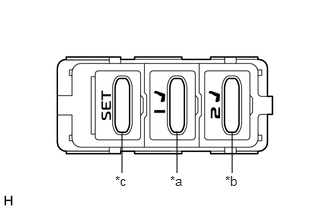
| *a | M1 Switch |
| *b | M2 Switch |
| *c | SET Switch |
- HINT:
-
The SET, M1 and M2 seat memory switches are shown in the illustration.
Turn the power switch on (IG) and move the shift lever to P.
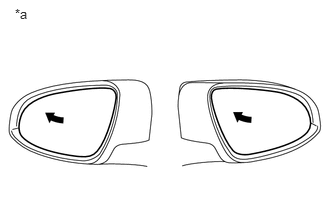
| *a | Turn to Fully Left Position |
Check the M1 switch.
Using the outer mirror switch assembly, turn the mirror surface to the fully left position.
Check that the buzzer sounds for 0.5 seconds and the seat and mirror surface position is memorized when the M1 switch is pressed within 3 seconds of the SET switch being pressed.
- NOTICE:
- ·
The mirror surface position will also be memorized when the M1 switch is pressed after first pressing and holding the SET switch.
·The mirror surface position will not be memorized when the SET switch and M1 switch are pressed simultaneously.
·The mirror surface position will not be memorized when 2 or more of the memory switches are pressed simultaneously (for example, M1 and M2) after first pressing the SET switch.
Using the outer mirror switch assembly, turn the mirror surface to the fully right position.
Press the M1 switch.
Check that the buzzer sounds for 0.1 seconds and the mirror surface automatically moves to the memorized fully left position.
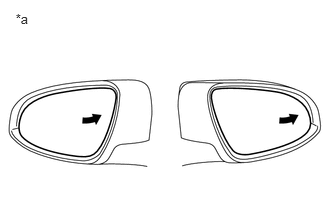
| *a | Turn to Fully Right Position |
Check the M2 switch.
Using the outer mirror switch assembly, turn the mirror surface to the fully right position.
Check that the buzzer sounds for 0.5 seconds and the seat and mirror surface position is memorized when the M2 switch is pressed within 3 seconds of the SET switch being pressed.
- NOTICE:
- ·
The mirror surface position will also be memorized when the M2 switch is pressed after first pressing and holding the SET switch.
·The mirror surface position will not be memorized when the SET switch and M2 switch are pressed simultaneously.
·The mirror surface position will not be memorized when 2 or more of the memory switches are pressed simultaneously (for example, M1 and M2) after first pressing the SET switch.
Using the outer mirror switch assembly, turn the mirror surface to the fully left position.
Press the M2 switch.
Check that the buzzer sounds for 0.1 seconds and the mirror surface automatically moves to the memorized fully right position.
CHECK REVERSE SHIFT-LINKED FUNCTION
Turn the power switch on (IG).
Turn the mirror select switch L or R switch on.
Check that the mirror surface turns downward when the shift lever is moved to R.
Check that the mirror surface position returns to the original position when one of the following conditions is met:
Shift lever is moved to any position other than R.
Both mirror select switch L and R switches are off.
Power switch is turned off.
CHECK REVERSE SHIFT-LINKED MIRROR POSITION MEMORIZATION FUNCTION
- HINT:
-
The reverse shift-linked mirror position memorization function can be customized.
-
Click hereVehicle Exterior>MIRROR (EXT)>POWER MIRROR CONTROL SYSTEM (w/ Memory)>CUSTOMIZE PARAMETERS
Turn the power switch on (IG).
Turn the mirror select switch L or R switch on.
Check that the mirror surface turns downward when the shift lever is moved to R.
While the mirror is in the reverse shift-linked operation position, move the mirror surface to the desired position.
- HINT:
-
If the mirror surface is set to turn to the upward position, the mirror surface turns upward when the shift lever is moved to R.
Check that the mirror surface moves to its normal position when the shift lever is moved to a position other than R, and then moves back to the memorized position when the shift lever is moved to R again.
CHECK MEMORY CALL FUNCTION
Memory call function check
With an electrical key transmitter sub-assembly recognition code registered, perform a wireless door unlock operation and check that opening the driver door causes the following:
The buzzer sounds for 0.1 seconds.
The driver seat and mirror surface positions automatically move to the memorized positions.
- HINT:
- ·
The registered electrical key transmitter sub-assembly recognition code is recalled automatically.
·If the memory call function is not operated, the buzzer will not sound.
With the power switch on (IG) and the driver door closed, press and hold the M1 or M2 switch while carrying the electrical key transmitter sub-assembly. The main body ECU (multiplex network body ECU) will enter electrical key transmitter sub-assembly recognition code registration mode to allow a key to be linked to mirror surface memory position.
- HINT:
-
If the seat memory switch is released before entering registration mode, the main body ECU (multiplex network body ECU) will not enter registration mode.
When the manual door lock switch is pressed, check that the buzzer sounds once (0.5 seconds).
With the power switch on (IG) and the driver door closed, press and hold the SET switch while carrying the electrical key transmitter sub-assembly. The main body ECU (multiplex network body ECU) will enter electrical key transmitter sub-assembly recognition code deletion mode.
- HINT:
-
If the seat memory switch is released before entering deletion mode, the main body ECU (multiplex network body ECU) will not enter deletion mode.
When the manual door lock switch is pressed, check that the buzzer sounds twice (0.1 seconds each time).
CHECK MEMORY CALL EMERGENCY STOP FUNCTION
While a memory call function is operating, check that any one of the following actions will stop the memory call operation: 1) pressing the SET, M1 or M2 switch, 2) moving the shift lever to R, 3) moving the mirror surface manually, or 4) moving the mirror surface to the uppermost, lowermost, leftmost or rightmost position.