WIPER / WASHER WIPER AND WASHER SYSTEM Washer Fluid Level Warning Switch Circuit
DESCRIPTION
When the washer fluid level is lower than a certain level, a warning message is displayed on the combination meter assembly.
WIRING DIAGRAM
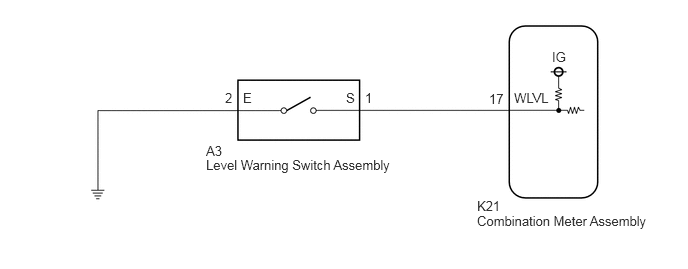
PROCEDURE
Connect the GTS to the DLC3.
Turn the power switch on (IG).
Turn the GTS on.
Enter the following menus: Body Electrical / Combination Meter / Data List.
Read the Data List according to the display on the GTS.
- Body Electrical > Combination Meter > Data List
-
Tester Display Measurement Item Range Normal Condition Diagnostic Note Washer Level Warning Switch Washer fluid level warning switch OFF or ON OFF: Washer fluid level not low
ON: Washer fluid level low-
- Body Electrical > Combination Meter > Data List
-
Tester Display Washer Level Warning Switch - 50003 409 25
- OK:
The GTS display changes correctly in response to the washer fluid level.
- Result:
Proceed to OK NG
OK
NG
Remove the level warning switch assembly.
Click hereVehicle Exterior>WIPER / WASHER>WASHER LEVEL WARNING SWITCH>REMOVAL
Inspect the level warning switch assembly.
Click hereVehicle Exterior>WIPER / WASHER>WASHER LEVEL WARNING SWITCH>INSPECTION
- Result:
Proceed to OK NG
OK
NG
Disconnect the K21 combination meter assembly connector.
Measure the resistance according to the value(s) in the table below.
- Standard Resistance:
Tester Connection Condition Specified Condition A3-1 (S) - K21-17 (WLVL) Always Below 1 Ω A3-1 (S) or K21-17 (WLVL) - Body ground Always 10 kΩ or higher
- Result:
Proceed to OK NG
OK
NG
Measure the resistance according to the value(s) in the table below.
- Standard Resistance:
Tester Connection Condition Specified Condition A3-2 (E) - Body ground Always Below 1 Ω
- Result:
Proceed to OK NG
OK
NG