AUDIO / VIDEO AUDIO AND VISUAL SYSTEM CUSTOMIZE PARAMETERS
CUSTOMIZE COOLER CONTROL SWITCH ASSEMBLY (Sensitivity Level)
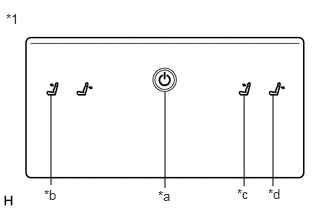
| *1 | Cooler Control Switch Assembly |
| *a | Home Switch |
| *b | Left Seat Reclining Forward Switch |
| *c | Right Seat Reclining Forward Switch |
| *d | Right Seat Reclining Back Switch |
Turn the power switch on (ACC).
While pressing and holding the home switch, touch the left seat reclining forward switch and right seat reclining back switch for 20 seconds or more.
- HINT:
-
Make sure not to touch any switch except the left seat reclining forward switch and right seat reclining back switch.
When a beep emitted, release the home switch, left seat reclining forward switch and right seat reclining back switch.
Touch the right seat reclining forward switch or right seat reclining back switch to adjust the sensitivity level.
| Switch | Sensitivity Level Adjustment |
|---|---|
| Right seat reclining forward switch | Up |
| Right seat reclining back switch | Down |
Check the selected sensitivity level according to the number of times the seat reclining switches blink.
| Sensitivity Level | Number of Blinks |
|---|---|
| High
(Default) |
10 |
| Medium | 9 |
| Low | 8 |
Perform any of the following to end customization.
Wait 10 seconds or more without touching a seat reclining switch.
Press the home switch.
Turn the power switch off.
Turn the power switch on (IG).