METER / GAUGE / DISPLAY COMBINATION METER DETAILS COMBINATION METER
CONSTRUCTION
Multi-information Display (Models with Analog Type Combination Meter Assembly with Multi-information Display)
The multi-information display has 2 areas depending on the display mode.
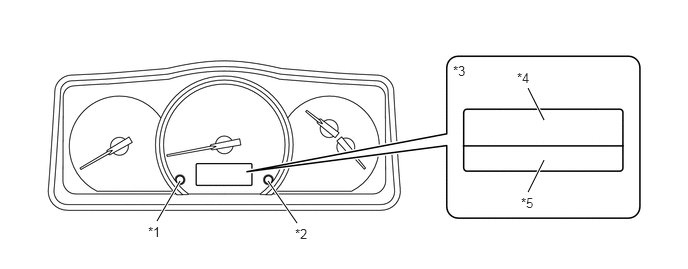
| *1 | DISP Switch | *2 | ODO/TRIP Switch |
| *3 | Multi-information Display | *4 | Drive Information Display |
| *5 | ODO/TRIP Meter | - | - |
The drive information display changes in the order shown below by pressing the DISP switch.
The average fuel consumption value can be reset by pressing and holding the DISP switch for 0.8 seconds or more.
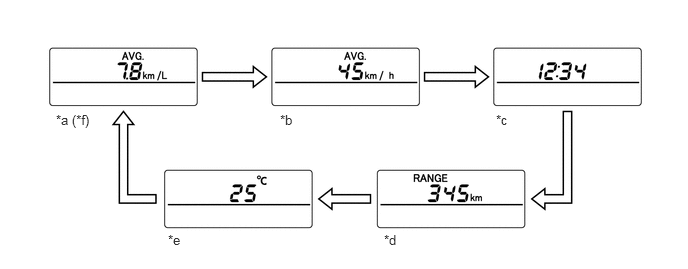
| *a | Average Fuel Consumption | *b | Average Vehicle Speed |
| *c | Driving Time | *d | Cruising Range |
| *e | Outside Temperature | *f | Pressing DISP switch for 0.8 seconds or more to reset. |

|
Pressing DISP switch for less than 0.8 seconds. | - | - |
- HINT:
-
The illustrations shown are examples only. The illustrations may differ the actual vehicle screen.
The ice warning light was provided on the multi-information display.
When the outside temperature drops below 3 °C, an ice warning light flashes 10 times to warn the driver to drive with caution due to icy road conditions. After the ice warning light flashes 10 times, the light stays on.
When the outside temperature reaches 5 °C, the light goes off.
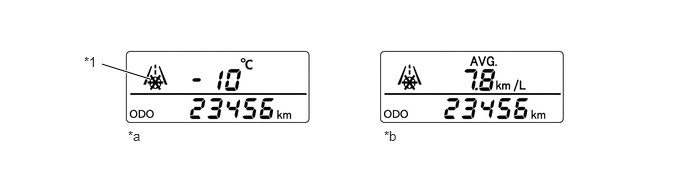
| *1 | Ice Warning Light | - | - |
| *a | Outside Temperature Display | *b | Except Outside Temperature Display |
The ODO/TRIP meter display changes in the order shown below by pressing the ODO/TRIP switch.
The meter panel luminance adjustment mode is also displayed when the taillight is on.
While the meter panel luminance adjustment mode is displayed, the brightness of the meter can be changed by pressing ODO/TRIP switch for 1 second or more. The brightness of the meter can be adjusted in 4 levels.
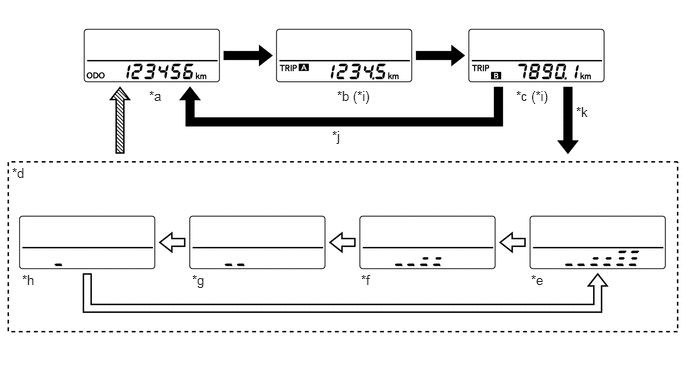
| *a | Odometer | *b | Trip Meter A |
| *c | Trip Meter B | *d | Meter Panel Luminance Adjustment Mode |
| *e | Luminance Ratio 100 % | *f | Luminance Ratio 75 % |
| *g | Luminance Ratio 50 % | *h | Luminance Ratio 25 % |
| *i | Pressing ODO/TRIP switch for 0.8 seconds or more to reset. | *j | Taillight is off |
| *k | Taillight is on | - | - |

|
Pressing ODO/TRIP switch for less than 0.8 seconds. |
|
Pressing ODO/TRIP switch for 1.0 seconds or more. |

|
Pressing ODO/TRIP Switch for less than 0.8 seconds, ignition switch is off or ODO/TRIP switch is not operated for 10 seconds or more. | - | - |
- HINT:
-
The illustrations shown are examples only. The illustrations may differ the actual vehicle screen.
Multi-information Display (Models with Optitron Type Combination Meter Assembly)
The multi-information display has 3 areas depending on the display mode.
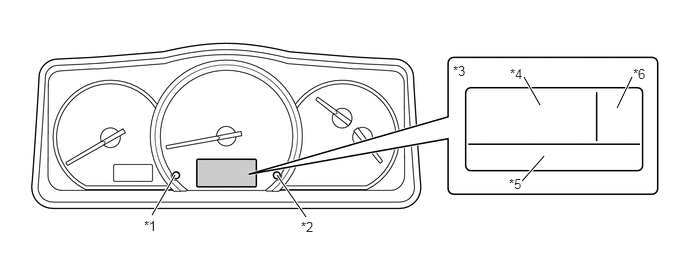
| *1 | DISP Switch | *2 | ODO/TRIP Switch |
| *3 | Multi-information Display | *4 | Drive Information Display |
| *5 | ODO/TRIP Meter | *6 | Outside Temperature Display |
Drive Information Display
The drive information display changes in the order shown below by pressing the DISP switch.
The average fuel consumption value can be reset by pressing and holding the DISP switch for 0.8 seconds or more.
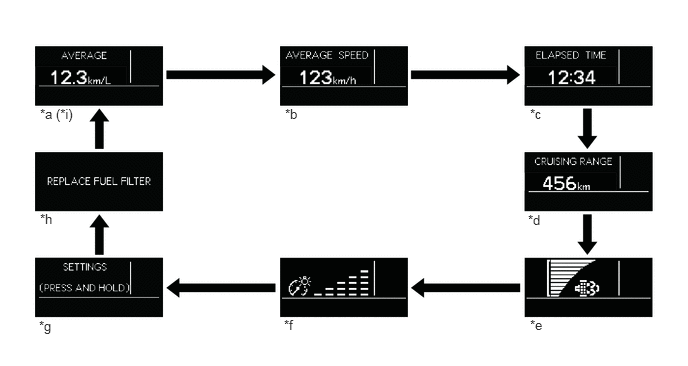
| *a | Average Fuel Consumption | *b | Average Vehicle Speed |
| *c | Driving Time | *d | Cruising Range |
| *e | DPF Sedimentation Bar Display | *f | Meter Panel Luminance Adjustment Display |
| *g | Settings | *h | Warning Message |
| *i | Pressing DISP switch for 0.8 seconds or more to reset. | - | - |
|
|
Pressing DISP switch for less than 0.8 seconds. | - | - |
- HINT:
-
The illustrations shown are examples only. The illustrations may differ the actual vehicle screen.
Meter Panel Luminance Adjustment Display
While the meter panel luminance adjustment mode is displayed, the brightness of the meter can be changed by pressing DISP switch for 1 second or more. The brightness of the meter can be adjusted in 5 levels.
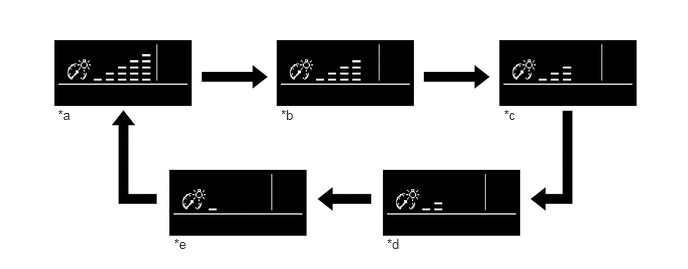
| *a | Luminance Ratio 100 % | *b | Luminance Ratio 75 % (Tail Light in OFF)
Luminance Ratio 25 % (Tail Light in ON) |
| *c | Luminance Ratio 50 % (Tail Light in OFF)
Luminance Ratio 12.5 % (Tail Light in ON) |
*d | Luminance Ratio 25 % (Tail Light in OFF)
Luminance Ratio 6.25 % (Tail Light in ON) |
| *e | Luminance Ratio 12.5 % (Tail Light in OFF)
Luminance Ratio 3 % (Tail Light in ON) |
- | - |
|
|
Pressing DISP switch for 1.0 seconds or more. | - | - |
- HINT:
-
The illustrations shown are examples only. The illustrations may differ the actual vehicle screen.
Outside Temperature Display
The outside temperature display and ice warning light was provided on the multi-information display.
When the outside temperature drops below 3 °C, an ice warning light flashes 10 times to warn the driver to drive with caution due to icy road conditions. After the ice warning light flashes 10 times, the light stays on.
When the outside temperature reaches 5 °C, the light goes off.
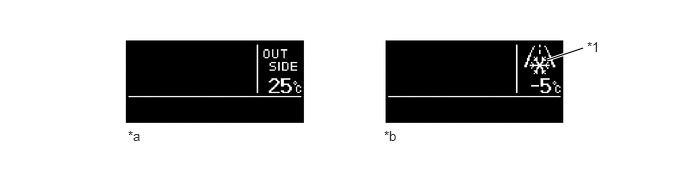
| *1 | Ice Warning Light | - | - |
| *a | Outside Temperature Display | *b | When below 3 °C |
ODO/TRIP Meter
The ODO/TRIP meter display changes in the order shown below by pressing the ODO/TRIP switch.
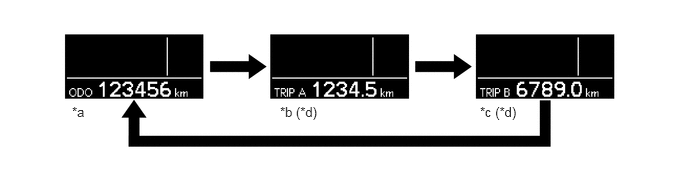
| *a | Odometer | *b | Trip Meter A |
| *c | Trip Meter B | *d | Pressing ODO/TRIP switch for 0.8 seconds or more to reset. |
|
|
Pressing ODO/TRIP switch for less than 0.8 seconds. | - | - |
Setting Function
The items displayed on the multi-information display can be customized.
The following items can be selected on the information setting screen.
| Item | Available Setting |
|---|---|
| Language | The language used on the multi-information display can be selected:
·
English ·
Simplified Chinese ·
Traditional Chinese |
| Units | The unit displayed on the multi-information display can be selected:
·
km (km/L) ·
km (L/100 km) |
Warning Mode Function
When a warning is necessary, the warning message interrupts the current display on the multi-information display.
A warning message is displayed via an interrupt display when a vehicle malfunction occurs to warn the driver. Also, an advice message is displayed via an interrupt display depending on the situation, such as when the driver must proceed with caution.
The buzzer in the combination meter assembly may sound depending on the item displayed on the multi-information display.
The combination meter assembly displays the following messages based on signals received from the engine oil pressure switch assembly.
| Message | Master Warning Light | Buzzer |
|---|---|---|
| ENGINE OIL
PRESSURE LOW |
Illuminates | Sounds |
The combination meter assembly displays the following messages based on signals received from the engine oil level sensor.
| Message | Master Warning Light | Buzzer |
|---|---|---|
| ENGINE OIL LOW | Illuminates | Sounds |
The combination meter assembly displays the following messages based on signals received from the fuel sedimenter level warning switch.
| Message | Master Warning Light | Buzzer |
|---|---|---|
| DRAIN WATER
FROM FUEL FILTER |
Illuminates | Sounds |
The combination meter assembly displays the following messages based on signals received from the fuel sedimenter level warning switch.
| Message | Master Warning Light | Buzzer |
|---|---|---|
| REPLACE FUEL FILTER | - | - |
The combination meter assembly displays the following messages based on signals received from the emission control ECU assembly via the ECM.
| Message | Master Warning Light | Buzzer |
|---|---|---|
| AdBlue LOW | - | - |
| REFILL AdBlue NOW | Illuminates | Sounds |
| REFILL AdBlue NOW
LOW POWER |
Illuminates | Sounds |
| INCORRECT AdBlue
DETECTED |
Illuminates | Sounds |
| INCORRECT AdBlue
DETECTED CHANGE AdBlue NOW |
Illuminates | Sounds |
| INCORRECT AdBlue
DETECTED UNABLE TO RESTART ENGINE CHANGE AdBlue NOW |
Illuminates | Sounds |
| INCORRECT AdBlue
DETECTED LOW POWER CHANGE AdBlue NOW |
Illuminates | Sounds |
| SCR MALFUNCTION | Illuminates | Sounds |
| SCR MALFUNCTION
CHECK AdBlue VISIT YOUR DEALER |
Illuminates | Sounds |
The combination meter assembly displays the following messages based on signals received from the parking brake switch assembly and skid control ECU.
| Message | Master Warning Light | Buzzer |
|---|---|---|
| RELEASE
PARKING BRAKE |
Blinks | Sounds |
Rental Car Mode Display Function
A rental car mode display function was provided to display the odometer and switch on the backlight for a fixed time when the ignition switch was switched from ON to OFF or when the driver's seat door was opened while the ignition was off.
The rental car mode display function displays the odometer and switches on the backlight when the ignition switch is switched from ON to OFF or when the driver's seat door is opened while the ignition is off.
The display of the multi-information display switches as shown below when the ignition switch is operated or when the driver's seat door is opened.
- HINT:
-
The rental car mode display function is activated when the driver's seat door was opened on RHD models only.
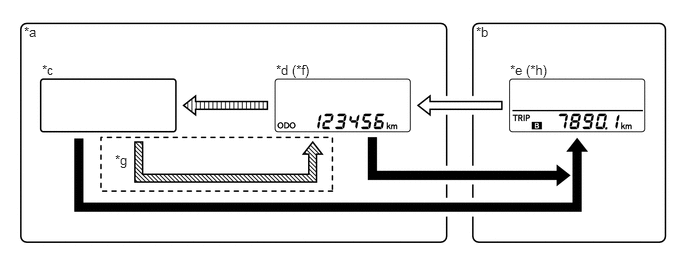
| *a | While Ignition Switch is OFF | *b | While Ignition Switch is ON |
| *c | Display Off | *d | Rental Car Mode Display |
| *e | Normal Display | *f | Backlight is switched on at the same time. |
| *g | RHD models only | *h | The item selected the last time the ignition was switched on is displayed. |
|
|
Ignition switch is turned to ON |
|
Ignition switch is turned OFF |
|
|
Driver's seat door is open | 
|
After 30 seconds has passed from the start of display (rental car mode display timeout) |
- HINT:
-
The illustrations shown are examples only. The illustrations may differ the actual vehicle screen.
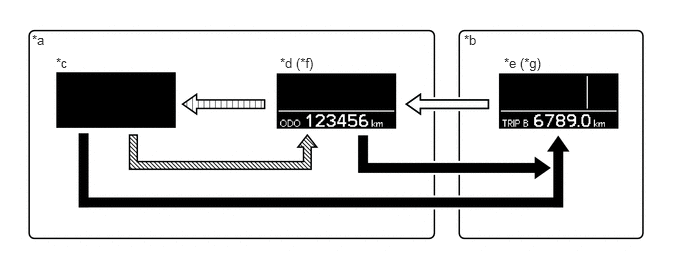
| *a | While Ignition Switch is OFF | *b | While Ignition Switch is ON |
| *c | Display Off | *d | Rental Car Mode Display |
| *e | Normal Display | *f | Backlight is switched on at the same time. |
| *g | The item selected the last time the ignition was switched on is displayed. | - | - |
|
|
Ignition switch is turned to ON |
|
Ignition switch is turned OFF |
|
|
Driver's seat door is open |
|
After 30 seconds has passed from the start of display (rental car mode display timeout) |
- HINT:
-
The illustrations shown are examples only. The illustrations may differ the actual vehicle screen.
DPF Sedimentation Bar Display
A DPF sedimentation bar display was employed to display the amount of Particulate Matter (PM) deposited in the DPF catalyst using a 10-stage bar graph.
An LCD for DPF sedimentation bar display was installed under the tachometer on the models with analog type combination meter assembly.
| Display Item | Display | Outline |
|---|---|---|
| DPF Sedimentation Bar Display | Analog Type Combination Meter Assembly

|
The amount of Particulate Matter (PM) deposited in the DPF catalyst is displayed using a 10-stage bar graph. |
Optitron Type Combination Meter Assembly

|
Shift Position Indicator (Models with A861E A/T)
A shift position indicator was employed to display the current shift position.
An LCD for shift position indicator was installed under the tachometer.
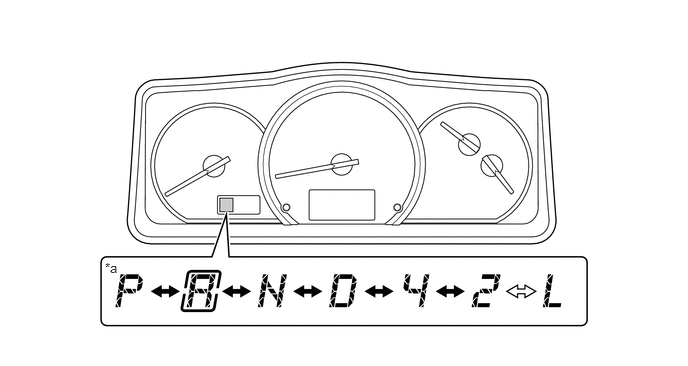
| *a | Shift Position Indicator | - | - |
|
|
Shift Lever Operation |
|
First Hold Switch (No. 1 Pattern Select Switch Assembly) Operation |
Buzzer
The table below shows the warning and reminder functions of the buzzer in the combination meter assembly.
| Priority | Item |
|---|---|
| 1 | Driver Seat Belt Warning (Models for G.C.C. Countries) |
| 2 | Emergency Door Warning |
| 3 | Driver Seat Belt Warning (Excluding Models for G.C.C. Countries) |
| 4 | Brake Fluid Low Warning |
| 5 | Vacuum Warning |
| 6 | Engine Oil Pressure Warning |
| 7 | Engine Coolant Temperature Warning |
| 8 | Multi-information Display Warning |
| 9 | Speed Warning |
| 10 | Parking Brake Unreleased Warning |
| 11 | Door Open while Driving Warning |
| 12 | Fuel Sedimenter Warning |
| 13 | DPF Warning |
- HINT:
-
The buzzer function differs by the vehicle specification.
Back Buzzer Control Function
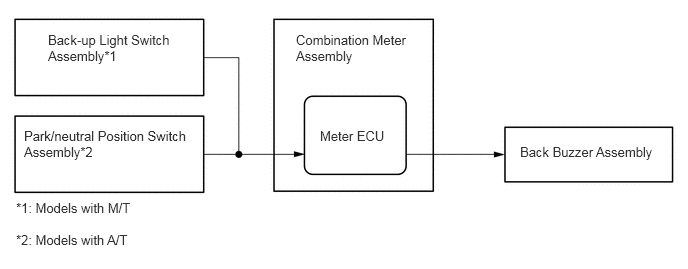
A back buzzer control was provided to notify bystanders that the vehicle is reversing by sounding the back buzzer assembly when the shift position was set to "R". The meter ECU controls the back buzzer assembly.
If a shift position R signal is input from the back-up light switch assembly*1 or park/neutral position switch assembly*2, the meter ECU sounds the back buzzer assembly intermittently.
*1: Models with M/T
*2: Models with A/T
Driver Seat Belt Warning Function (Models with Driver Seat Belt Warning System)
Driver Seat Belt Warning Function (Models for G.C.C. Countries)
When the ignition switch is ON, this system detects the condition of the seat belt based on the signal from the driver seat belt buckle switch.
If the ignition switch is turned to the "ON" position with the seatbelt unbuckled, the buzzer sounds for the 6 seconds.
If the vehicle reaches a speed of 20 km/h (20 mph) with the seatbelt unbuckled, the buzzer sounds once. If the seat belt is still unbuckled after 24 seconds, the buzzer will sound intermittently for 10 seconds. Then, if the seat belt is still unbuckled, the buzzer will sound in a different tone for 20 more seconds.
Once a buzzer begins to sounds, it will continue until the driver seat belt is buckled or the ignition switch is turned off.
Driver Seat Belt Warning Function (Excluding Models for G.C.C. countries)
When the ignition switch is ON, this system detects the condition of the seat belt based on the signal from the driver seat belt buckle switch.
If the vehicle reaches a speed of 20 km/h (12.4 mph) with the seatbelt unbuckled, the buzzer sounds once. If the seat belt is still unbuckled after 24 seconds, the buzzer will sound intermittently for 30 seconds. Then, if the seat belt is still unbuckled, the buzzer will sound in a different tone for 90 more seconds.
Once a buzzer begins to sounds, it will continue until the driver seat belt is buckled or the ignition switch is turned off.