A444E AUTOMATIC TRANSMISSION / TRANSAXLE AUTOMATIC TRANSMISSION SYSTEM DTC CHECK / CLEAR
CHECK DTC
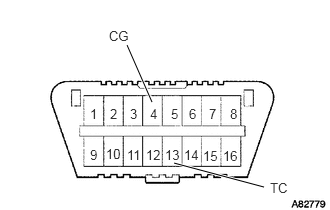
Turn the ignition switch to ON.
Using SST, connect terminal 13 (TC) and 4 (CG) of the DLC3.
- SST
- 09843-18040
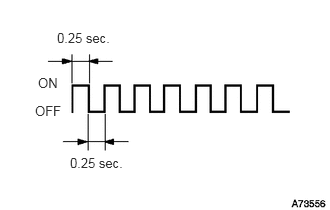
Read DTCs by observing the O/D OFF indicator light. If a DTC is not detected, the O/D OFF indicator light blinks as shown in the illustration.
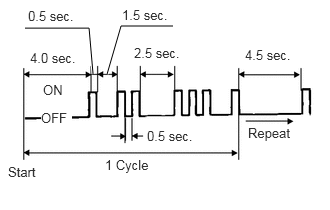
Example
DTCs 12 and 31 are detected and the O/D OFF indicator light starts displaying the DTCs, as shown in the illustration. The O/D OFF indicator light blinking pattern of DTC 12 will be displayed first.
- HINT:
-
If 2 or more DTCs are detected, the O/D OFF indicator light will display the smaller number DTC first.
A 2.5 second pause will occur. This pause will occur between the O/D OFF indicator light blinking patterns of each DTC.
The O/D OFF indicator light blinking pattern of DTC 31 will be displayed.
A 4.5 second pause will occur. This pause will occur when the O/D OFF indicator light blinking pattern is the last of a string of multiple DTCs.
The O/D OFF indicator light will repeat the display of the string of DTCs again.
Check the details of the malfunction using the DTC chart (Click hereDrivetrain>A444E (AUTOMATIC TRANSMISSION / TRANSAXLE)>AUTOMATIC TRANSMISSION SYSTEM>DIAGNOSTIC TROUBLE CODE CHART).
After completing the check, disconnect terminals 13 (TC) and 4 (CG) and turn OFF the tester.
Confirm the details of the DTCs (Click hereDrivetrain>A444E (AUTOMATIC TRANSMISSION / TRANSAXLE)>AUTOMATIC TRANSMISSION SYSTEM>DIAGNOSTIC TROUBLE CODE CHART).
CLEAR DTCS
Turn the ignition switch to ON.
Using SST, connect terminal 13 (TC) and 4 (CG) of the DLC3.
- SST
- 09843-18040
Push the transmission control switch to OFF (O/D OFF)
Disconnect terminal 13 (TC) and 4 (CG) of the DLC3.
Turn the ignition switch off.
Push the transmission control switch to ON (O/D ON)
Turn the ignition switch to ON.
Using SST, connect terminal 13 (TC) and 4 (CG) of the DLC3.
Read DTCs by observing the O/D OFF indicator light. If a DTC is not detected, the O/D OFF indicator light blinks as shown in the illustration.