CALIBRATION
Troubleshooting · Vehicles built from Aug 2012
| SELECT COMPASS DISPLAY MODE |
- HINT:
- The button allows you to select the Display or Non-display mode of the compass.
Press and hold the button to display "Custom Settings Menu".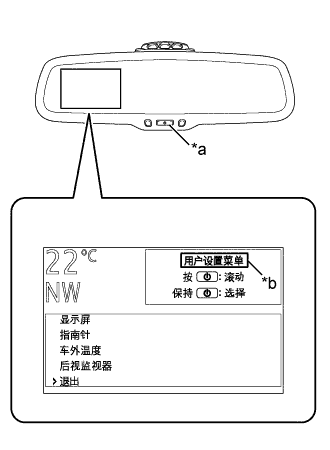

Text in Illustration *a
Button
*b
Custom Settings Menu
Press the button and select "Compass", then press and hold the button.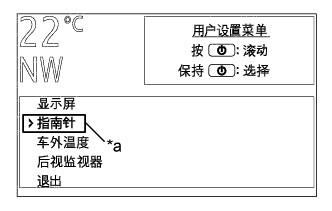
Text in Illustration *a
Compass
Press the button and select "Compass Display".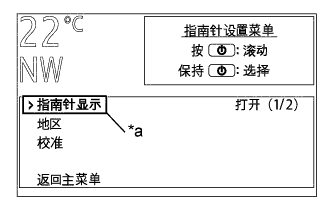
Text in Illustration *a
Compass Display
Press and hold the button and select display on/off.
To leave the "Compass Settings Menu", select "Back to Main Menu" to return to the starting screen.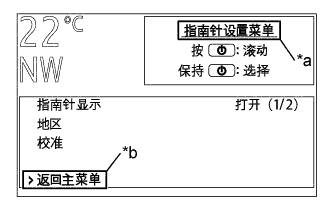
Text in Illustration *a
Compass Settings Menu
*b
Back to Main Menu
To close the "Custom Settings Menu", either select "Exit" or wait several seconds without pressing the button.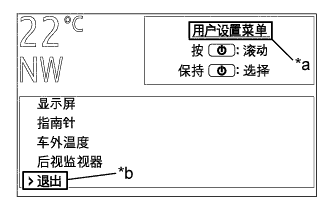
Text in Illustration *a
Custom Settings Menu
*b
Exit
| SET ZONE |
Deviation between the "magnetic north" and "actual north" differs depending on the location. Therefore, calibration of the compass is required. As the magnetic conditions differ depending on the area where the vehicle is used, it is necessary for the user to set the zone. The zone setting can be changed using the switch of the inner mirror.
If you cross over one of the map boundaries shown in the illustration, the compass will deviate.
To obtain higher precision or more accurate calibration, refer to "Deviation Calibration".
If "C" appears on the display, circling calibration needs to be performed.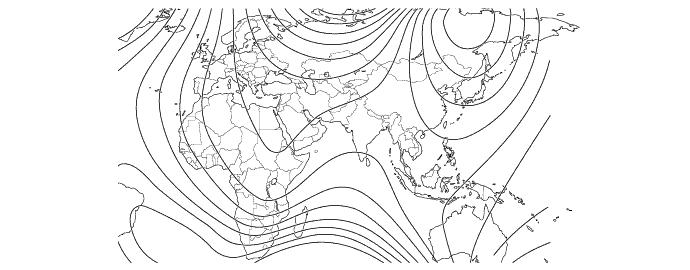
| PERFORM CALIBRATION |
As each vehicle has its own magnetic field, calibration should be performed for each individual vehicle. This compass function is used when storing the record of the vehicle's magnetic field.
| WHEN COMPASS IS MAGNETIZED |
A compass could be magnetized during shipping by vessels or freight cars. Therefore, make sure to perform calibration and ensure that calibration is performed properly before delivery. If this cannot be done (cannot be completed in spite of driving around several times), it may be caused by magnetization. Demagnetize the vehicle using a demagnetizer and perform calibration again.
| DEVIATION CALIBRATION PROCEDURE |
Press and hold the button to display "Custom Settings Menu".
Text in Illustration *a
Button
*b
Custom Settings Menu
Press the button and select "Compass", then press and hold the button.
Text in Illustration *a
Compass
Press the button and select "Zone", then press and hold the button.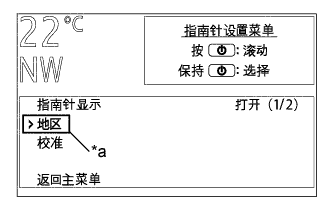
Text in Illustration *a
Zone
The selected region changes each time the button is pressed. Select the region, then press and hold the button to confirm.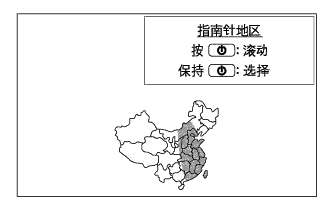
To leave the "Compass Settings Menu", select "Back to Main Menu" to return to the starting screen.
Text in Illustration *a
Compass Settings Menu
*b
Back to Main Menu
To close the "Custom Settings Menu", either select "Exit" or wait several seconds without pressing the button.
Text in Illustration *a
Custom Settings Menu
*b
Exit
| CIRCLING CALIBRATION PROCEDURE |
Stop the vehicle in a place where it is safe to drive in a circle.
Press the button and hold to display "Custom Settings Menu".
Text in Illustration *a
Button
*b
Custom Settings Menu
Press the button and select "Compass", then press and hold the button.
Text in Illustration *a
Compass
Press the button and select "Calibrate", then press and hold the button. "C" appears on the display.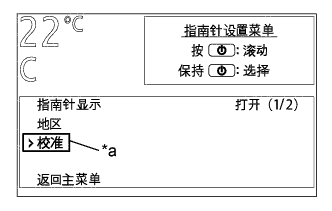
Text in Illustration *a
Calibrate
Drive the vehicle at a slow speed of 8 km/h (5 mph) or less in a circular direction.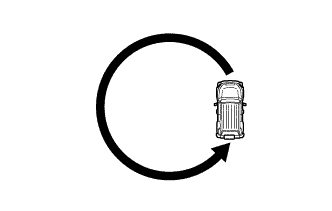
Driving in a circle 1 to 3 times will cause "C" to disappear from the display, completing the calibration.
- HINT:
- After the calibration is completed, it is not necessary to perform the above procedures unless the magnetic field strength is drastically changed. If this happens, "C" appears on the display.
To leave the "Compass Settings Menu", select "Back to Main Menu" to return to the starting screen.
Text in Illustration *a
Compass Settings Menu
*b
Back to Main Menu
To close the "Custom Settings Menu", either select "Exit" or wait several seconds without pressing the button.
Text in Illustration *a
Custom Settings Menu
*b
Exit