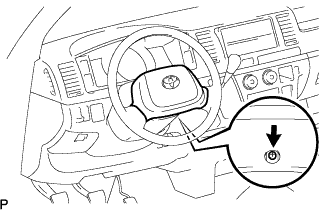
 |
Remove the screw.
WIPER SWITCH > REMOVAL |
| 1. DISCONNECT CABLE FROM NEGATIVE BATTERY TERMINAL |
| 2. INSPECT FRONT WHEELS FACING STRAIGHT AHEAD |
| 3. REMOVE STEERING PAD (w/o AIRBAG) |
|
Remove the screw.
Remove the steering pad.
Disconnect the horn connector.
| 4. REMOVE NO.2 STEERING WHEEL COVER LOWER (w/ AIRBAG) |
Using a screwdriver, remove the steering wheel No.2 cover lower.
| 5. REMOVE NO.3 STEERING WHEEL COVER LOWER (w/ AIRBAG) |
Using a screwdriver, remove the steering wheel No.3 cover lower.
| 6. REMOVE STEERING PAD (w/ AIRBAG) |
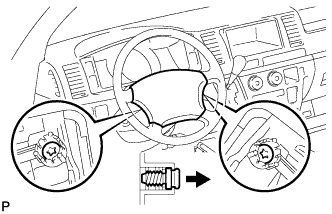 |
Using a "torx" socket wrench (T30), loosen the 2 "torx" screws until the groove along the screw circumference catches on the screw case.
Pull out the steering pad from the steering wheel assembly and support the steering pad with one hand.
Disconnect the horn connector.
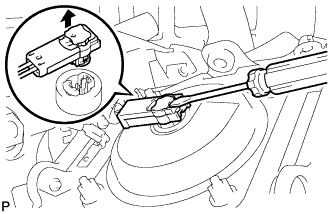 |
Disconnect the connector and remove the steering pad.
| 7. REMOVE STEERING WHEEL ASSEMBLY |
Remove the steering wheel set nut.
Put matchmarks on the steering wheel assembly and steering main shaft assembly.
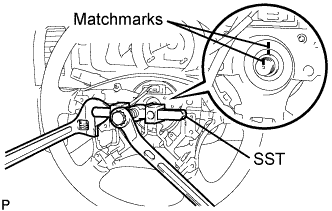 |
Using SST, remove the steering wheel assembly.
| 8. REMOVE STEERING COLUMN COVER LOWER |
Set the steering tilt mechanism to the lowermost position.
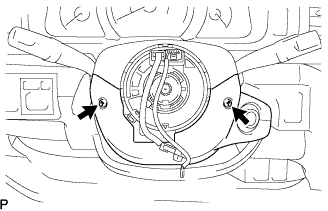 |
Remove the 2 "torx" screws from the steering column cover lower.
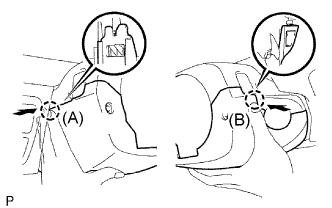 |
Press on the left side of the steering column cover lower to disengage claw A.
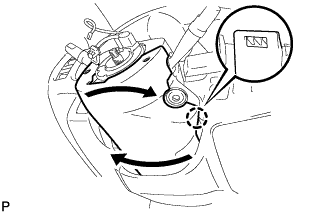 |
Press on the right side of the steering column cover lower to disengage claw B.
| 9. REMOVE WIPER SWITCH |
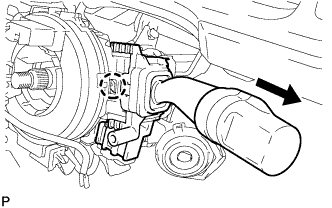 |
Disconnect the connector.
Disengage the claw and remove the wiper switch as shown in the illustration.